P8
To ret the dust bin to your cleaner, follow the above instructions in reverse.
4. CLEANER MAINTENANCE
4.1 DUST BIN
When emptying any vacuum cleaner it is dicult to avoid exposure to dust.
To minimize this risk, please ensure that you encase the dust bin in a large bag to empty it and close the bag as tightly as possible around the dust bin.
Remove the dust bin and close the bag as tightly and quickly as possible and dispose of this immediately.
It is advised to wear disposable gloves and a face mask while emptying the cleaner.
If possible, ask a non allergy suerer to empty the dust bin when required.
4. CLEANER MAINTENANCE
4.2 DUST BIN - ALLERGY SUFFERERS
Emptying the dust bin
IMPORTANT: Before performing any maintenance task, always ensure your product is
switched o and unplugged from the electricity supply.
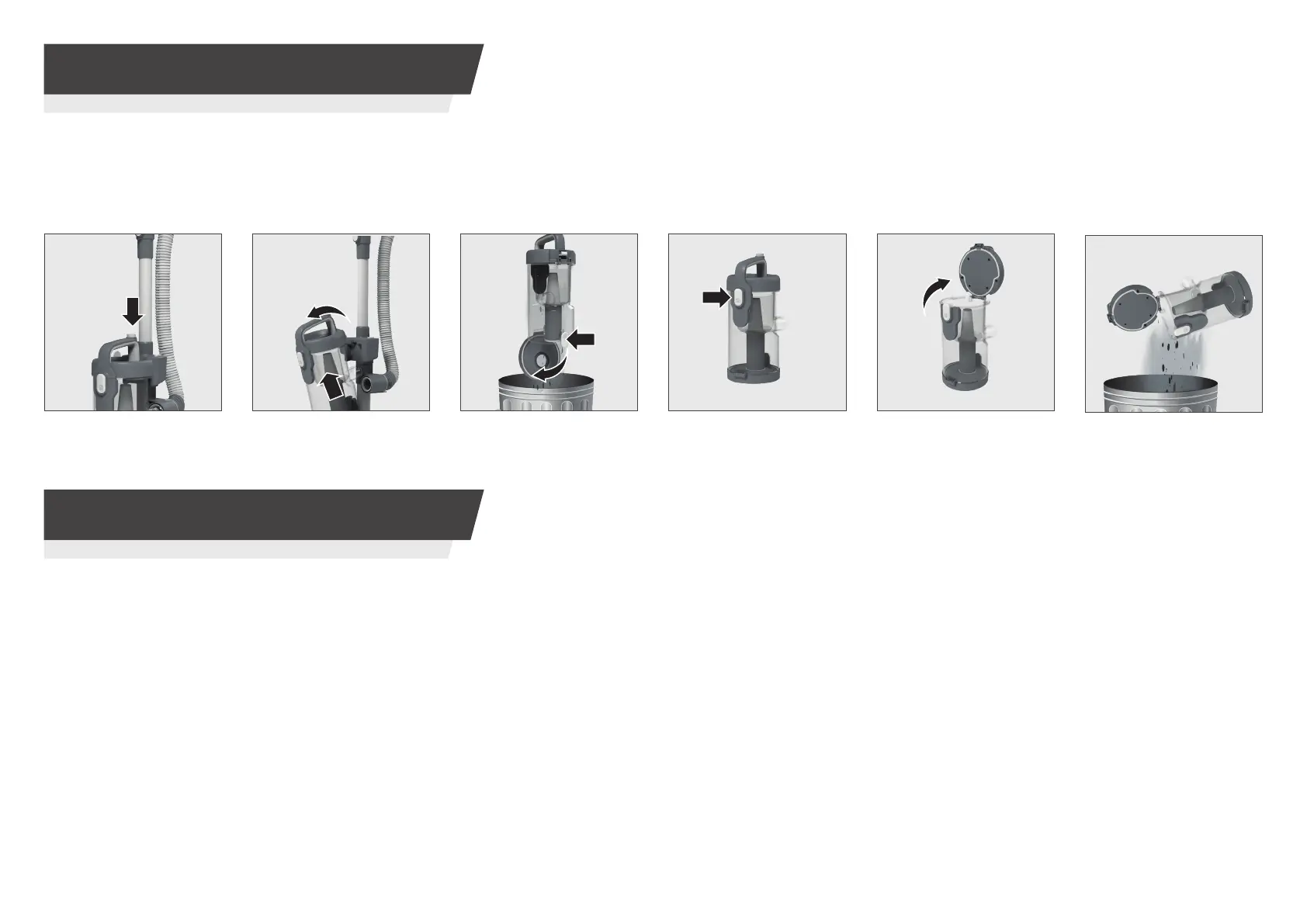
Emptying the dust bin
STEP 2: Remove the
dust bin assembly from
your cleaner.
STEP 3:
Press the dust
bin empty button over a
rubbish bin to empty.
STEP 4:
Press the dust
bin lid button to release
the bin lid.
STEP 5:
Open the dust
bin lid.
STEP 6:
Remove excess
debris over a rubbish bin.
STEP 1:
Press and hold
the dust bin release
button.


 To Next Page