7
DVD Mode
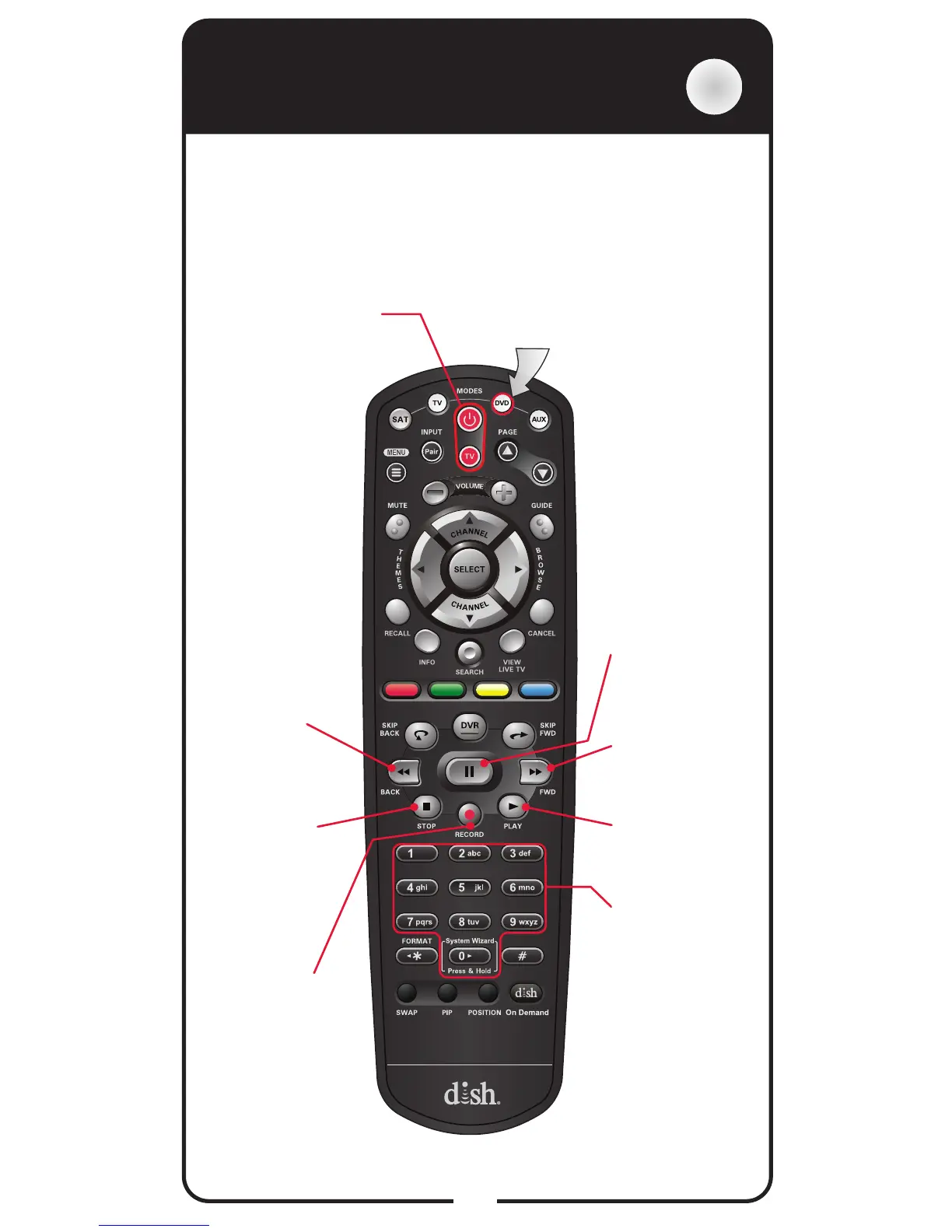
DVD
Power & TV Power
Top button turns the
DVD/BD/VCR on/off
Bottom button
turns the TV on/off
Number Buttons
Use to get to
specic chapters
on the DVD; the
function of remote
number buttons
depends on the
device
Press this button
for DVD Mode
FWD
Forward a
videotape or
DVD
Play
Play a videotape
or DVD
Pause
Pause a
videotape or
DVD
Back
Rewind a
videotape
or reverse a
DVD
Stop
Stop playing
or recording a
videotape, or
stop playing a
DVD
Record
Record on a
videotape
To use the features described in this section, make sure you
are in DVD mode by pressing the DVD Mode button. You
can use this mode to operate a DVD player, a Blu-ray
Disc (BD) player, or a VCR. Remote programming is
required. Note: Some features may not be available
depending on your device’s model.


 To Next Page