30
TR10A108-B RE / 02.2013
6 Menus
NOTES:
The hand transmitter must be ready ō
for operation (see section 4.2.10)
With the function blocks that ō
consist of several menus, only one
menu may be selected per block.
After the operator has been taught ō
in, only the selectable
menus 10 – 46 are shown.
Menus 01 – 05 are only accessible
during initial start-up. Menu 00 is
used to exit programming mode.
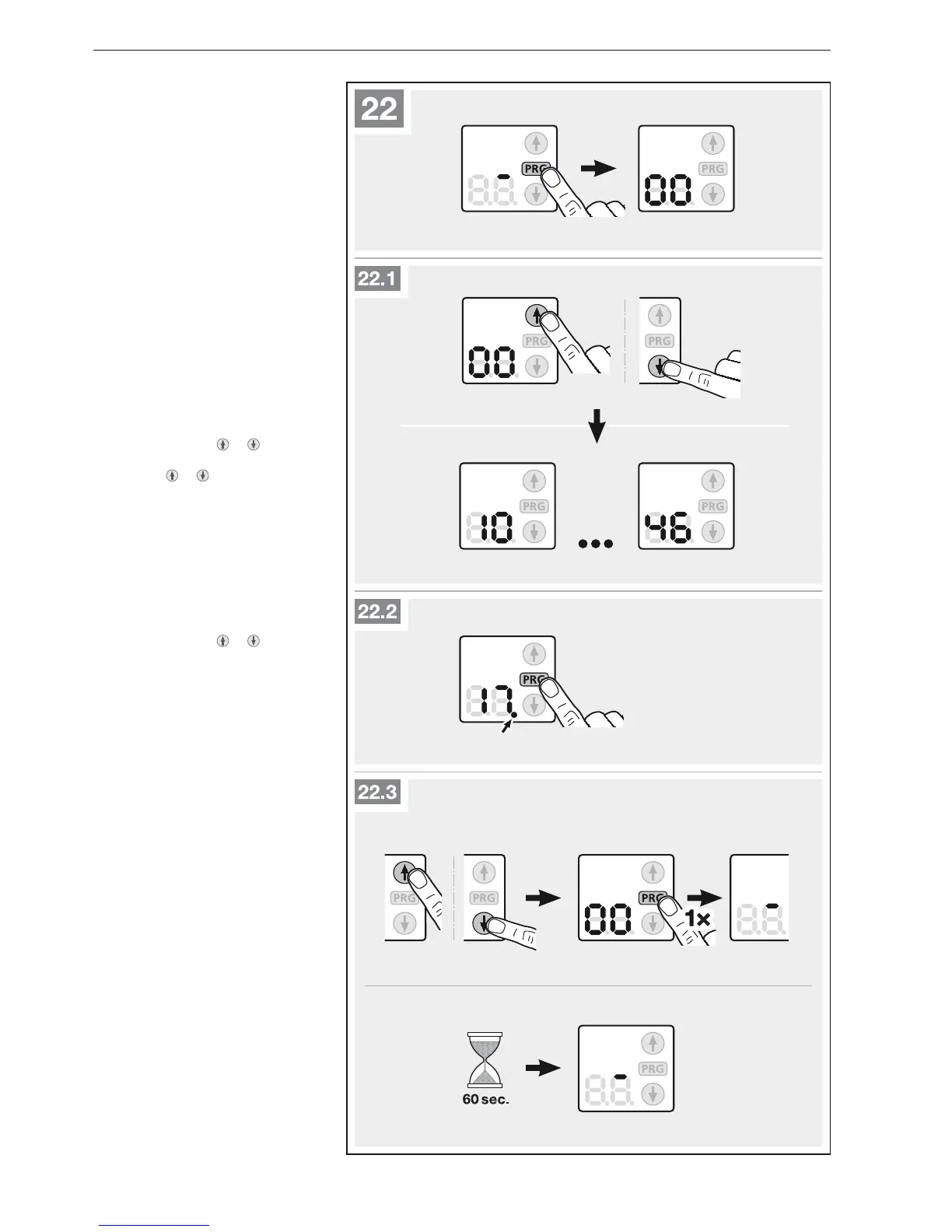
A decimal point next to the menu ō
number indicates an active menu.
To switch to programming mode:
Figure 22
Press the
▶
PRG button until the 00
display is illuminated.
To select a menu: Figure 22.1
With the buttons
▶
or select the
desired menu. Holding down the
buttons
or lets you go through
the menus quickly.
To activate a menu: Figure 22.2
Press the
▶
PRG button until the
decimal point next to the menu
number is illuminated.
The menu is immediately activated.
To exit programming mode:
Figure 22.3
With the buttons
▶
or select
menu 00 and press the PRG button.
or
No entry for 60 seconds (timeout).
▶
ENGLISH



 To Next Page