34
TR10A108-B RE / 02.2013
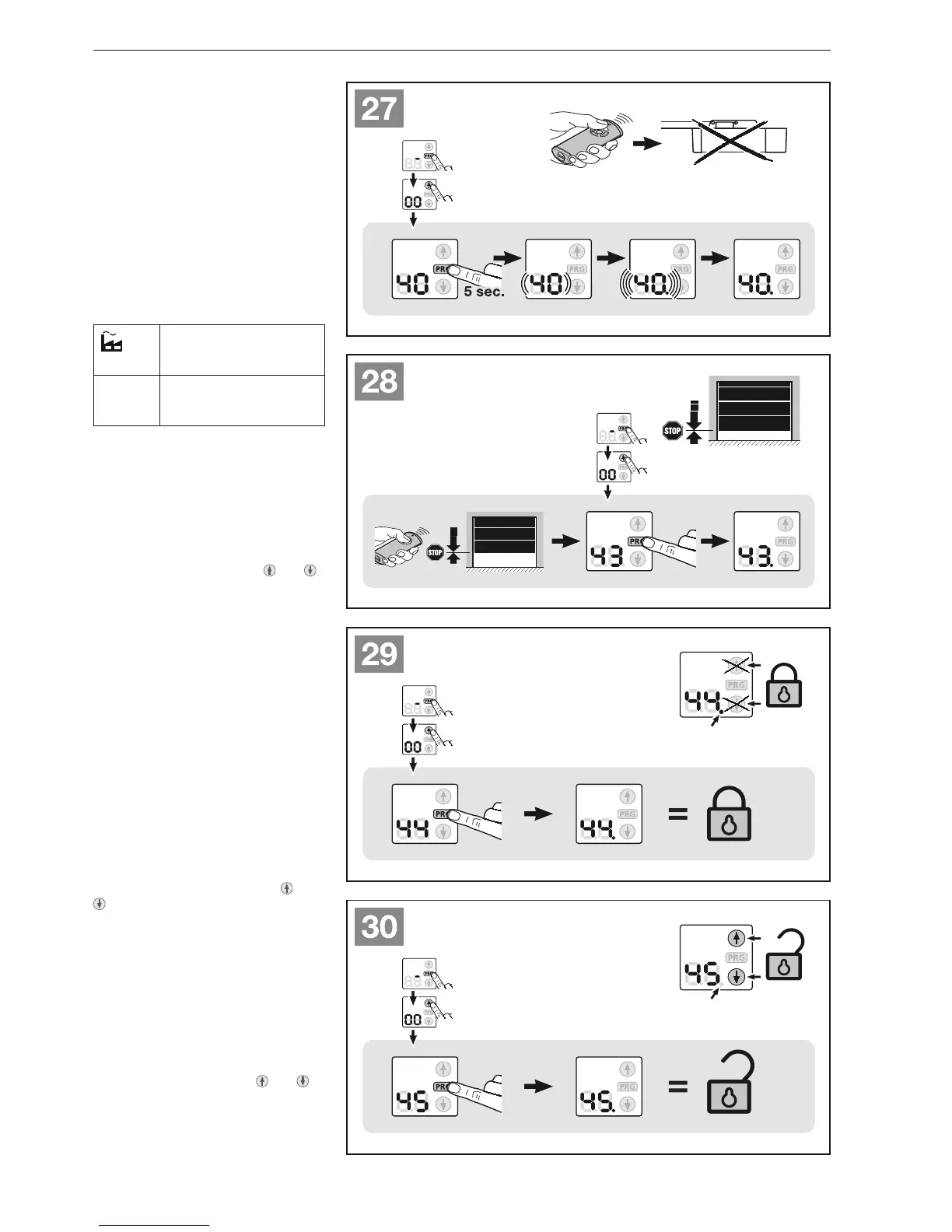
6.1.12 Menu 40: Deleting radio -
All functions
See Figure
▶
27
There is no option to delete the radio
codes for individual hand transmitter
buttons or individual functions.
Menu 43: Changing the 6.1.13
ventilation position
See Figure
▶
28
The partial opening position (ventilation
position) depends on the door type and
is pre-set at the factory.
Sectional door:
Approx. 260 mm slide
travel before the Close
end-of-travel position.
Minimum
height
Approx. 120 mm slide
travel before each
end-of-travel position.
The partial opening position is triggered
using the 3rd radio channel (menu 13),
an external receiver, the additional print
UAP 1 or an impulse at terminals 20 / 23.
To change the partial opening
position:
Move the door into the desired 1.
position with the buttons
and ,
via the taught-in radio code impulse
or an external control element with
impulse function.
Select menu 2. 43.
Press the 3. PRG button until the
decimal point next to the menu
number is illuminated.
The changed partial opening position
is saved.
If the selected height is too low, a 2-digit
number starting with 1 will appear with
a flashing decimal point (see section 17).
Menu 44: Blocking the 6.1.14
control buttons on the
operator
See Figure
▶
29
When blocking, only the buttons
and
on the operator are blocked. External
control elements and hand transmitters
remain active.
If the decimal point next to the menu
number is illuminated, the control
buttons are blocked.
Menu 45: Releasing the 6.1.15
control buttons on the
operator
See Figure
▶
30
When releasing, the buttons
and
on the operator become active again.
If only the menu number is illuminated,
the control buttons are not blocked.
ENGLISH



 To Next Page