44
TR10A108-B RE / 02.2013
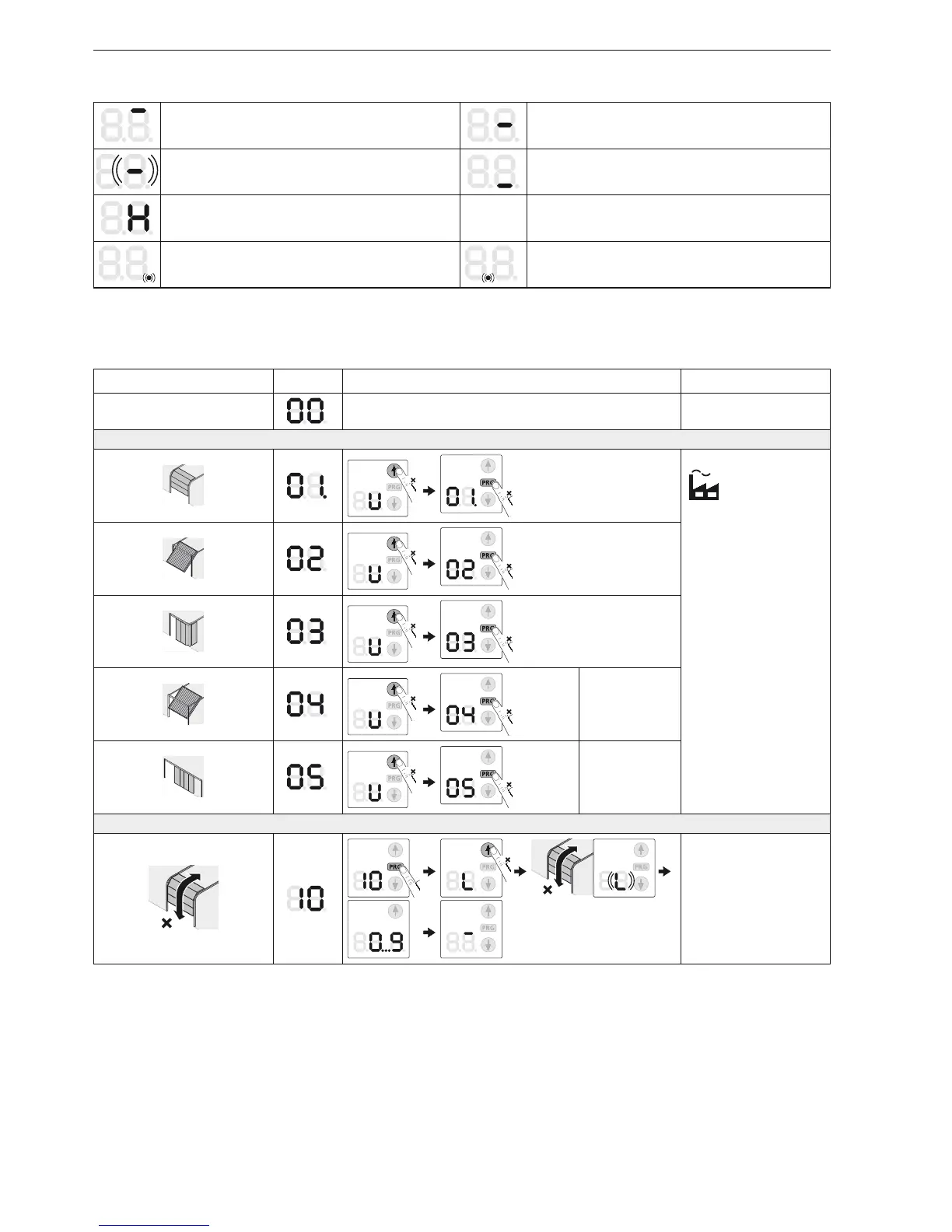
Display of Operating Conditions17.2
The operator is in the Open end-of-travel position The operator is in an intermediate position
The operator is currently in motion1.
The pre-warning phase is active2.
The operator is in the Close end-of-travel position
The operator is in the partial opening position
Impulse input from a radio code (flashes 1 ×) Sending status feedback to the hand transmitter
(flashes 1 ×)
18 Menu and programming overview
The listed factory settings apply to sectional doors.
Symbol Menu Action Note
Exit programming mode
Selecting the door type
1
1
2
1
Select door type –
(all required standard
settings, such as speed,
soft stop, reversal
behaviour of the safety
devices, reversal limit,
etc. are preset)
3
1
4
1
ET 100
ET 500 only
SupraMatic H
5
1
ST 500 only
SupraMatic H
Learning runs
7
1
7
5 sec.
Learning runs after
service / maintenance
or modifications
ENGLISH



 To Next Page