SET
Double click = off or on
Press and hold = data save
(Yellow)
LOCK
MON
TS 1
These displays
apply to 2.19 and
up only
13
Many other features, for autolock and motion
detector configuration, are available through
additional adjustable parameters.
These parameters can be discussed in
greater detail by calling the technical
service group.
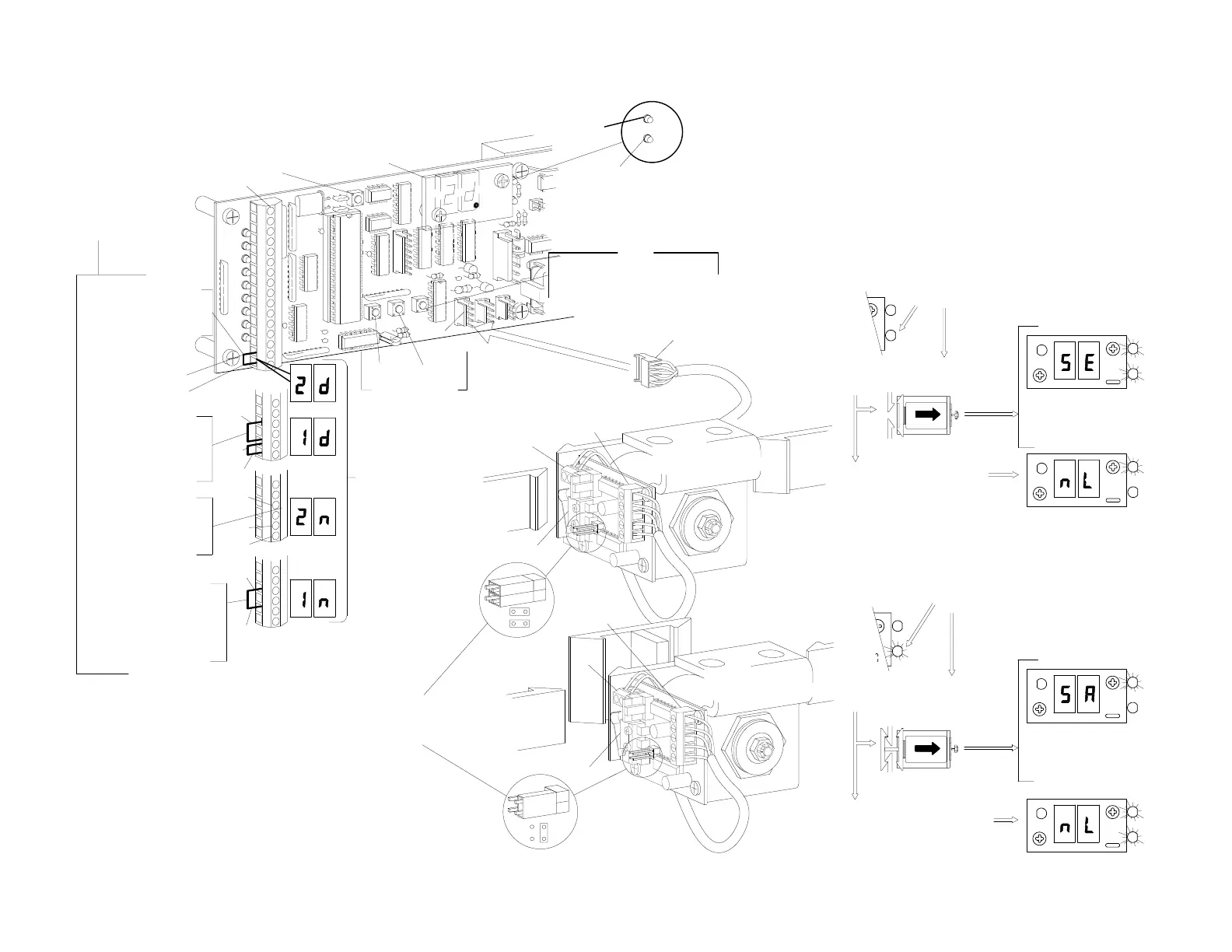
2.191d
NOTE:
1-way night mode
setting is:
jumper or switch from
13 to15
NO jumper or switch from
15 to 16
2-way night mode
setting is:
NO jumpers or
switches
15
13
15
16
1st Step
Fa
i
l
s
a
f
e
Set jumpers as shown
for fail secure or fail safe
Lock
monitor SW
Lock
monitor SW
F
a
i
l
s
e
c
u
r
e
TS 2
5. ACTUATION FEATURES
CODE
DISPLAY
2-way day mode
factory setting is:
jumper or switch from
15 to16.
1-way day mode
setting is:
jumper or switch
from 13 to15
and 15 to 16.
16
15
Com
13
15
16
Set jumpers or key
switch for the type of
operation required.
See diagram 2
page H202.16
1
D
1
RESET
UP DOWN
Display Scroll
C
N
4
TS 2
TS 1
C
N
5
LOCK
(Orange)
H202.5
SOLENOID
If there is no response it
knows there is no lock.
The control sends a pulse
to retract solenoid...
If the yellow LED is on...
The C2150 looks to see if there is a contact at the
lock port CN4 and if the yellow lock monitor LED
is on.
LOCK
MON
FAIL SAFE
LOCK
FAIL SAFE
Unlocks at power failure
5
O
Y
LOCK
MON
If the control gets a
response back, it
knows there is a
fail safe lock.
R
+100
O
Y
LOCK
MON
LOCK
Y
R
+100
LOCK
O
6. AUTOLOCK SET UP AND INITIALIZATION
Press SET and RESET simultaneously, release
RESET, wait 5 seconds,then release SET - version
number will displayed.
During initialization the control clears all ports and
the solenoid becomes inactive.
If the yellow LED is off...
SOLENOID
The control sends a pulse
to retract the solenoid...
FAIL SECURE
The C2150 looks to see if there is a contact at the
lock port CN4 and if the yellow lock monitor LED
is off.
If there is no response it
knows there is no lock.
Remains locked at power failure
Connect to CN 4
FAIL SECURE
1
LOCK
O
LOCK
MON
Y
If the control gets a
response back, it
knows there is a fail
secure lock.
R
+100
+100
R
Y
LOCK
MON
O
LOCK
Y
LOCK
MON
O
LOCK


 To Next Page