-A full learn cycle can not be completed with this security parameter in place.
Consult your supervisor or the factory for authorization and instructions on how to remove
this security parameter.
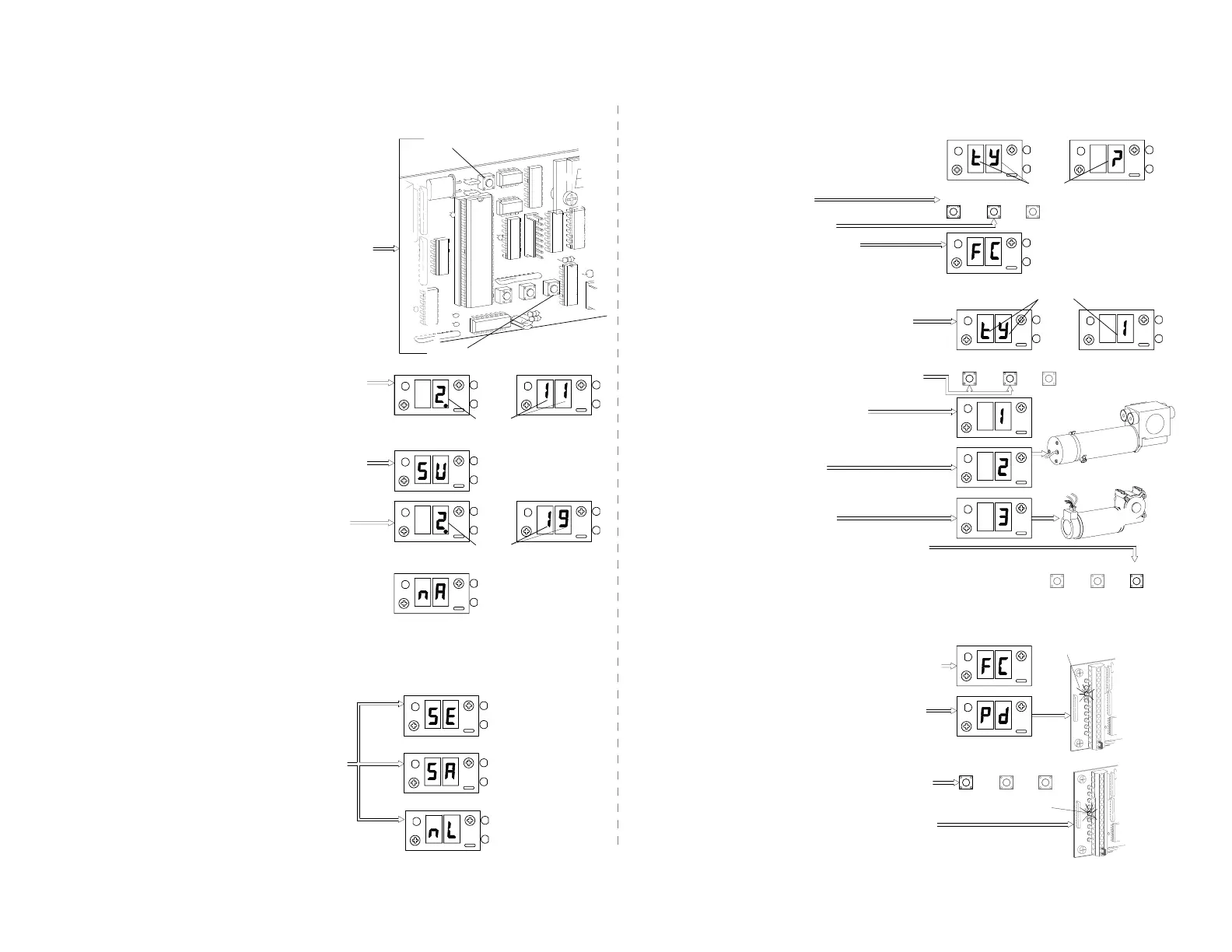
In version 2.19 and later, the display will show SU
-If SU does not appear, then the control was not
properly reset into the full learn mode (Go back
to step 2)
-If the display flashes nA like an error code,
The nA (no Access) parameter has been
turned on.
-The control will display ONE of the following
lock codes depending the type of lock
connected. (see Section 6)
-The display should "blink" the version number
(as in 2 then 19)
*LOCK CODES
2.188d
O
R
OR
+100
R
+100
+100
R
OR
LOCK
MON
Y
O
LOCK
No
Autolock
LOCK
MON
Fail Safe
Autolock
LOCK
MON
O
LOCK
Y
Y
Fail Secure
Autolock
+100
R
R
+100
Y
LOCK
R
Y
O
LOCK
MON
O
LOCK
MON
Y
LOCK
LOCK
THEN
LOCK
MON
+100
LOCK
O
Instruct the control to perform a full learn cycle by:
-Holding down the SET button and the RESET button.
-Release the RESET button.
-Hold the SET button for an additional 5 seconds
then release.
Be sure the toggle circuit is complete and apply
AC power to the unit.
CAUTION: THE DOOR WILL MOVE.
VERSION 2.18 and earlier
2. C2150 INITIALIZATION (learn cycle)
The display should "blink" the version number
(as in 2 then 11) *The display will show the lock
code (see below)
VERSION 2.19 and LATER
3rd Step - Version display
1st Step - Power up
2nd Step - Learn cycle
SET
R
+100
+100
R
LOCK
MON
LOCK
Y
O
Y
THEN
LOCK
MON
+100
LOCK
MON
Y
R
O
LOCK
O
LOCK
RESET
H202.2
-The display should indicate FC (for first run - Finding
Close stop) The door should fully close at slow speed.
-In versions later than 2.11, Pd canbeovercomeby
holding the up button untill the door closes.
NOTE: Pressing the wrong button (wrong series) will result in the
operator proceeding in a setup which should yield proper operation,
but the number displayed when accessing ts (total stroke) and other
stroke dependent parameters will be incorrect.
-To approve the selected type push the SET button
-If the door moves a short distance then stops, and
the display indicates Pd, the pre-wired safety beams
or other actuating devices are stopping the door and
preventing the "learn cycle". The yellow SAF BEM
indicator will be lit.
-The yellow CLS MON (close monitor) indicator will
come on when the door is fully closed.
-Select 3 for 2003 (C5600-1 motor)
5th Step - Close stop
R
D5
SET
UP
DOWN
+100
R
+100
+100
R
D3
UP
C5600-1
DOWN
SET
-The display will flash alternately tY and ?, indicating
the control is ready to be set to the proper series
operator.
-The display will flash tY and then 1. This is the
menu that selects the series type.
NOTE: for versions earlier than 2.15 go to Step 5.
-Use the UP & DOWN buttons to locate the series
number of the unit.
FOR VERSION 2.19 or later
-Select 2 for 2003 (C5600 motor)
-Select 1 for 2001 (0 will default to 2001)
FOR VERSION 2.15 - 2.18
-Press the DOWN button for 2003
-Press the UP button for 2001
4thStep-Settingseriestype
-Hold the button until FC is displayed
THEN
SET
+100
R
+100
R
DOWN
UP
O
LOCK
R
LOCK
MON
Y
+100
C5600
R
+100
LOCK
O
Y
LOCK
MON
SET
THEN
O
LOCK
R
+100
Y
LOCK
MON
DOWN
UP
LOCK
LOCK
MON
R
+100
O
Y
LOCK
O
LOCK
MON
Y
R
+100


 To Next Page