DESIGN INSPIRAT I O N
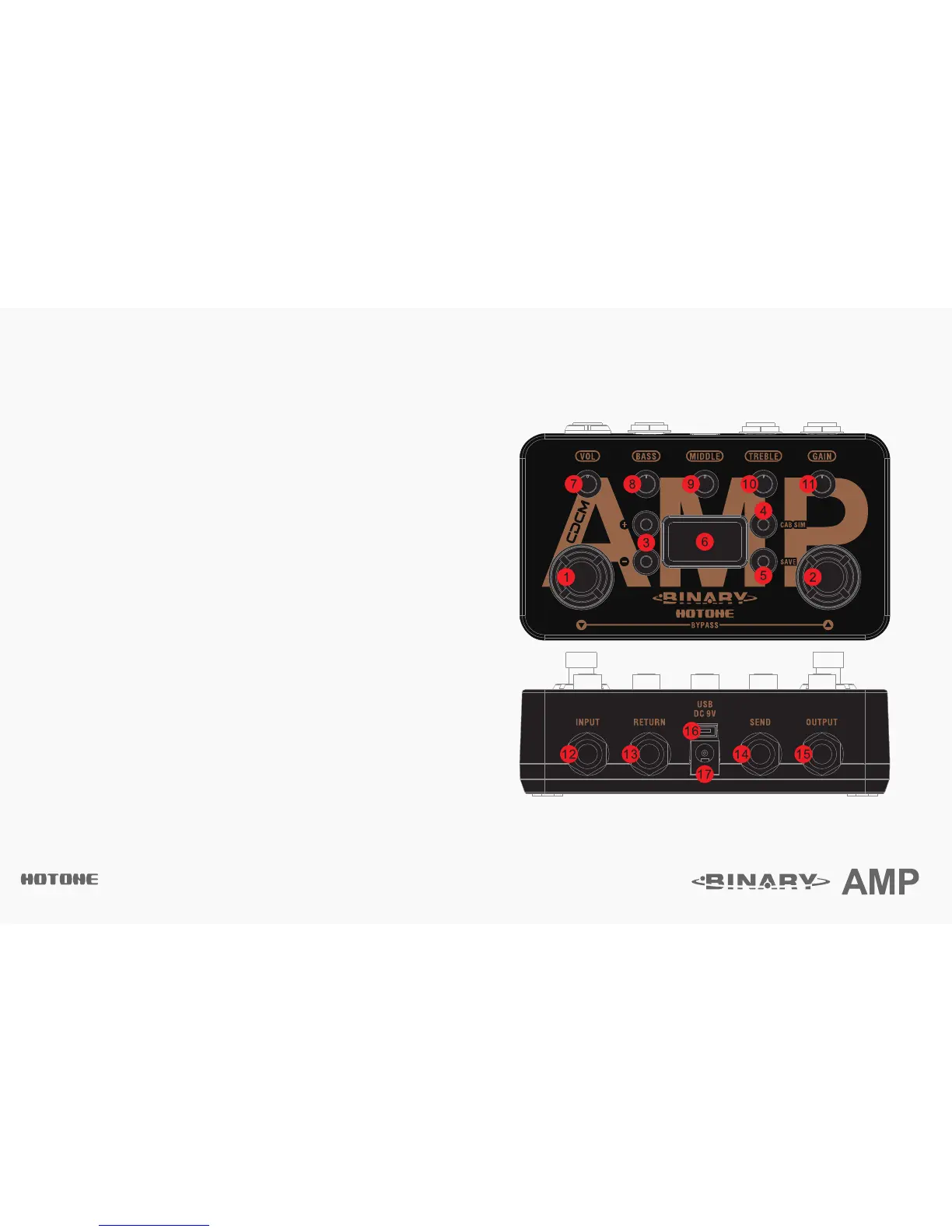
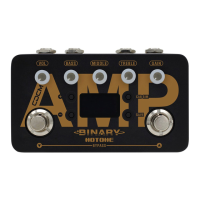
1-2.▽/△:For selecting presets, bypass, and other parameters.
3. +/- buttons: For selecting effects and adjusting parameters.
4. CAB SIM button: For switching cab sim on/off.
5. SAVE button: For saving parameter changes.
6. OLED screen: Shows bank/patch numbers, setting values and other operation info.
7. VOL: Controls effect output level.
8-10. BASS/MIDDLE/TREBLE: 3-Band EQ, controls the effect tone.
11. GAIN: Controls effect gain amount.
12. INPUT: 1/4” (6.35mm) mono jack, for plugging in instruments or other effects.
13-14. SEND/RETURN jacks: 1/4” (6.35mm) mono jacks, for connecting other effects.
15. OUTPUT: 1/4” (6.35mm) mono jack, for connecting to amps or other effects.
16. USB jack: Mini USB jack, for effects editing, firmware updates, and factory reset.
17. DC 9V: Plug in your power supply here (DC 9V, center negative).
Panel Introduction


 To Next Page