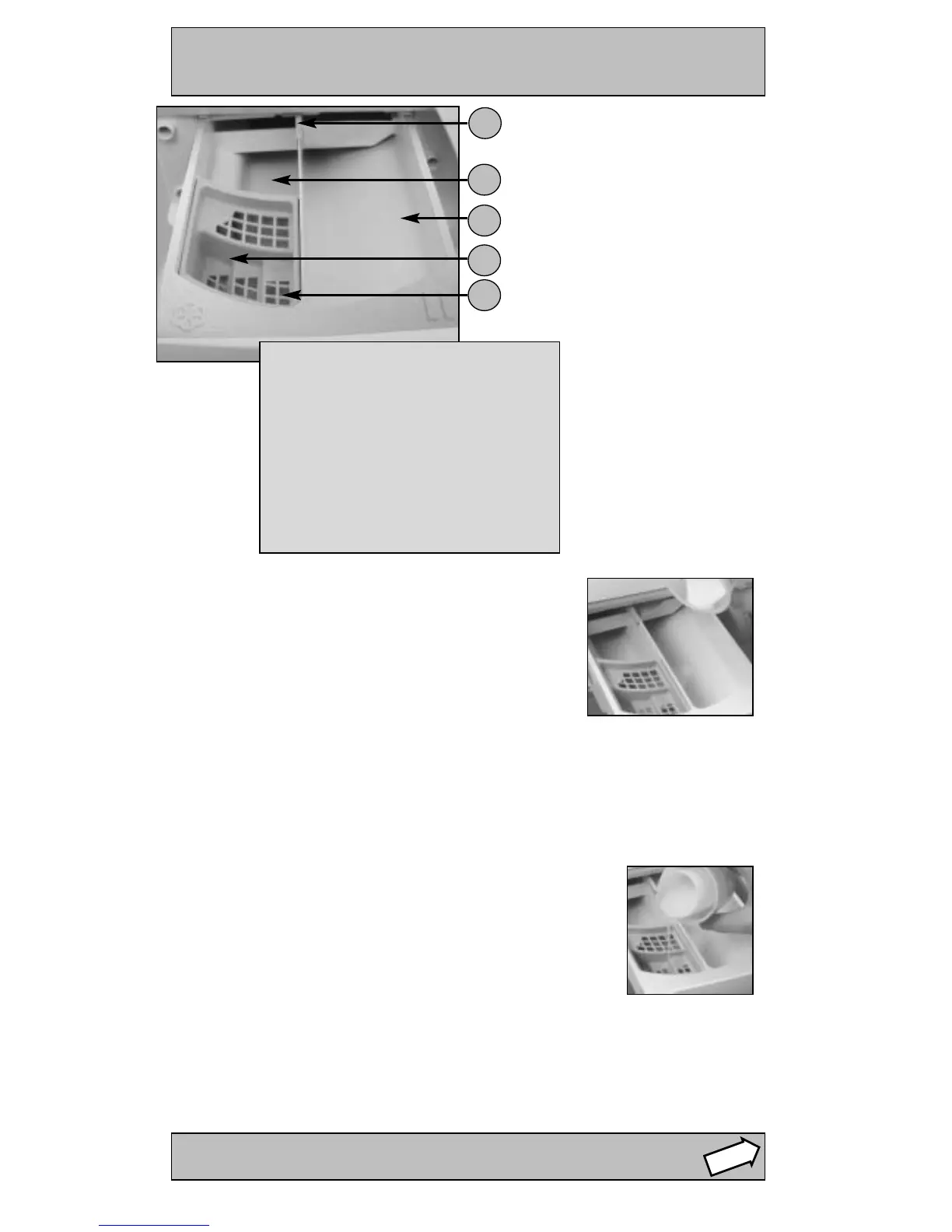
The Dispenser Drawer
STEP 3
Adding Fabric Conditioner
Dispensing Powder Detergent
Dispensing Liquid Detergent
Index:
1. Drawer release latch
2. Pre-wash detergent compartment
Maximum 200ml powder or
100ml liquid
3. Main detergent compartment
Maximum 400ml powder or
200ml liquid
4. Grate
5. Fabric conditioner compartment
120ml maximum
1
2
3
4
5
To achieve the best wash results the manufacturer’s
recommended amount of detergent should be measured
and added to the main detergent compartment (II symbol)
(max. 400ml).
Pour the recommended amount of fabric conditioner into the
compartment (flower symbol).
Do not exceed the maximum fill line.
Pre-wash Programme A
When selecting programme A add detergent to both the pre-wash compartment
(I symbol) and the main wash compartment (II symbol).
DO NOT use in drum dosing devices with Pre-wash programme A.
WARNING:
● Do not put any items into
the drawer, other than
detergents designed to be
released from the drawer, as
they may cause damage or
blockage.
We recommend the use of a detergent dosing ball, as provided by your detergent
manufacturer.



 To Next Page