15
USING YOUR OVEN
Before Using Your Oven
1. Look at the controls. Be sure you understand how
to set them properly.
2. Check the oven interior. Look at the shelves. Take
a practice run at removing and replacing them
properly to give sure, sturdy support.
3. Read over the information and tips that follow.
4. Keep this guide handy so you can refer to it,
especially during the first weeks of using your
new range.
NOTE: You may notice a “burning” or “oily” smell
the first few times you turn your oven on. This is
normal in a new oven and will disappear in a short
time. See the Operating the Self-Cleaning Oven section.
Oven Controls
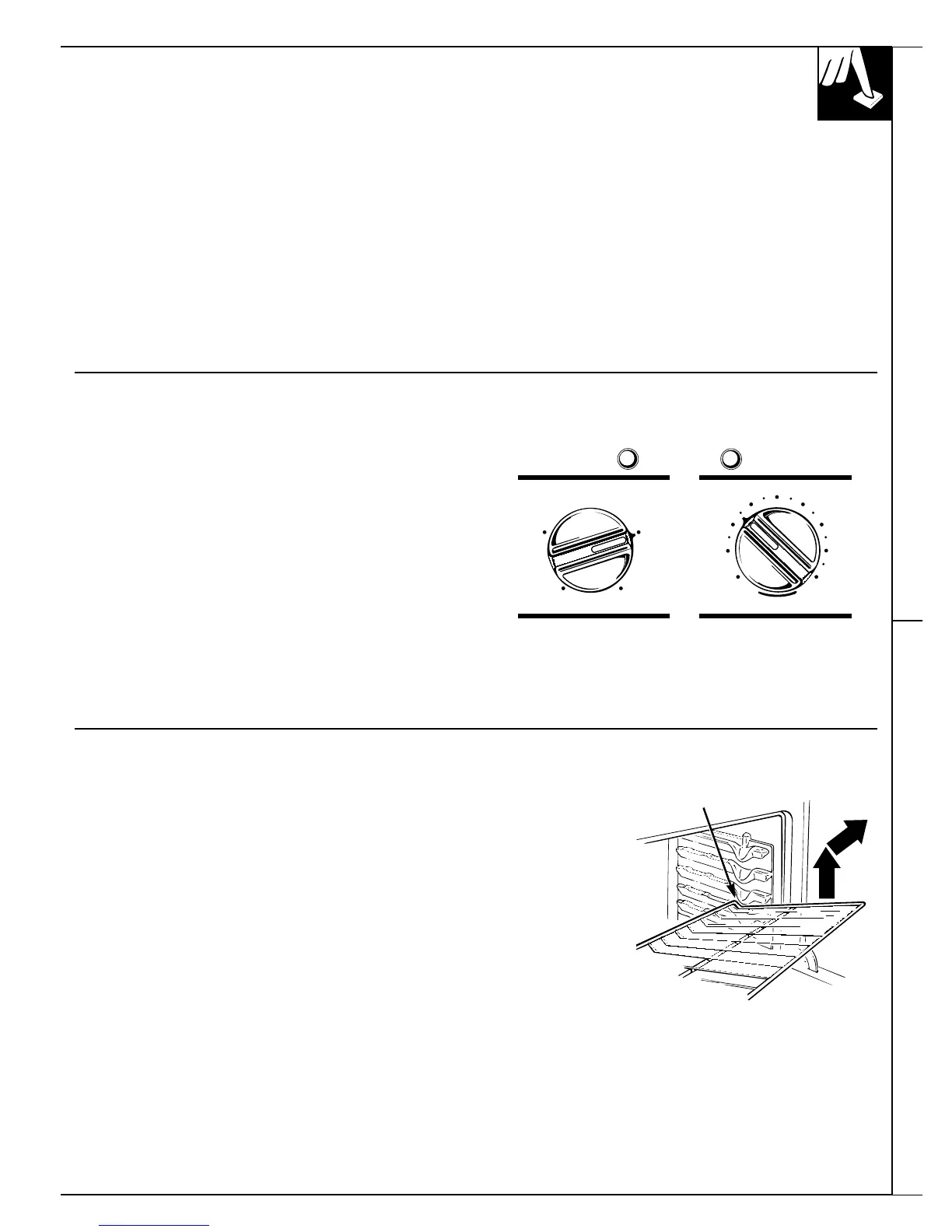
Your range has two oven control knobs—
OVEN SET and OVEN TEMP.
The OVEN SET knob has settings for BAKE, TIMED
BAKE, CLEAN, BROIL and OFF. When you turn the
knob to the desired setting, the proper heating units
are then activated for that operation.
The OVEN TEMP knob maintains the temperature
you set, from WARM (150°F.) to BROIL (550°F.) and
also at CLEAN (880°F.).
The oven set light glows when the knob is turned
to BAKE, TIMED BAKE, CLEAN or BROIL.
The oven temp light glows until the oven reaches
your selected temperature, then goes off and on with
the oven unit during cooking.
OVEN TEMP
CLEAN
BROILWARM
200 500
250 450
400300
350
OFF
BROIL BAKE
CLEAN TIMED BAKE
OVEN SET
Automatic Timers and Clock Using Your Oven
Oven Shelves
The shelves are designed with
stop-locks so when placed
correctly
on the shelf supports,
they will stop before coming
completely out of the oven and
will not tilt when you are
removing food from them or
placing food on them.
When placing cookware on a shelf,
pull the shelf out to the bump on
the shelf support. Place the cookware
on the shelf, then slide the shelf
back into the oven. This will
eliminate reaching into the hot oven.
To remove a shelf from the oven,
pull it towards you, tilt the
front
end upward and pull it out.
To replace, place the shelf on the
shelf support with the stop-locks
(curved extension of shelf) facing
up and toward the rear of the oven.
Tilt up the front and push the shelf
toward the back of the oven until it
goes past the bump on the shelf
support. Then lower the front of
the shelf and push it all the way
back.
(continued next page)
Bump







 To Next Page