28 of 43
Service Manual UK
Whirlpool UK Appliances Ltd
English
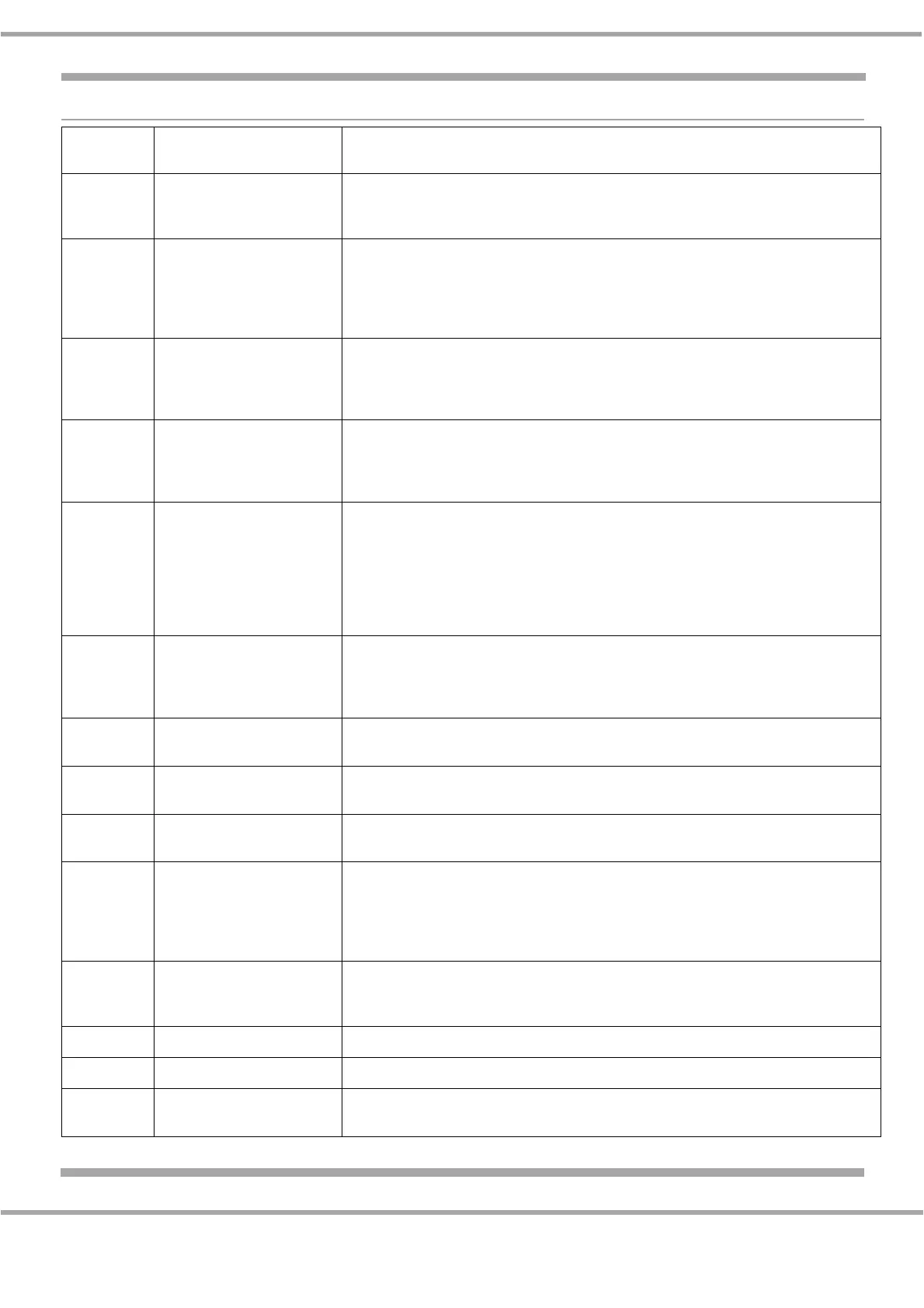
ERROR CODE
Failure
Code
Failure Type Suggested Repair Action
F01 Probe Temperature Probe error.
First check probe connection, if ok disconnect the probe and measure its
resistance (1000: +3.75* Temp ambient). If value is in range check AM.
F02 Temperature Temperature error.
Check heating elements insulation (disconnect the heating element and
check each terminal for continuity to EARTH).
If there is no continuity change AM.
If there is continuity change heating element.
F03 EEPROM EEPROM error.
Check with the manual configuration menu that the oven is correctly
configured and the test bit is set to ON. Wait 10 minutes.
If F03 appears again, change AM.
F04 WIDE WIDE communication error.
First check the connection on P007. If it is OK check the connection of the
WIRE that start from AM P007 to the UI board. If it is OK connect a new UI
and check if the appliance works properly. If not change the AM.
F05 Latch
(Pyro version only)
Latch error.
First unplug the appliance, wait at least 10 seconds the reconnect. Verify that
latch system repositioning work correctly (door has to be closed, motor has
to run). If this happens, check the connection between AM and door latch
system. If it is OK check microswitch functionality (door switch open if the
door is open and latch switch open if the door is unlocked). If switches are OK
then change AM.
F06 Door
(Pyro version only)
Door error.
First check connection between AM and door latch system. If it is OK check
door switch functionality (open circuit if door is open, closed circuit if the door
is closed). If switch is OK then change AM.
F07 Cooking parameter data
set error.
Data set error.
If the system persists change AM.
F08 UI EEPROM User Interface EEPRO< error.
Change IU (Navigator or Atlas).
F09 UI SPI memory error UI SPA memory error.
Change UI (Navigator or Atlas).
F10 Function Knob error The value read is not allowed for the selected knob.
First check connection between UI (dummy or smart) and the knob. If it is OK,
check that the oven is correctly configured using the manual configuration
menu. If the problem persists change the knob encoder. If the problem still
persists, change the AM.
F11 6th Sense error 6th Sense error, voltage error or current error.
Verify power supply voltage is 230 +/- 10%.
If supply is within tolerances, change AM.
F18 Zero crossing error Not foreseen.
F20 FPGA error (only Atlas) Change UI.
F21
HMI input error (only
Atlas)
Change UI.


 To Next Page