30 of 43
Service Manual UK
Whirlpool UK Appliances Ltd
English
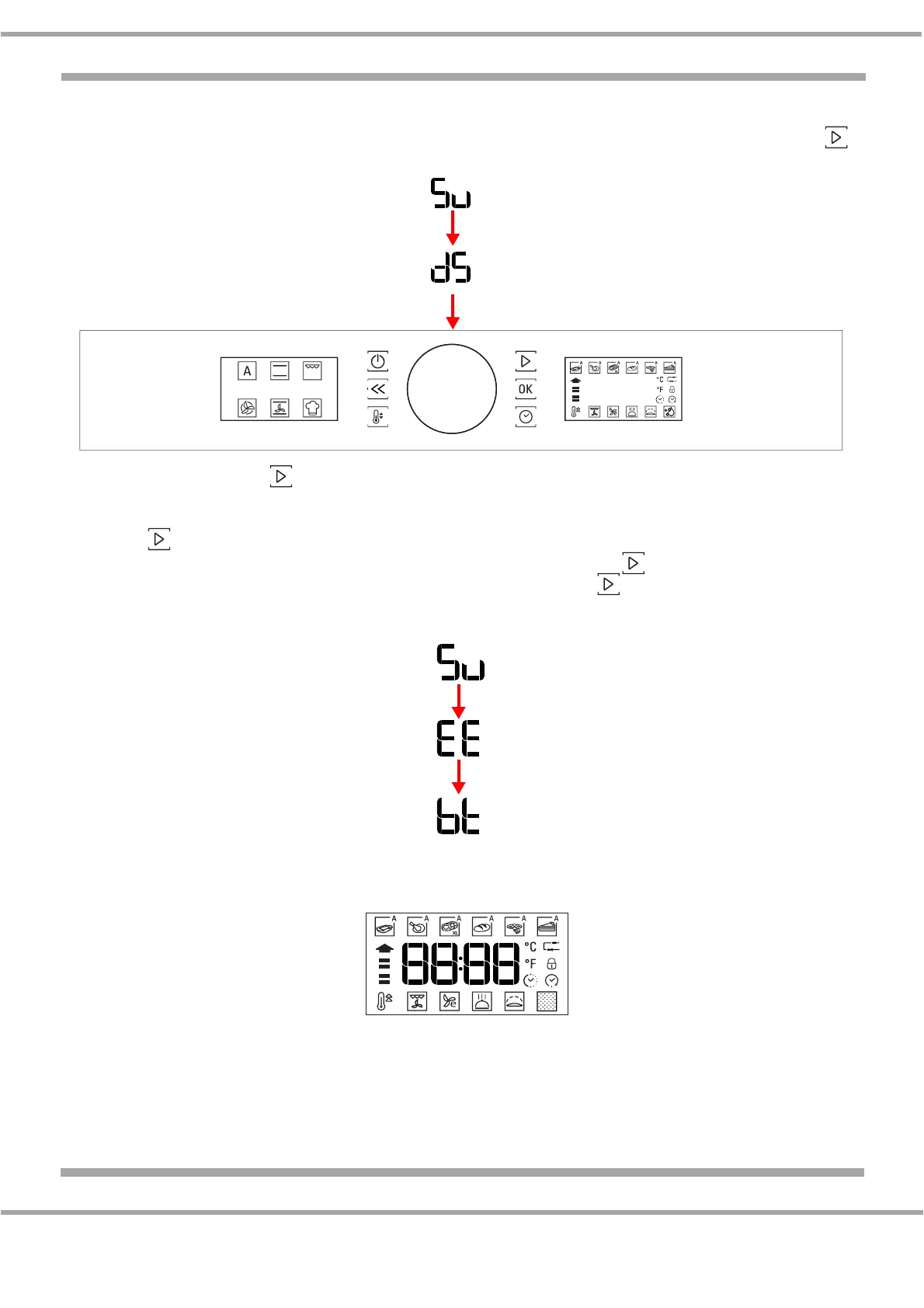
9. The Software version (Su) of the User Interface (UI) will be displayed. Press the Start Button .
The Data Version (ds) will be displayed. These are not relevant to the repair.
10. Press the Start button . Set the configuration number for the Control Board (AM) by turning the
central knob. Refer to the Configuration Code in Specifications or on the Rating Plate of the oven
for the correct code. For confirmation and advancing onto the next step always press the Start
button .
11. The Software version (Su) will be displayed. Press the Start button . The Data version (EE) of
the Control Board (AM) will be displayed. Press the Start button . The Boot version (Bt) will be
displayed. These are not relevant to the repair.
12. As soon as the Start button is pressed all the icons of the display are switched on. A beep sounds
to confirm the alarm message.
An00


 To Next Page
 Loading...