39
• To input a metric conversion command into a calculation,
press
(CONV) and then input the two-digit
number that corresponds to the command you want.
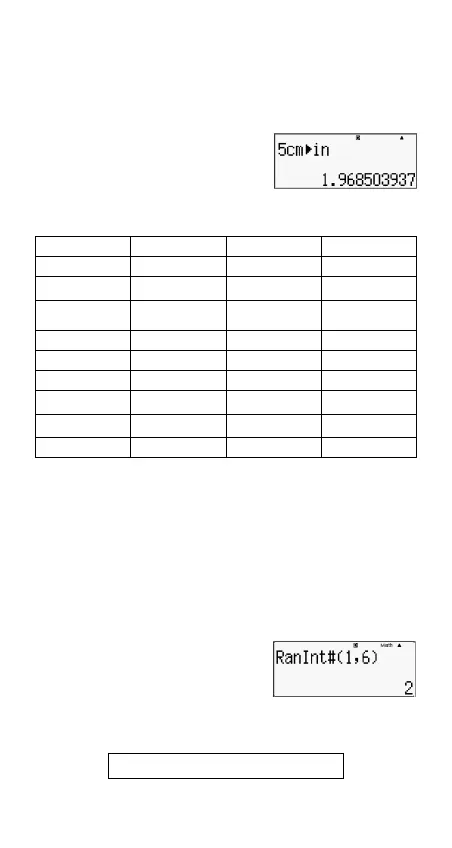
Example: To convert 5 cm into inches:
(CONV)
The following table shows the two-digit numbers for each of
the metric conversion commands.
Conversion formula data is based on the ''NIST Special
Publication 811(1995)."
Note: The J
cal command performs conversion for values at
a temperature of 15
°
C.
RanInt
Function RanInt#(a,b) generates a random integer within the
range of a to b.
Example: To generate a random integer from 1 to 6.
(RanInt#()
(,)
Other Functions
This section explains how to use the functions shown below.
01: in
cm 02: cm
in 03: ft
m 04: m
ft
05: yd
m 06: m
yd 07: mile
km 08: km
mile
09: n mile
m 10: m
n mile
11: acre
m
2
12: m
2
acre
13: gal(US)
ℓ
14:
ℓ
gal(US) 15: gal(UK)
ℓ
16:
ℓ
gal(UK)
17: pc
km 18: km
pc 19: km/h
m/s 20: m/s
km/h
21: oz
g 22: g
oz 23: lb
kg 24: kg
lb
25: atm
Pa 26: Pa
atm 27: mmHg
Pa 28: Pa
mmHg
29: hp
kW 30: kW
hp
31: kgf/cm
2
Pa 32: Pa
kgf/cm
2
33: kgf_m
J 34: J
kgf_m
35: lbf/in
2
kPa 36: kPa
lbf/in
2
37:
°
F
°
C 38:
°
C
°
F39: J
cal 40: cal
J
!, Abs (, Ran #,
n
P
r
,
n
C
r
, Rnd(



 To Next Page