EasyManua.ls Logo

HP 3457A - 3-13. Range Selection; 3-14. Measurement Resolution; 3-15. Integration Time

HP 3457A
273 pages
Print Icon
To Next Page IconTo Next Page
To Previous Page IconTo Previous Page
Loading...
Operation
3457A
AC
BANDWIDTH
(ACBAND)
.........+e0-20eeeeeee
MATH
REGISTERS
.
ALL
Cleared
Except
the
following
)
AUTO-RANGE
(ARANGE)
DEGREE
.
20
AUTO-ZERO
.
OFFSET
.
«
O
BEEP
REFERENCE
dB
(REF)
1
CHANNELS
CONNECTED
(CHAN)
RES
.
50
DELAY
...
DEFAULT
(Minimum
required
for
accuracy)
SCALE
.
1
DIGITS
BESPLAYED:
(NDIG):
sciisiis
mnsirseermae
rsa’
5
MEMORY
(MEM)
ptipeaiserian
tetas
“ORE
DISPLAY
(DISP)
oN
MEMORY
SIZE
(MSIZE)
.....--e005
Previous
Setting
EMASK
.....-.-
.
32767
enabled
NUMBER
OF
READINGS
PER
TRIGGER
(NRDGS)
1
ERROR
REGISTER
-
Results
of
Self-Test
OFFSET
COMPENSATION
(OCOMP)
OFF
FIXED
IMPEDANCE
(FIXEDZ)
....--....eeeeeeeeee
OFF
OUTPUT
FORMAT
(OFORMAT)
ASCII
FREQUENCY
SOURCE
(FSOURCE)
. . +
AC
VOLTS
PROGRAM
MEMORY
..........
. .
.
. .
CLEAR
FUNCTION
(FUNC)
.......005
sseaeeee,
DO
VOLTS
READING
HENORY
sieinesiecsateietsirta'eis
slot
sie
Stes
CLEAR
HP-IB
ADDRESS
....
UNCHANGED
(Factory
setting
22)
REQUEST
SERVICE
(ROS)
Power
ON
bit
unchanged
INPUT
BUFFER
CINBUF)
.....seeeeeeeeeeeeeeeees
OFF
SCAN
ADVANCE
(SADV)
HOLD
INPUT
TERMINALS
(TERM)
SCAN:
LUST,
CSLEST)
sa
seceanh
wancateuaes
CHANNEL
0
INTEGRATION
TIME
(NPLC)
STATUS
REGISTER
..
Pwr
ON
bit
+
Self-Test
results
MATH
FORMAT
(MFORMAT)
TIMER
LeeGaae
1
sec.
MATH
FUNCTION
(MATH)
TRIGGER
(TRIG)
-
AUTO
TRIGGER
ARM
(TARM)
-
AUTO
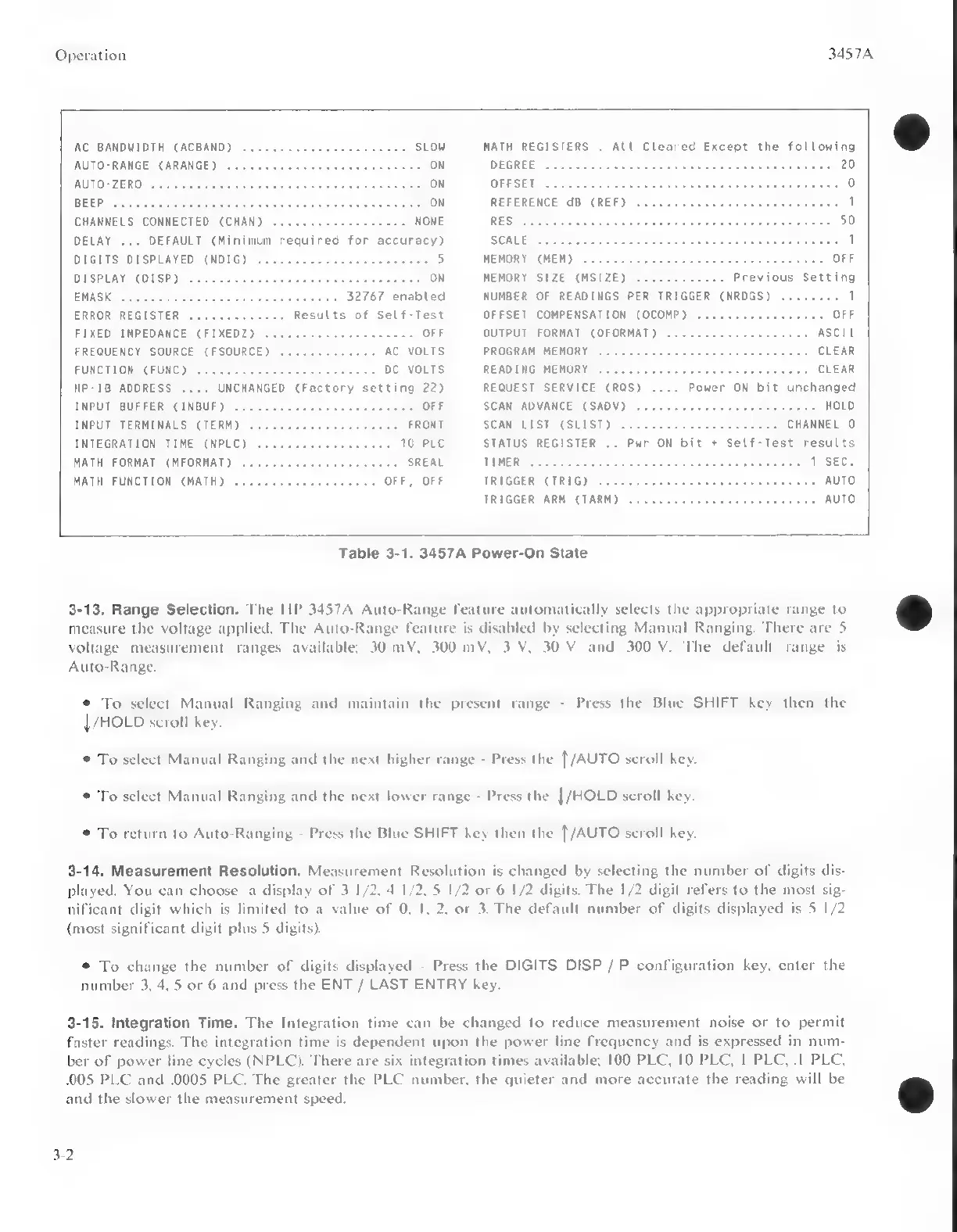
Table
3-1.
3457A
Power-On
State
3-13.
Range
Selection.
The
HP
3457A
Auto-Range
feature
automatically
selects
the
appropriate
range
to
op
measure
the
voltage
applied.
The
Auto-Range
feature
is
disabled
by
selecting
Manual
Ranging.
There
are
5
voltage
measurement
ranges
available;
30
mV,
300
mV,
3
V,
30
V
and
300
V.
The
default
range
is
Auto-Range.
©
To
select
Manual
Ranging
and
maintain
the
present
range
-
Press
the
Blue
SHIFT
key
then
the
|
/HOLD
scroll
key.
©
To
select
Manual
Ranging
and
the
next
higher
range
-
Press
the
{/AUTO
scroll
key.
©
To
select
Manual
Ranging
and
the
next
lower
range
-
Press
the
|/HOLD
scroll
key.
©
To
return
to
Auto-Ranging
-
Press
the
Blue
SHIFT
key
then
the
[/AUTO
scroll
key.
3-14.
Measurement
Resolution.
Measurement
Resolution
is
changed
by
selecting
the
number
of
digits
dis-
played.
You
can
choose
a
display
of
3
1/2,
4
1/2,
5
1/2
or
6
1/2
di
The
1/2
digit
refers
to
the
most
sig-
nificant
digit
which
is
limited
to
a
value
of
0,
1,
2,
or
3.
The
default
number
of
digits
displayed
is
5
1/2
(most
significant
digit
plus
5
digits).
©
To
change
the
number
of
digits
displayed
-
Press
the
DIGITS
DISP
/
P
configuration
key,
enter
the
number
3,
4,
5
or
6
and
press
the
ENT
/
LAST
ENTRY
key.
3-15.
Integration
Time.
The
Integration
time
can
be
changed
to
reduce
measurement
noise
or
to
permit
faster
readings.
The
integration
time
is
dependent
upon
the
power
line
frequency
and
is
expressed
in
num-
ber
of
power
line
cycles
(NPLC).
There
are
six
integration
times
available;
100
PLC,
10
PLC,
|
PLC,
.1
PLC,
005
PLC
and
.0005
PLC.
The
greater
the
PLC
number,
the
quieter
and
more
accurate
the
reading
will
be
and
the
slower
the
measurement
speed.
s
3-2

Other manuals for HP 3457A

Related product manuals