T
.O
. 33K8-4-551-1
4
.6
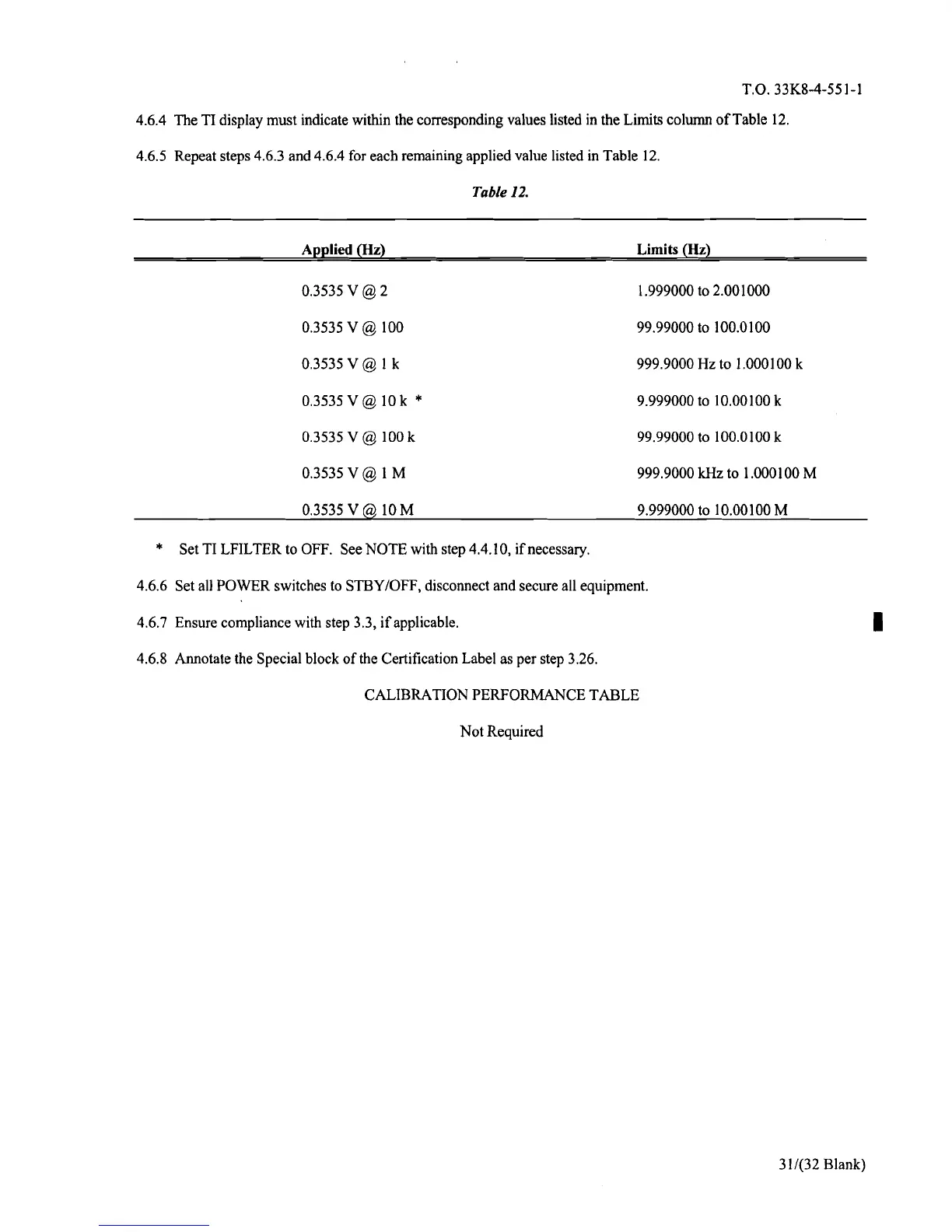
.4 The TI display must indicate within the corresponding values listed in the Limits column of Table 12.
4
.6
.5 Repeat steps 4
.6
.3 and 4
.6
.4 for each remaining applied value listed in Table 12.
Table 12.
Applied (Hz)
Limits (Hz)
0
.3535 V @ 2
1
.999000 to 2
.001000
0
.3535 V @ 100
99
.99000 to 100
.0100
0
.3535V@1k
999
.9000 Hz to 1
.000100 k
0.3535 V @ 10 k * 9
.999000 to 10
.00100 k
0
.3535 V @ l00 k
99
.99000 to 100
.0100 k
0
.3535V@1M
999
.9000 kHz to 1
.000100 M
0
.3535V@10M
9
.999000 to 10 .00100 M
* Set TI LFILTER to OFF
. See NOTE with step 4
.4
.10, if necessary.
4
.6
.6 Set all POWER switches to STBY/OFF, disconnect and secure all equipment.
4
.6
.7 Ensure compliance with step 3
.3, if applicable.
4
.6
.8 Annotate the Special block of the Certification Label as per step 3
.26.
CALIBRATION PERFORMANCE TABLE
Not Required
1
31/(32 Blank)



 To Next Page