HP Pavilion home PC
5
Filename: 5219urf users guide US_revised(p11).doc Title: hp pavilion home pc
Template: Normal.dot Author: pamela Last Saved By: demi
Revision #: 2 Page: 5 of 13 Printed: 03/03/03 02:22 PM
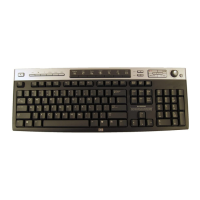
1Install the two AA alkaline batteries
(provided) in the wireless keyboard: Remove
the cover (G) from the bottom of the
keyboard, and insert the batteries into the
compartment (H). Note the battery icons,
and make sure batteries are placed in the
correct direction. Replace the cover.
2
Adjust the keyboard height by lifting the
adjustment bar (JI).
Getting the Receiver Ready
The receiver (A) must be placed upright and
positioned properly to avoid interference
from other electrical equipment.
1
Turn off your computer, and disconnect the
power cord and modem/phone cable.
2
Connect the receiver cable (L) to the USB
connector on the back of the computer.


 To Next Page