5
Rear components
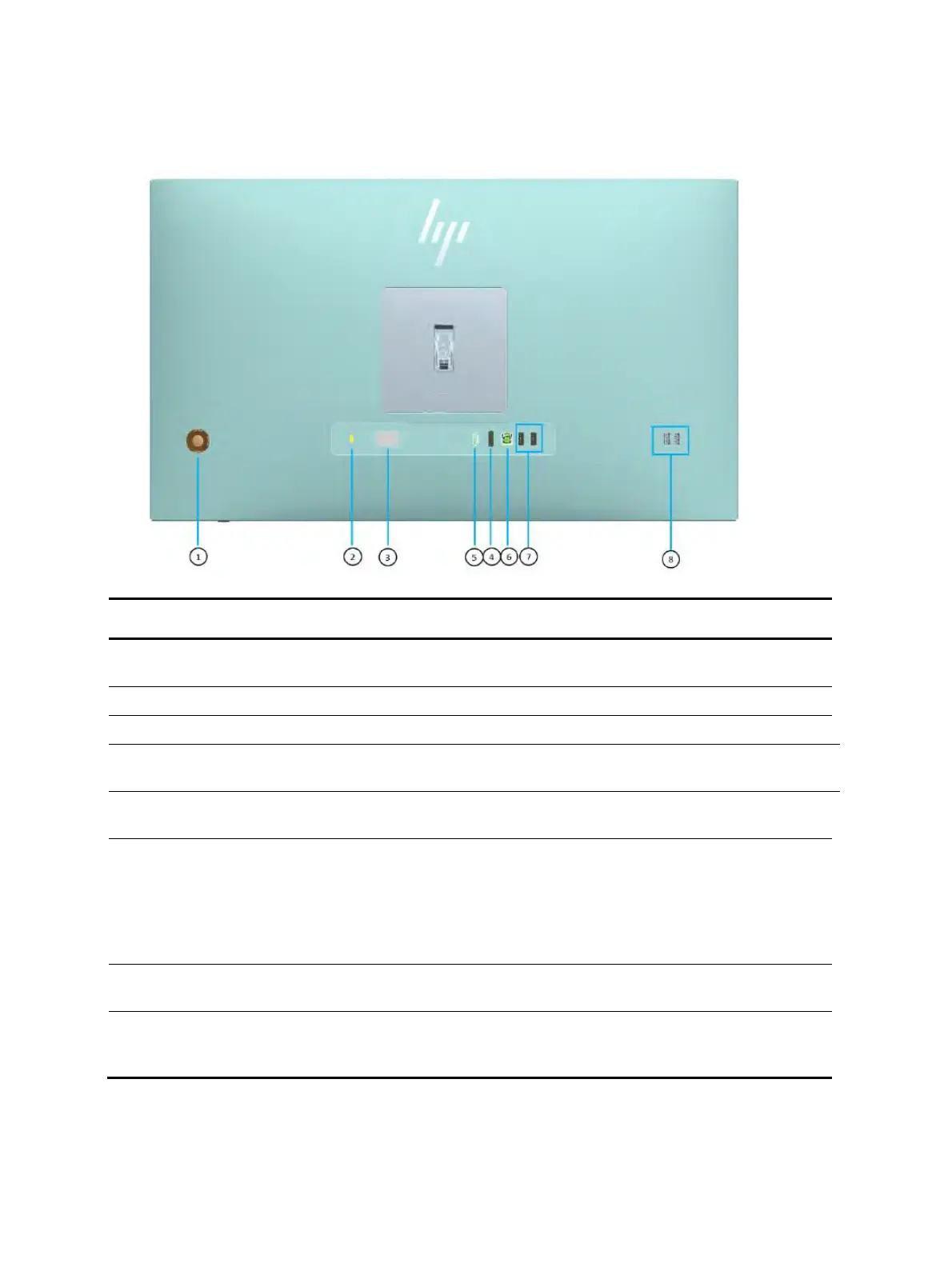
To identify the components on the rear of the monitor, use this illustration and table.
Table 1-2: Rear and side components and their descriptions
Opens the OSD menu and makes adjustments to
monitor settings.
Connects an optional security cable.
(4) DisplayPort connector
Connects the DisplayPort cable to a source device
such as a computer or game console.
Connects the HDMI cable to a source device such
as a computer or game console.
(6) USB Type-B port (upstream)
Connects the USB Type-B cable to a source device
such as a computer or game console.
NOTE: A USB Type-B cable or a USB Type-C
cable must be connected from the source device to
the monitor to enable USB Type-A ports on the
monitor.
(7) USB ports (2) (downstream)
Connect a USB cable to a peripheral device, such
as a keyboard, mouse, or USB hard drive.
(8) USB ports (2) (downstream)
Connect a USB cable to a peripheral device, such
as a keyboard, mouse, or USB hard drive, and
charge peripheral devices.


 To Next Page