EasyManua.ls Logo

HP 5254C - CRYSTAL FILTER ADJUSTMENT; MIXER BALANCE ADJUSTMENT; LOW PASS FILTER ADJUSTMENT

HP 5254C
69 pages
Print Icon
To Next Page IconTo Next Page
To Previous Page IconTo Previous Page
Loading...
Model
5254C
Section
V
5-38.
CRYSTAL
FILTER
ADJUSTMENT.
5-39.
To
adjust
the cyrstal
bandpass
filter
in
the
Multiplier
Amplifier
Assembly
Al,
proceed
as
follows:
a.
With
counter
power
off, connect
converter
to
counter
with
Extension
Cable
HP
10506B.
b. Remove the
four
screws
which
secure MP6
(top
plate)
and
remove
MP6.
c.
Remove
the four
screws
which
secure MP7
(left
side
plate) and
remove MP7.
d.
Remove
Cavity
Output
Cable
Assembly
from
MP14
(Machined
Amplifier Shield).
To
prevent
damage
to
the cable
assembly,
first
remove
the four
screws that
secure
the
Cavity Plug
Assembly (MP3)
and
remove
the cavity
plug and
output
cable,
then
un-
screw and
remove
the
other
end
of the output
cable
from
MP14
.
Replace
the
cavity plug (MP3)
and the
four
screws
that secure
it to the
cavity.
e.
Connect
a male
BNC
Plug
connector (HP
Stock
No.
1250-0052)
to the
end of the
cavity
output
cable.
f.
Using BNC
male
to
Type
N
female
adapter (HP
Stock
No.
1250-0077), connect
the
output
cable from
Harmonic
Selector
Cavity
to the HP
Spectrum
Analyzer.
g.
Set
Spectrum
Analyzer
Controls
as
follows:
VERTICAL
DISPLAY
IF
BANDWIDTH
.
.
SWEEP TIME
.
. .
IF
GAIN
SPECTRUM
WIDTH
SYNC
FREQUENCY.
.
.
.
ATTENUATOR
.
. . .
SIGNAL
IDENTIFIER
LOG
1 kHz
30
ms per cm
60
dB
100 kc
per
cm
INT
. . .2-10
GHz
0
dB
OFF
h.
Turn
counter
power
ON
and turn
Converter
Mix-
ing
Frequency
control
to 2. 95
GHz.
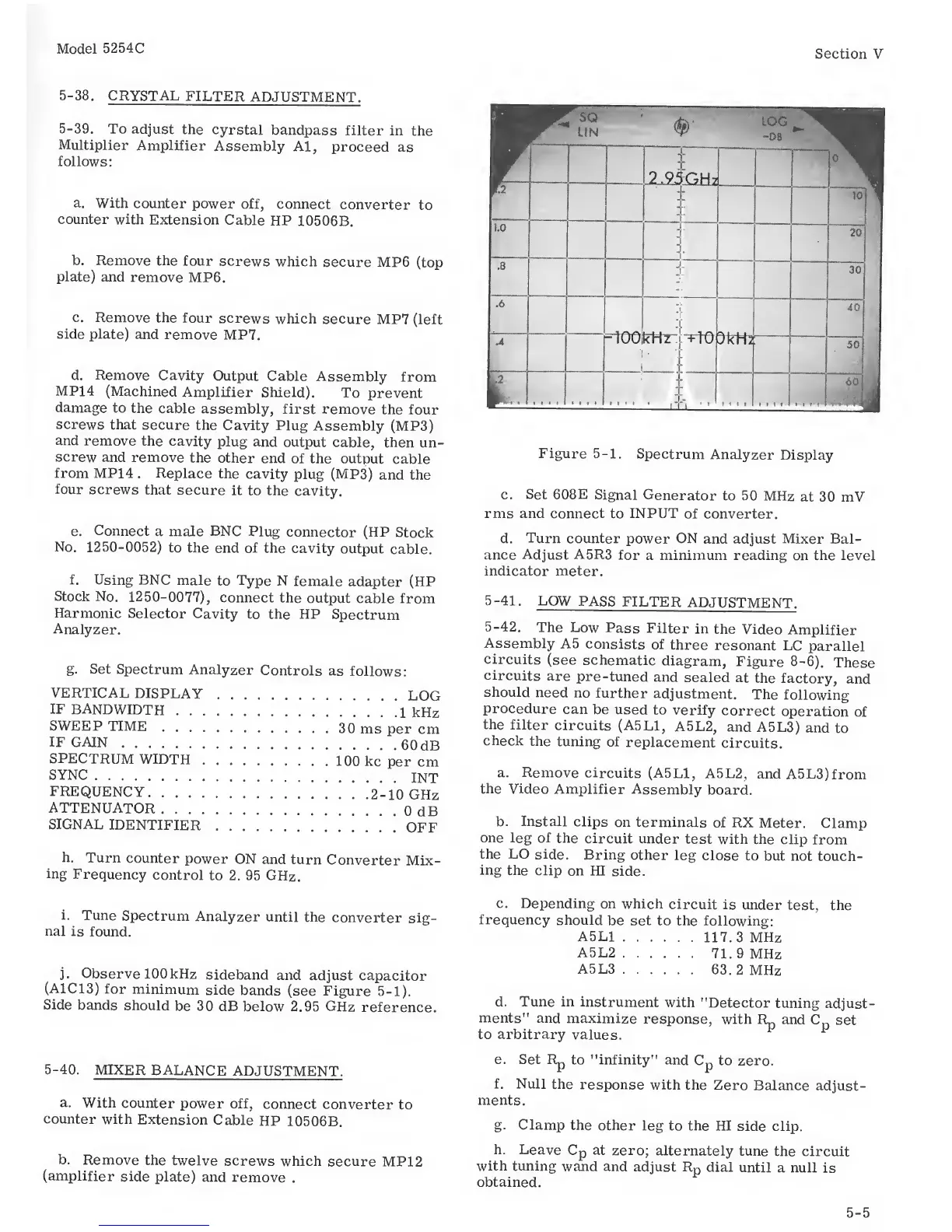
Figure
5-1.
Spectrum
Analyzer
Display
c. Set
608E
Signal
Generator
to 50 MHz
at
30 mV
rms and
connect to
INPUT
of
converter.
d.
Turn
counter
power
ON
and adjust Mixer Bal-
ance
Adjust A5R3
for
a
minimum
reading on the
level
indicator
meter.
5-41.
LOW
PASS
FILTER
ADJUSTMENT.
5-42.
The Low
Pass
Filter
in
the
Video
Amplifier
Assembly
A5
consists
of
three
resonant
LC
parallel
circuits
(see
schematic
diagram,
Figure 8-6).
These
circuits
are
pre
-tuned
and
sealed
at
the
factory,
and
should
need
no
further
adjustment.
The
following
procedure
can
be used
to
verify
correct
operation
of
the
filter
circuits
(A5L1,
A5L2,
and
A5L3)
and
to
check
the tuning
of
replacement
circuits.
a. Remove
circuits
(A5L1,
A5L2,
andA5L3)from
the
Video Amplifier
Assembly
board.
b.
Install
clips
on terminals
of RX
Meter.
Clamp
one leg of
the
circuit
under
test with
the
clip
from
the
LO
side.
Bring
other
leg
close
to but not
touch-
ing
the
clip on
HI
side.
i.
Tune
Spectrum
Analyzer
until
the
converter
sig-
nal
is found.
j.
Observe 100
kHz
sideband
and adjust
capacitor
(A1C13)
for
minimum
side
bands
(see Figure
5-1).
Side
bands
should
be 30 dB
below
2.95 GHz
reference.
5-40.
MIXER
BALANCE
ADJUSTMENT.
a. With
counter
power
off,
connect
converter
to
counter
with
Extension
Cable
HP
10506B.
b.
Remove
the
twelve
screws which
secure MP12
(amplifier
side plate)
and
remove
.
c.
Depending
on
which
circuit
is
under
test,
the
frequency
should
be
set to the
following:
A5L1
117. 3
MHz
A5L2
71.9
MHz
A5L3
63.2
MHz
d. Tune
in
instrument
with
"Detector
tuning
adjust-
ments”
and
maximize
response,
with
and
C
p
set
to
arbitrary
values.
e. Set Rp
to "infinity"
and
Cp
to
zero.
f. Null
the
response
with
the
Zero
Balance
adjust-
ments.
g.
Clamp
the
other leg
to
the
HI
side clip.
h.
Leave Cp
at
zero; alternately
tune
the circuit
with tuning
wand and
adjust
Rp dial
until
a null
is
obtained.
5-5

Related product manuals