EasyManua.ls Logo

HP 5254C - MODEL 5254 A PERFORMANCE CHECK; MODEL 5254 A TROUBLESHOOTING; OLDER HP 5254 A INSTRUMENTS

HP 5254C
69 pages
Print Icon
To Next Page IconTo Next Page
To Previous Page IconTo Previous Page
Loading...
Section VII
Model
5254C
A5R16 is
a
factory
selected
part with
a
typical
value
of 10k ohms. In
Paragraph 5-43d,
connect
RF milli-
voltmeter
to
AUX A output on
the
rear of the HP
5245L.
7-14.
IN-CABINET
PERFORMANCE
CHECK
7-15.
The
HP 5254B In-
Cabinet
Performance
Check
(Table
5-4) can
be
used
for the HP
5254A.
However,
the HP
5254A
frequency
range
check covers
300
MHz
to 3000
MHz
instead of 200
MHz
to 3000
MHz.
7-16.
TROUBLESHOOTING
7-17.
Paragraphs
5-9
through
5-15
as
well
as
Table
7-2
can
be used in
troubleshooting
the HP
5254A.
Figures
7-2,
7-3,
and
7-4
show internal
plug-in
views
with
parts indicated,
as
well
as
the
MP1
Cavity
As-
sembly.
Schematics
in Figures 7-5
and
7-6
contain
A1
through
A5 Assembly circuits.
7-18.
OLDER
HP 5254A
INSTRUMENTS.
7-19.
This
section
applies
directly to the 5254A
Fre-
quency
Converter having
serial
prefix numbers
514-
02175 and
above. This
section
with the following
changes also
applies to 52
54A
Frequency
Converter
having serial
numbers 514-02175
and below, 429
and
415.
Instrument
Serial
No. Prefix
Change
No.
514-02175
and below
1
429,
415
2
CHANGE
1:
Figure
7-2,
A5
Video Amplifier
Assembly.
Make
the following
changes:
A5R32:
change
to 2400 ohms*
A5E1:
delete*.
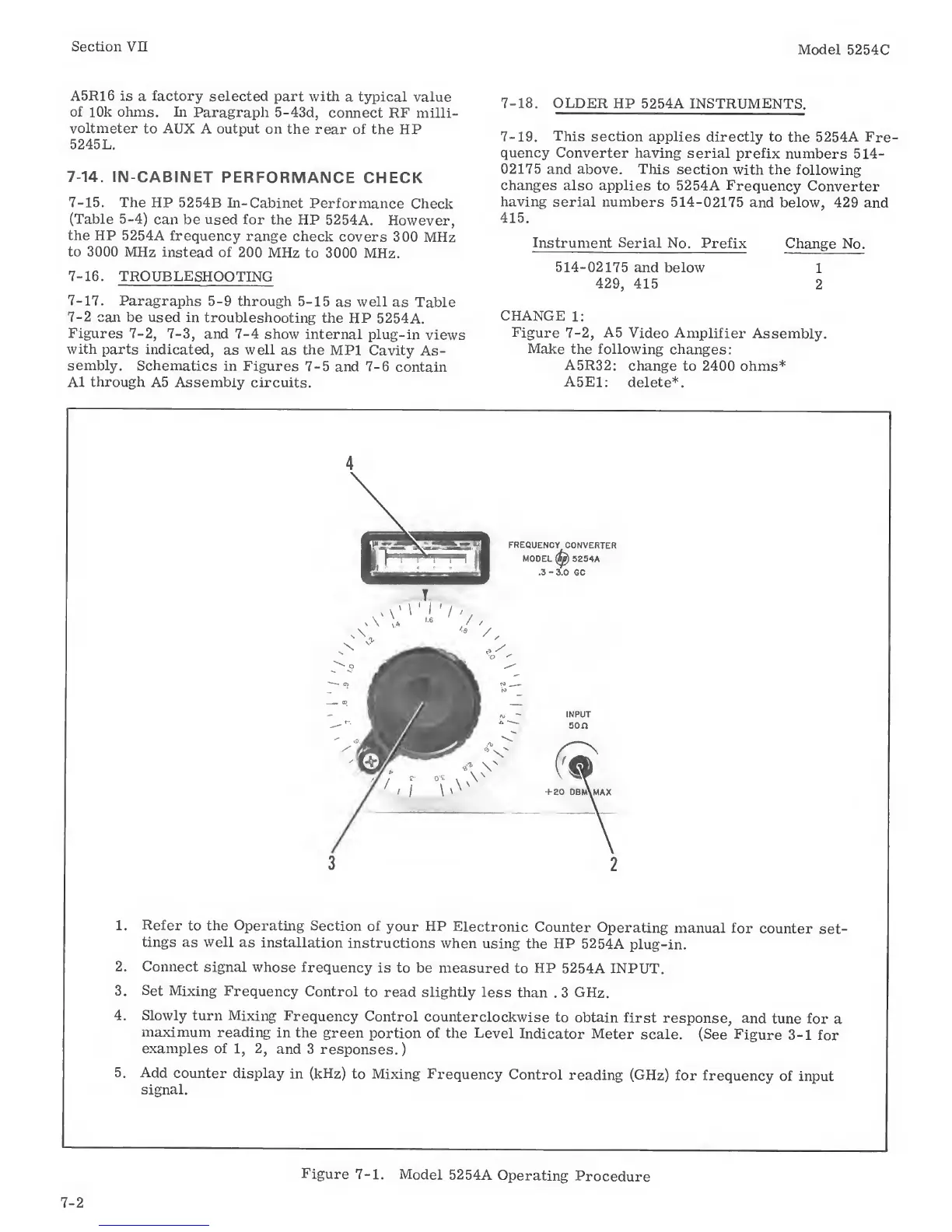
1. Refer
to the Operating
Section
of
your
HP
Electronic
Counter
Operating
manual
for
counter
set-
tings
as well
as
installation
instructions
when
using
the
HP
52 54
A
plug-in.
2. Connect
signal
whose
frequency
is to
be measured
to
HP
5254A INPUT.
3.
Set
Mixing
Frequency
Control
to read slightly
less
than
.
3 GHz.
4. Slowly
turn Mixing
Frequency
Control
counterclockwise
to
obtain first
response,
and
tune for
a
maximum
reading
in the green
portion
of
the Level
Indicator Meter
scale. (See
Figure
3-1
for
examples of
1, 2,
and 3
responses.
)
5.
Add
counter display
in (kHz)
to Mixing
Frequency
Control
reading (GHz)
for frequency
of input
signal.
7-2
Figure
7-1.
Model
52 54
A
Operating
Procedure

Related product manuals