EasyManua.ls Logo

HP 5326A - Page 22

HP 5326A
30 pages
Print Icon
To Next Page IconTo Next Page
To Previous Page IconTo Previous Page
Loading...
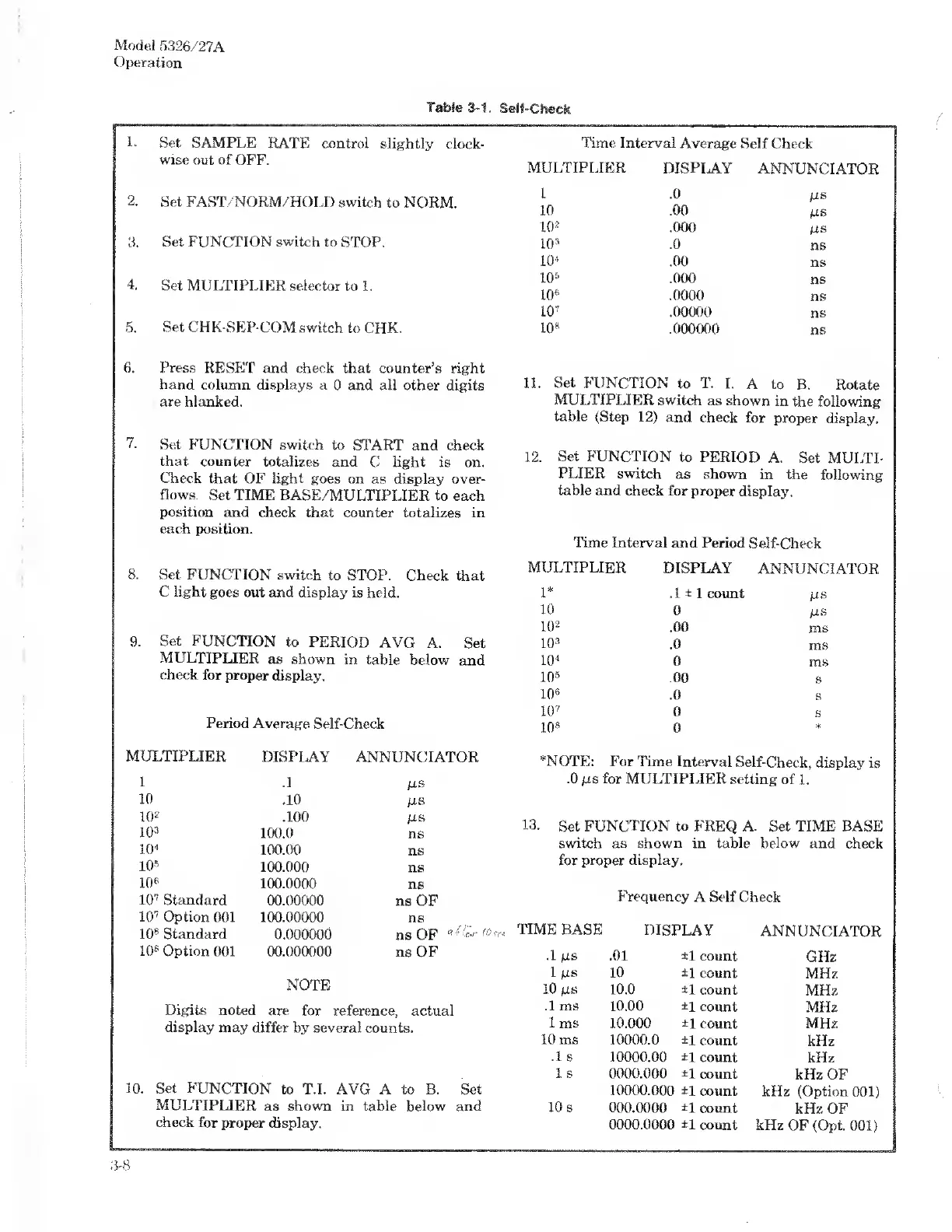
Model
5326/27A
Operation
Table
3-1.
Self-Check
1.
Set
SAMPLE
RATE
control
slightly
clock¬
wise
out
of
OFF.
2.
Set
FAST/NORM/HOLD
switch
to
NORM.
3.
Set
FUNCTION
switch
to
STOP.
4.
Set
MULTIPLIER
selector
to
1.
5.
Set
CHK-SEP-COM
switch
to
CHK.
6.
Press
RESET
and
check
that
counter’s
right
hand
column
displays
a
0
and
all
other
digits
are
blanked.
7.
Set
FUNCTION
switch
to
START
and
check
that
counter
totalizes
and
C
light
is
on.
Check
that
OF
light
goes
on
as
display
over¬
flows.
Set
TIME
RASE/MULTIPLIER
to
each
position
and
check
that
counter
totalizes
in
each
position.
8.
Set
FUNCTION
switch
to
STOP.
Check
that
C
light
goes
out
and
display
is
held.
9.
Set
FUNCTION
to
PERIOD
AVG
A.
Set
MULTIPLIER
as
shown
in
table
below
and
check
for
proper
display.
Period
Average
Self-Check
MULTIPLIER
DISPLAY
ANNUNCIATOR
1
.1
MS
10
.10
MS
10
2
.100
MS
10®
100.0
ns
10"
100.00
ns
10*
100.000
ns
10*
100.0000
ns
10
7
Standard
00.00000
ns
OF
10
7
Option
001
100.00000
ns
10
6
Standard
0.000000
ns
OF
«
10
s
Option
001
00.000000
NOTE
ns
OF
Digits
noted
are
for
reference,
actual
display
may
differ
by
several
counts.
10.
S
et
FUNCTION
to
T.I.
AVG
A
to
B.
Set
MULTIPLIER
as
shown
in
table
below
and
check
for
proper
display.
Time
Interval
Average
Self
Check
MULTIPLIER
DISPLAY
ANNUNCIATOR
I
.0
MS
10
.00
MS
10
2
.000
MS
10’
.0
ns
io>
.00
ns
10*
.000
ns
10*
.0000
ns
10
7
.00000
ns
10*
.000000
ns
11.
Set
FUNCTION
to
T.
I.
A
to
B.
Rotate
MULTIPLIER
switch
as
shown
in
the
following
table
(Step
12)
and
check
for
proper
display.
12.
Set
FUNCTION
to
PERIOD
A.
Set
MULTI¬
PLIER
switch
as
shown
in
the
following
table
and
check
for
proper
display.
Time
Interval
and
Period
Self-Check
MULTIPLIER
DISPLAY
ANNUNCIATOR
1*
.1±
1
count
MS
10
0
MS
10
2
.00
ms
10
3
.0
ms
10
4
0
ms
10
s
.00
s
10*
.0
s
10
7
0
s
10
s
0
*
*NOTE:
For
Time
Interval
Self-Check,
display
is
.0
ms
for
MULTI
PLIER
setting
of
1.
13.
S
et
FUNCTION
to
FREQ
A.
Set
TIME
BASE
switch
as
shown
in
table
below
and
check
for
proper
display.
Frequency
A
Self
Check
TIME
BASE
DISPLAY
ANNUNCIATOR
.1
M
s
.01
±1
count
GHz
1
M
s
10
±1
count
MHz
10
MS
10.0
±1
count
MHz
.1
ms
10.00
±1
count
MHz
1
ms
10.000
±1
count
MHz
10
ms
10000.0
±1
count
kHz
.1
s
10000.00
±1
count
kHz
1
s
0000.000
±1
count
kHz
OF
10000.000
±1
count
kHz
(Option
001)
10
s
000.0000
±1
count
kHz
OF
0000.0000
±1
count
kHz
OF
(Opt.
001)
3-8

Related product manuals