EasyManua.ls Logo

HP 5326A - Page 26

HP 5326A
30 pages
Print Icon
To Next Page IconTo Next Page
To Previous Page IconTo Previous Page
Loading...
Model
5326/27A
Operation
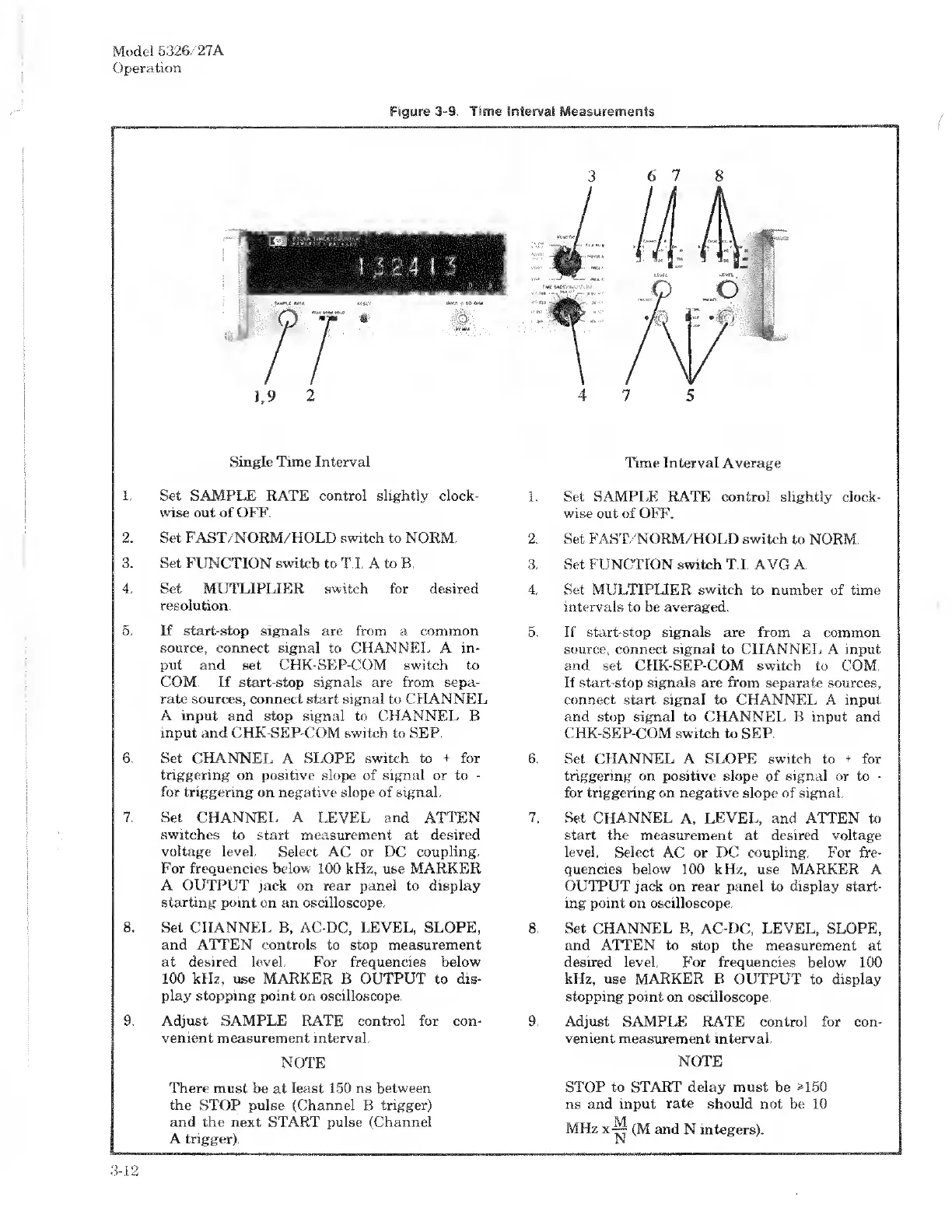
6
7
Single
Time
Interval
1.
Set
SAMPLE
RATE
control
slightly
clock¬
wise
out
of
OFF.
2.
Set
FAST/NORM/HOLD
switch
to
NORM.
3.
Set
FUNCTION
switch
to
T.I.
A
to
R.
4.
Set
MIJTLI
FLIER
switch
for
desired
resolution.
5.
If
start-stop
signals
are
from
a
common
source,
connect
signal
to
CHANNEL
A
in¬
put
and
set
CHK-SEP-COM
switch
to
COM.
If
start-stop
signals
are
from
sepa¬
rate
sources,
connect
start
signal
to
CHANNEL
A
input
and
stop
signal
to
CHANNEL
B
input
and
CHK-SEP-COM
switch
to
SEP.
6.
Set
CHANNEL
A
SLOPE
switch
to
+
for
triggering
on
positive
slope
of
signal
or
to
-
for
triggering
on
negative
slope
of
signal.
7.
Set
CHANNEL
A
LEVEL
and
ATTEN
switches
to
start
measurement
at
desired
voltage
level.
Select
AC
or
DC
coupling.
For
frequencies
below
100
kHz,
use
MARKER
A
OUTPUT
jack
on
rear
panel
to
display
starting
point
on
an
oscilloscope.
8.
Set
CHANNEL
B,
AC-DC,
LEVEL,
SLOPE,
and
ATTEN
controls
to
stop
measurement
at
desired
level.
For
frequencies
below
100
kHz,
use
MARKER
B
OUTPUT
to
dis¬
play
stopping
point
on
oscilloscope.
9.
Adjust
SAMPLE
RATE
control
for
con¬
venient
measurement
interval.
NOTE
There
must
be
at
least
150
ns
between
the
STOP
pulse
(Channel
B
trigger)
and
the
next
START
pulse
(Channel
A
trigger).
Time
Interval
Average
1.
Set
SAMPLE
RATE
control
slightly
clock¬
wise
out
of
OFF.
2.
Set
FAST/NORM/HOLD
switch
to
NORM.
3.
Set
FUNCTION
switch
T.I.
AVG
A.
4.
Set
MULTIPLIER
switch
to
number
of
time
intervals
to
be
averaged.
5.
If
start-stop
signals
are
from
a
common
source,
connect
signal
to
CHANNEL
A
input
and
set
CHK-SEP-COM
switch
to
COM.
If
start-stop
signals
are
from
separate
sources,
connect
start
signal
to
CHANNEL
A
input
and
stop
signal
to
CHANNEL
B
input
and
CHK-SEP-COM
switch
to
SEP.
6.
Set
CHANNEL
A
SLOPE
switch
to
+
for
triggering
on
positive
slope
of
signal
or
to
-
for
triggering
on
negative
slope
of
signal.
7.
Set
CHANNEL
A,
LEVEL,
and
ATTEN
to
start
the
measurement
at
desired
voltage
level.
Select
AC
or
DC
coupling.
For
fre¬
quencies
below
100
kHz,
use
MARKER
A
OUTPUT
jack
on
rear
panel
to
display
start¬
ing
point
on
oscilloscope.
8.
Set
CHANNEL
B,
AC-DC,
LEVEL,
SLOPE,
and
ATTEN
to
stop
the
measurement
at
desired
level.
For
frequencies
below
100
kHz,
use
MARKER
B
OUTPUT
to
display
stopping
point
on
oscilloscope.
9.
Adjust
SAMPLE
RATE
control
for
con¬
venient
measurement
interval.
NOTE
STOP
to
START
delay
must
be
M50
ns
and
input
rate
should
not
be
10
(M
and
N
integers).
3-12

Related product manuals