EasyManua.ls Logo

HP 5326A - Page 27

HP 5326A
30 pages
Print Icon
To Next Page IconTo Next Page
To Previous Page IconTo Previous Page
Loading...
Model
5326/27A
Operation.
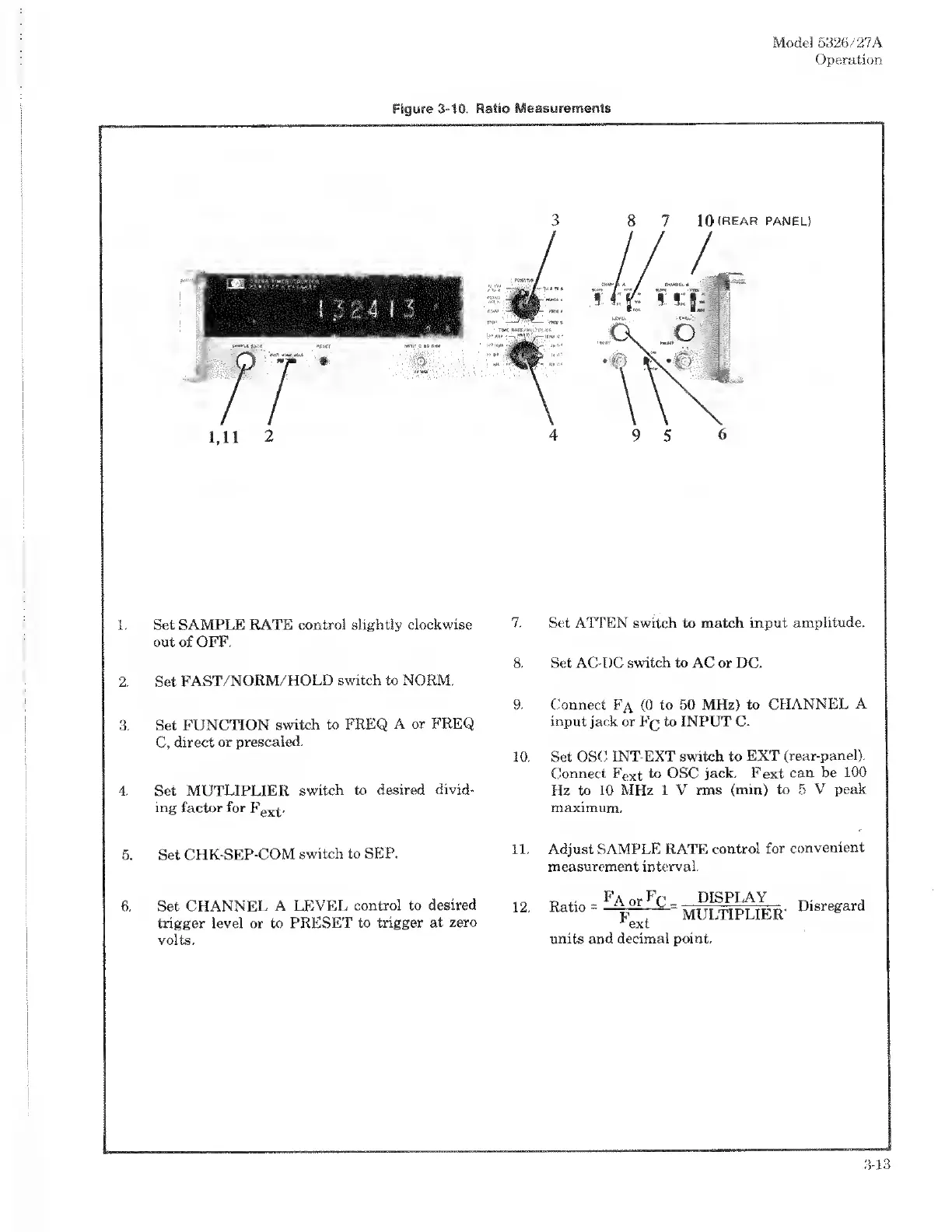
1.
Set
SAMPLE
RATE
control
slightly
clockwise
out
of
OFF.
2.
Set
FAST/NORM/HOLD
switch
to
NORM.
3.
Set
FUNCTION
switch
to
FREQ
A
or
FREQ
C,
direct
or
prescaled.
4.
Set
MUTLIPLIER
switch
to
desired
divid¬
ing
factor
for
F
ex
^.
5.
Set
CHK-SEP-COM
switch
to
SEP.
6.
S
et
CHANNEL
A
LEVEL
control
to
desired
trigger
level
or
to
PRESET
to
trigger
at
zero
volts.
7.
Set
ATTEN
switch
to
match
input
amplitude.
8.
Set
AC-DC
switch
to
AC
or
DC.
9.
Connect
Fa
(0
to
50
MHz)
to
CHANNEL
A
input
jack
or
Fq
to
INPUT
C.
10.
Set
OSC
INT-EXT
switch
to
EXT
(rear-panel).
Connect
F
ex
t
to
OSC
jack.
Fext
can
be
100
Hz
to
10
MHz
1
V
rms
(min)
to
5
V
peak
maximum.
11.
Adjust
SAMPLE
RATE
control
for
convenient
measurement
interval.
i
o
Rntin
-
^
or
-DjSPLA-\_
riiq
rof
rp
r
a
12.
Ratio
p
"
MULTIPLIER'
U
&
r
ext
units
and
decimal
point.
3-13

Related product manuals