EasyManua.ls Logo

HP 532A - Page 4

HP 532A
10 pages
Print Icon
To Next Page IconTo Next Page
To Previous Page IconTo Previous Page
Loading...
Page
6
Model
532A/B
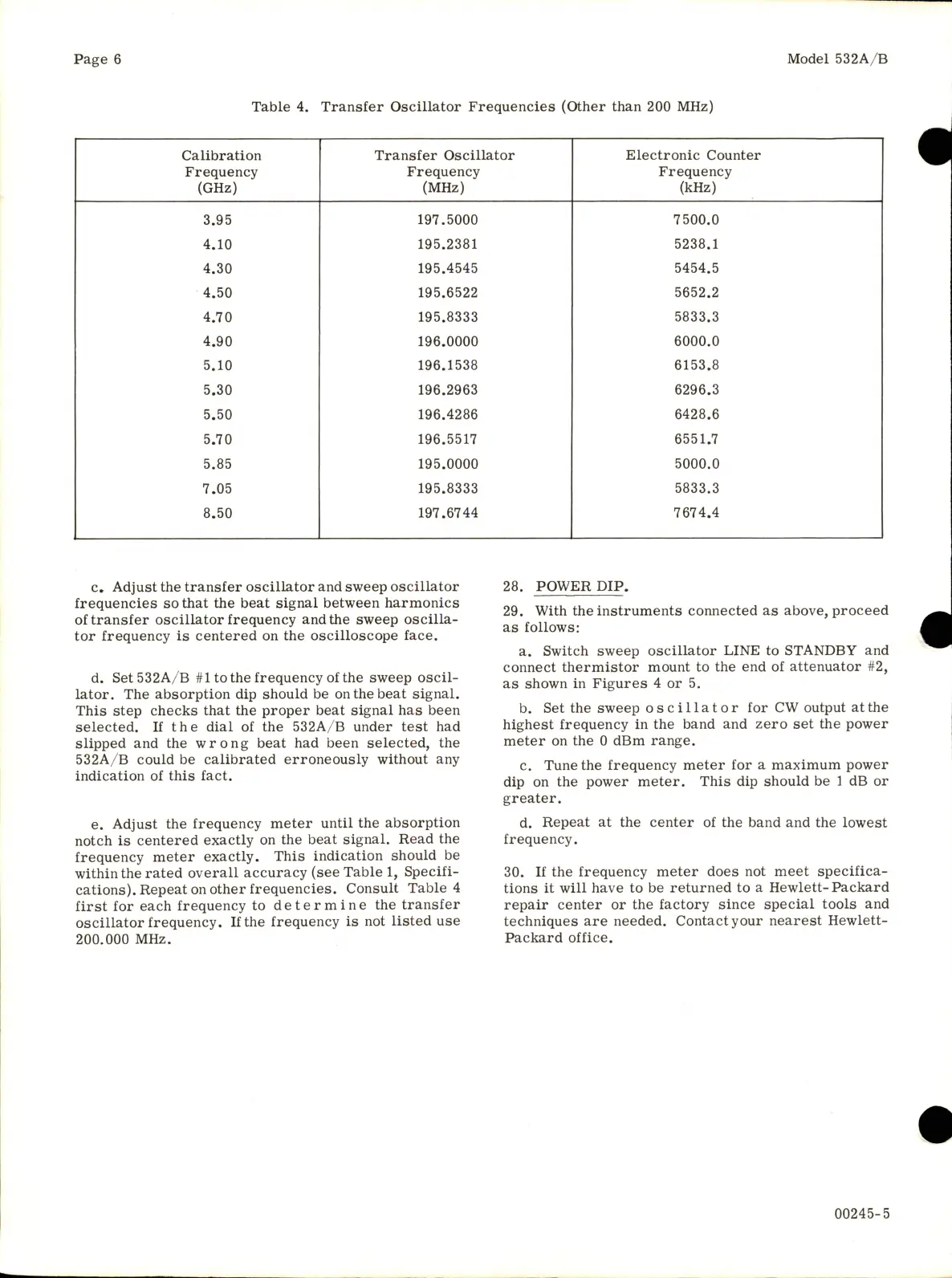
Table
4.
Transfer
Oscillator
Frequencies
(Other
than
200
MHz)
Calibration
Transfer
Oscillator
Electronic
Counter
Frequency
Frequency
Frequency
(GHz)
(MHz)
(kHz)
3.95
197.5000
7500.0
4.10
195.2381
5238.1
4.30
195.4545
5454.5
4.50
195.6522
5652.2
4.70
195.8333
5833.3
4.90
196.0000
6000.0
5.10
196.1538
6153.8
5.30
196.2963
6296.3
5.50
196.4286
6428.6
5.70
196.5517
6551.7
5.85
195.0000
5000.0
7.05
195.8333
5833.3
8.50
197.6744
7674.4
c.
Adjust
the
transfer
oscillator
and
sweep
oscillator
frequencies
so
that
the
beat
signal
between
harmonics
of
transfer
oscillator
frequency
and
the
sweep
oscilla
tor
frequency
is
centered
on
the
oscilloscope
face,
d.
Set532A/B
#1
to
the
frequency
of
the
sweep
oscil
lator.
The
absorption
dip
should
be
on
the
beat
signal.
This
step
checks
that
the
proper
beat
signal
has
been
selected.
If
the
dial
of
the
532A/B
under
test
had
slipped
and
the
wrong
beat
had
been
selected,
the
532A/B
could
be
calibrated
erroneously
without
any
indication
of
this
fact.
e.
Adjust
the
frequency
meter
until
the
absorption
notch
is
centered
exactly
on
the
beat
signal.
Read
the
frequency
meter
exactly.
This
indication
should
be
within
the
rated
overall
accuracy
(see
Table
1,
Specifi
cations).
Repeat
on
other
frequencies.
Consult
Table
4
first
for
each
frequency
to
determine
the
transfer
oscillator
frequency.
If
the
frequency
is
not
listed
use
200.000
MHz.
28.
POWER
DIP.
29.
With
the
instruments
connected
as
above,
proceed
as
follows:
a.
Switch
sweep
oscillator
LINE
to
STANDBY
and
connect
thermistor
mount
to
the
end
of
attenuator
#2,
as
shown
in
Figures
4
or
5.
b.
Set
the
sweep
oscillator
for
CW
output
at
the
highest
frequency
in
the
band
and
zero
set
the
power
meter
on
the
0
dBm
range.
c.
Tune
the
frequency
meter
for
a
maximum
power
dip
on
the
power
meter.
This
dip
should
be
1
dB
or
greater.
d.
Repeat
at
the
center
of
the
band
and
the
lowest
frequency.
30.
If
the
frequency
meter
does
not
meet
specifica
tions
it
will
have
to
be
returned
to
a
Hewlett-
Packard
repair
center
or
the
factory
since
special
tools
and
techniques
are
needed.
Contact
your
nearest
Hewlett-
Packard
office.
00245-5

Related product manuals