EasyManua.ls Logo

HP 700 - Page 45

HP 700
92 pages
Print Icon
To Next Page IconTo Next Page
To Previous Page IconTo Previous Page
Loading...
40
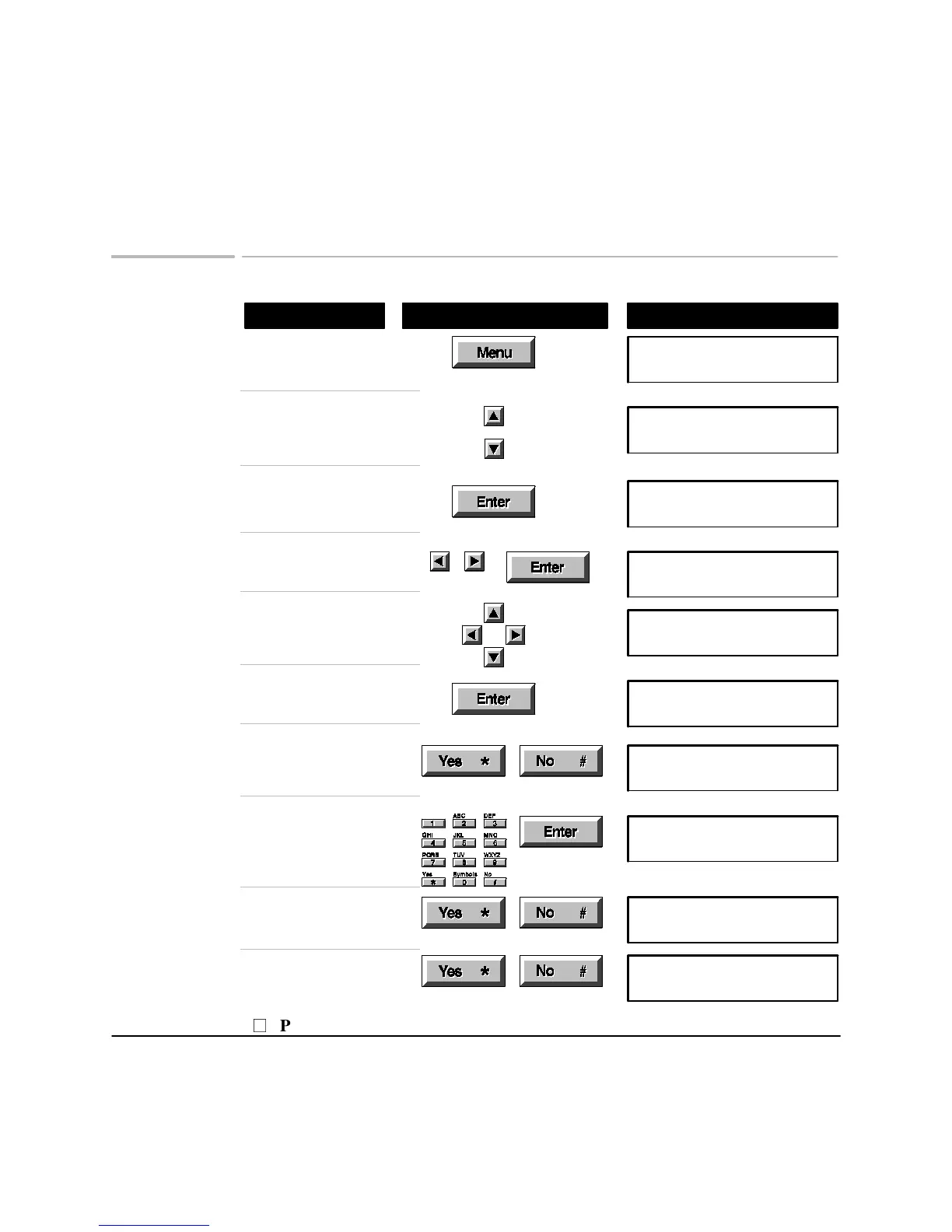
Reviewing, changing, or canceling scheduled faxes
Using These Buttons
Do This
To Display
Press
Menu
Menu Options (1-9)
1:Scan & Send
Browse to
5: Schedule Send Fax
Menu Options (1-9)
5:Schedule Send Fax
Choose
5: Schedule Send Fax
Schedule new fax or
review? New/Review
Choose Review
'ENTER' selects fax
01:(18:30) 1 619 592->
Browse to the fax you
want to change or review
'ENTER' selects fax
03:(21:00) 1 814 335 ->
Select the fax
Cancel fax? Yes/No
03:(21:00) 1 814 335 ->
Choose
Yes
to cancel, or
No
to review or change
Cancel fax? Yes/No
03:(21:00) 1 814 335 ->
Change the time to
send, or press
Enter
to
keep it
Enter time to send
24Hr Clk [09:00] 21:00
Choose
Yes
to remove
numbers, or
No
to keep
them
Delete 1st nbr? Y/N
1 814 3357
Choose
Yes
to add
numbers, or
No
to finish
Add 4th nbr? Y/N
P
Press Stop to cancel

Related product manuals