©2015 Recycler Publishing & Events Ltd THE RECYCLER - TECHNICAL GUIDE PAGE 4
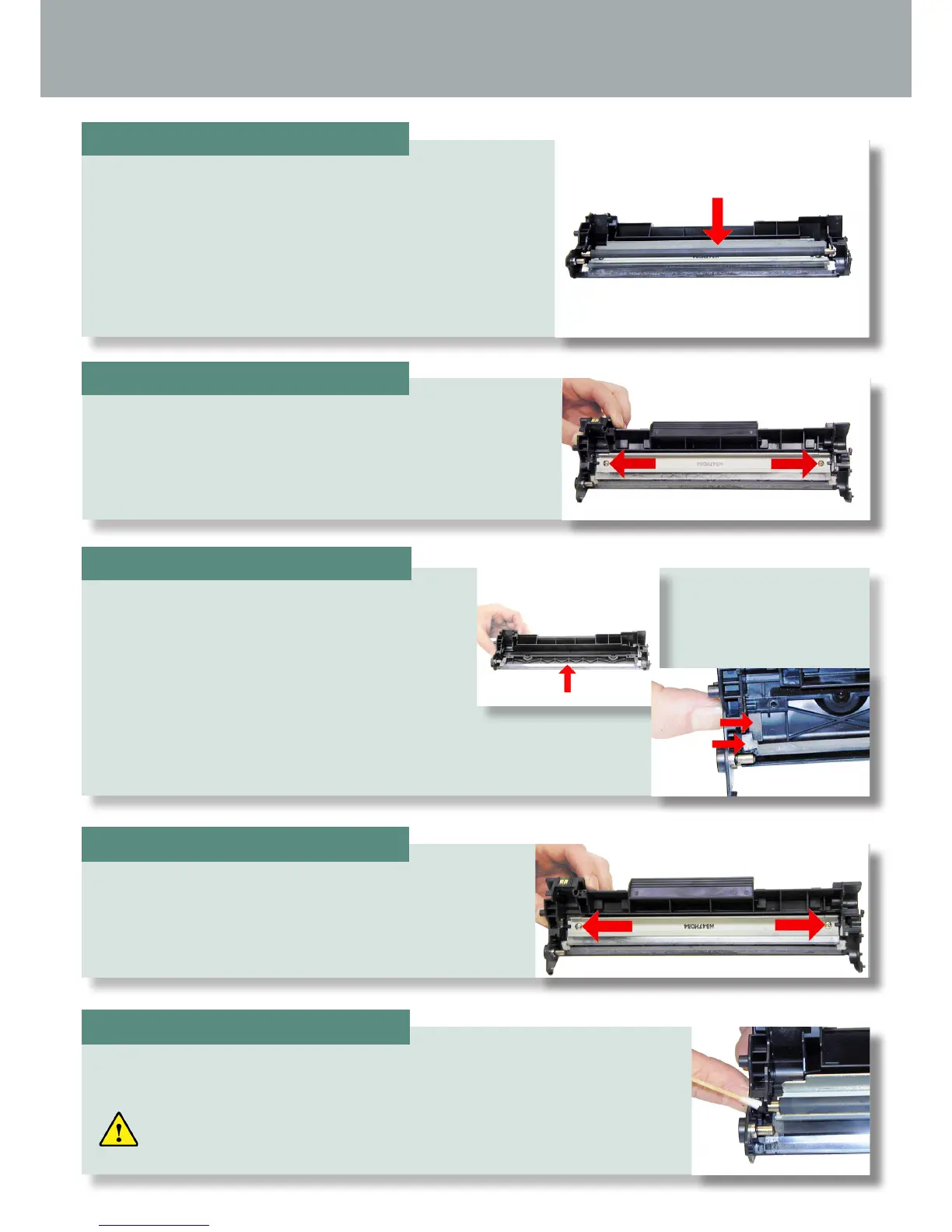
Remove the PCR and clean with your standard PCR
cleaner.
Remove the two screws and the wiper blade.
Clean out all the waste toner from the hopper.
Be careful not to damage the recovery blade
located next to the wiper blade. If this blade is
bent in any way, the cartridge will leak. Make
sure the wiper blade foam seals are clean.
Coat the new/cleaned wiper blade with your preferred
lubricant. Install the wiper blade and two screws
Install the cleaned PCR. Place a small amount of conductive grease on to
the black holder side of the shaft.
Just a small amount of grease is more than sufcient.
STEP FIVE
STEP SIX
STEP SEVEN
STEP EIGHT
STEP NINE
TECHNICAL GUIDE
By Mike Josiah and the Technical Staff at Uninet







 To Next Page