SOP
Document No. : Empire FA Dis-assembly SOP Station :
Operation Des : Ver. : Date :
Fixture list
Qty
Fixture list
Qty
Step:
Attention︰ Pls inform the OP assistant immediately once there is any abnormal
Editor:
Publish:
Zhu Ya IE
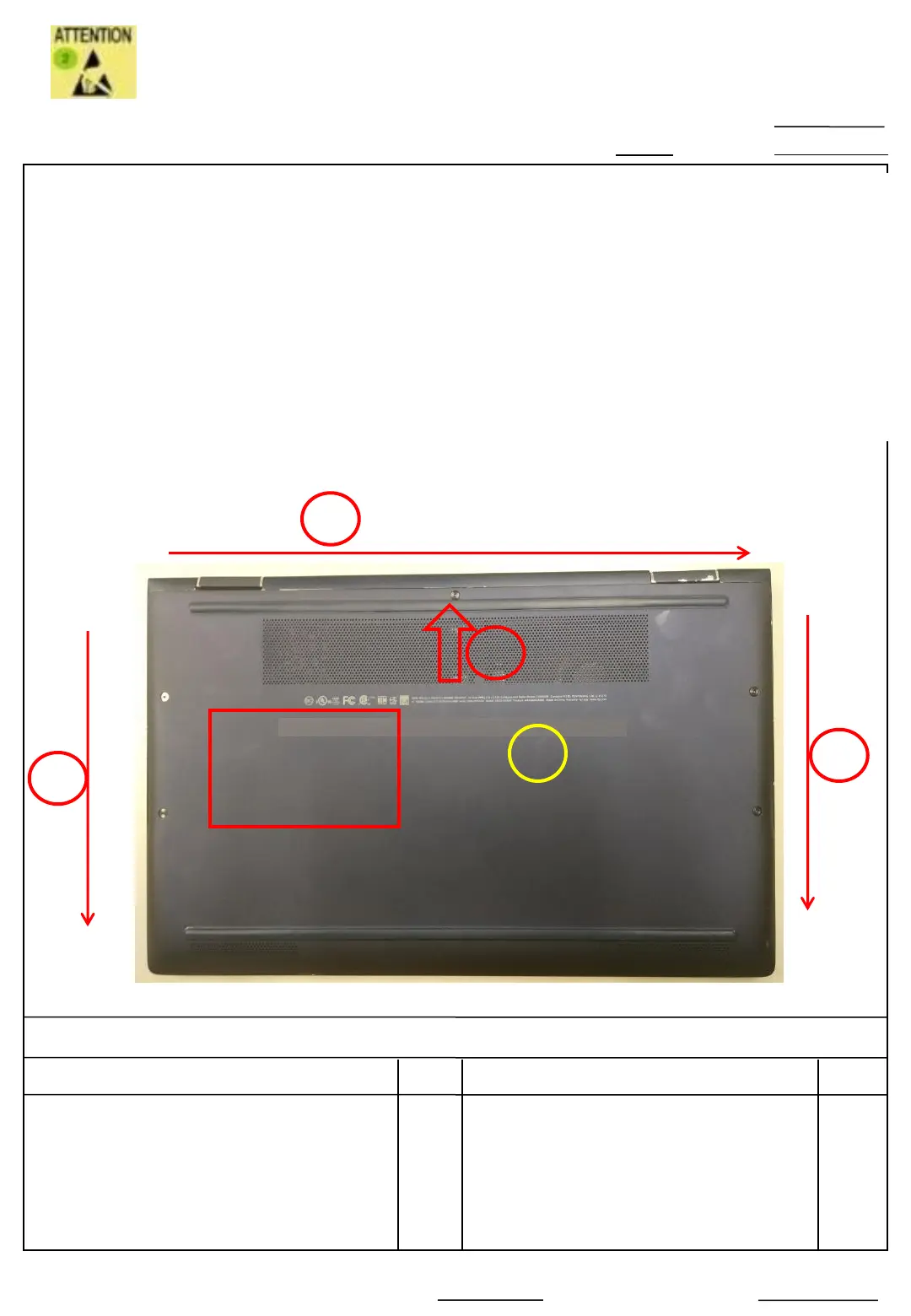
Remove the Top case & Bottom case
1. Absorb the icon area with suction cup, and disassemble from the upper left corner/ Upper
side
2. Follow the arrow and queue 1-2-3, disassemble upper side and left/right side
Absorb the icon area with suction cup , be care the middle hook, avoid destroy the bottom
case
3. Base on the bottom side , disassemble C case and bottom case Rotatingly.
4. Recycle the bottom case(6070B1587501)
2(1/1)
Note: Absorb lightly,
avoid destroy the
bottom case
icon area
suction cup 1
2019/9/18
1.01
Pull the bottom case lightly
from upper side ,separate
the hook between C case
and bottom case
1
Suction cup absorb & disassemble upper side hook
2
3
3
Key station









 To Next Page