


 Need help?
Do you have a question about the HP EliteBook 8460p and is the answer not in the manual?
Identifies key locations including power, volume, display toggle, brightness, and other function keys.
Details the various ports available on the right, back, and left sides of the laptop for connectivity.
Highlights the touchpad on/off light and notification LEDs for system status indication.
Step-by-step instructions for safely removing the laptop battery using release latches.
Guides on using function keys to increase, decrease, or mute audio volume and adjust screen brightness.
Instructions for connecting to an external projector and adjusting display settings for dual output.
Procedure for toggling the laptop's wireless network card on or off using a dedicated button.
Explanation of LED indicators for wireless, power status, battery charging, and disk activity.
Technical details including model, processor, memory, storage, display, and connectivity options.
A reference table mapping function key combinations to specific system operations like sleep or ambient light.
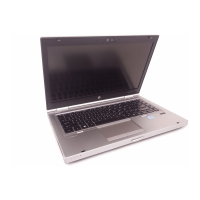
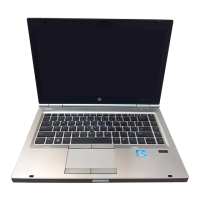
The HP EliteBook 8460p is a full-size HP Wide Screen Laptop designed for professional use, offering a range of features for productivity and connectivity. This document provides a comprehensive overview of its functions, usage, and basic maintenance, specifically focusing on battery removal.
The EliteBook 8460p serves as a robust portable computing solution, integrating essential components for daily tasks. It features a power button for turning the device on and off, and a series of function keys (Fn keys) that provide quick access to various system settings and utilities. These include controls for volume adjustment (Fn + F6/F7), muting audio, and activating QuickWeb for quick internet access without a full system boot (though QuickWeb is noted as disabled in the diagram).
Display management is a core function, with Fn + F4 allowing users to toggle between different display modes, such as extending the display to an external monitor or duplicating the screen. The laptop also supports sleep mode via Fn + F3, conserving power when not in active use. For screen captures, Fn + Insert acts as a print screen function, while Fn + F11 controls the ambient light sensor, which automatically adjusts screen brightness based on environmental lighting. LCD brightness can also be manually adjusted using Fn + F9 (decrease) and Fn + F10 (increase).
Input devices include a keyboard, a touchpad, and a trackpoint, offering multiple ways to interact with the system. The touchpad has an on/off light, indicating its active status, and can be enabled or disabled as needed. A fingerprint reader is integrated for enhanced security, though it is noted as disabled in the provided diagram.
Connectivity is a key aspect of the EliteBook 8460p. It includes a wireless button to turn the wireless card on or off, indicated by a notification LED. Various ports are available for connecting peripherals: USB 3.0 ports for high-speed data transfer, a USB 2.0-powered port that can charge devices even when the laptop is off, and an eSATA/USB 2.0 combo port for external storage. Video output is supported through a VGA external monitor port and a Display Port. Audio connections include headphone and microphone jacks. Network connectivity is provided via an RJ-45 Ethernet port and an RJ-11 modem port. For additional expansion, the laptop features an ExpressCard slot and an SD Card reader.
The EliteBook 8460p is designed for ease of use with several intuitive features.
To adjust the volume, press the Fn key in combination with F7 to increase the volume or F6 to decrease it. The Mute button, located above the Delete key, allows for quick muting and unmuting of audio.
Connecting to an external projector or monitor is straightforward. First, plug the video cable into the VGA external monitor port on the back of the laptop. Then, press Fn + F4 to cycle through display options, enabling both the laptop LCD and the external monitor/projector. Windows Display Settings can be used to fine-tune the resolution.
Screen brightness can be increased by pressing Fn + F10 and decreased by pressing Fn + F9. The ambient light sensor, toggled by Fn + F11, automatically adjusts brightness, optimizing viewing comfort and battery life.
The wireless card can be turned on or off by pressing the Wireless button located above the Backspace key. Notification LEDs provide visual feedback on the status of wireless devices, power, and battery. A white light indicates the integrated wireless device is on, while amber signifies wireless devices are off.
The touchpad can be enabled or disabled as needed. An amber light indicates the touchpad is disabled, while no light means it is enabled.
The laptop features several notification LEDs to keep users informed about system status:
Basic maintenance for the HP EliteBook 8460p includes battery management.
This procedure allows for battery replacement or removal for storage when the laptop is not in use for extended periods. The battery light provides crucial information about the battery's charge status, helping users manage power effectively.
 General
| Bus type | DMI |
|---|---|
| Stepping | J1 |
| Tjunction | 100 °C |
| Processor cache | 3 MB |
| Processor cores | 2 |
| Processor model | i5-2410M |
| System bus rate | 5 GT/s |
| Processor family | Intel® Core™ i5 |
| Processor series | Intel Core i5-2400 Mobile Series |
| Processor socket | BGA 1023 |
| Processor threads | 4 |
| Processor codename | Sandy Bridge |
| Processor frequency | 2.3 GHz |
| Processor cache type | Smart Cache |
| Processor lithography | 32 nm |
| Processor manufacturer | Intel |
| Processor front side bus | - MHz |
| PCI Express slots version | 2.0 |
| Processor boost frequency | 2.9 GHz |
| Processor operating modes | 64-bit |
| ECC supported by processor | No |
| PCI Express configurations | 1x8, 1x16, 2x4, 2x8 |
| Thermal Design Power (TDP) | 35 W |
| CPU multiplier (bus/core ratio) | 23 |
| Maximum number of PCI Express lanes | 16 |
| Motherboard chipset | Intel® QM67 Express |
| HDD speed | 7200 RPM |
| HDD interface | SATA |
| Optical drive type | DVD-RW |
| Card reader integrated | Yes |
| Total storage capacity | 320 GB |
| Compatible memory cards | MMC, SD |
| Number of HDDs installed | 1 |
| Display diagonal | 14 \ |
| Display resolution | 1366 x 768 pixels |
| Native aspect ratio | 16:9 |
| Power supply type | AC/DC |
| Intel segment tagging | Enterprise |
| Operating temperature (T-T) | 41 - 95 °F |
| Compliance industry standards | IEEE 802.3, IEEE 802.3u, IEEE 802.3ab |
| Memory slots | 2x SO-DIMM |
| Internal memory | 4 GB |
| Memory clock speed | 1333 MHz |
| Internal memory type | DDR3-SDRAM |
| Maximum internal memory | 16 GB |
| Audio system | SRS Premium Sound |
| Pointing device | Touchpad |
| Wi-Fi standards | 802.11a, 802.11b, 802.11g |
| Bluetooth version | 2.1+EDR |
| Cabling technology | 10/100/1000Base-T(X) |
| Networking features | Gigabit Ethernet |
| Operating system installed | Windows 7 Professional |
| Charging port type | DC-in jack |
| USB 2.0 ports quantity | 3 |
| CardBus PCMCIA slots quantity | 0 |
| Cable lock slot type | Kensington |
| AC adapter power | 65 W |
| Battery capacity | 62 Wh |
| Number of battery cells | 6 |
| Storage relative humidity (H-H) | 10 - 90 % |
| Sustainability certificates | ENERGY STAR |
| Product color | Black, Silver |
| Country of origin | China |
| On-board graphics card ID | 0x116 |
| Discrete graphics card model | Intel® HD Graphics 3000 |
| On-board graphics card family | Intel® HD Graphics |
| On-board graphics card base frequency | 650 MHz |
| On-board graphics card dynamic frequency (max) | 1200 MHz |
| Processor ARK ID | 52224 |
| Processor package size | 37.5x37.5 (rPGA988B); 31 x 24 (BGA1023) mm |
| Supported instruction sets | AVX |
| Intel Identity Protection Technology version | 1.00 |
 Weight and Dimensions
| Depth | 231 mm |
|---|---|
| Width | 338 mm |
| Height | 34 mm |
| Weight | 2070 g |


 To Next Page