Interpret control-panel light patterns (HP LaserJet Professional M1130 MFP
series only)
If the product requires attention, an error code appears on the control-panel display.
Table 2-2 Status-light legend
Symbol for "light off"
Symbol for "light on"
Symbol for "light blinking"
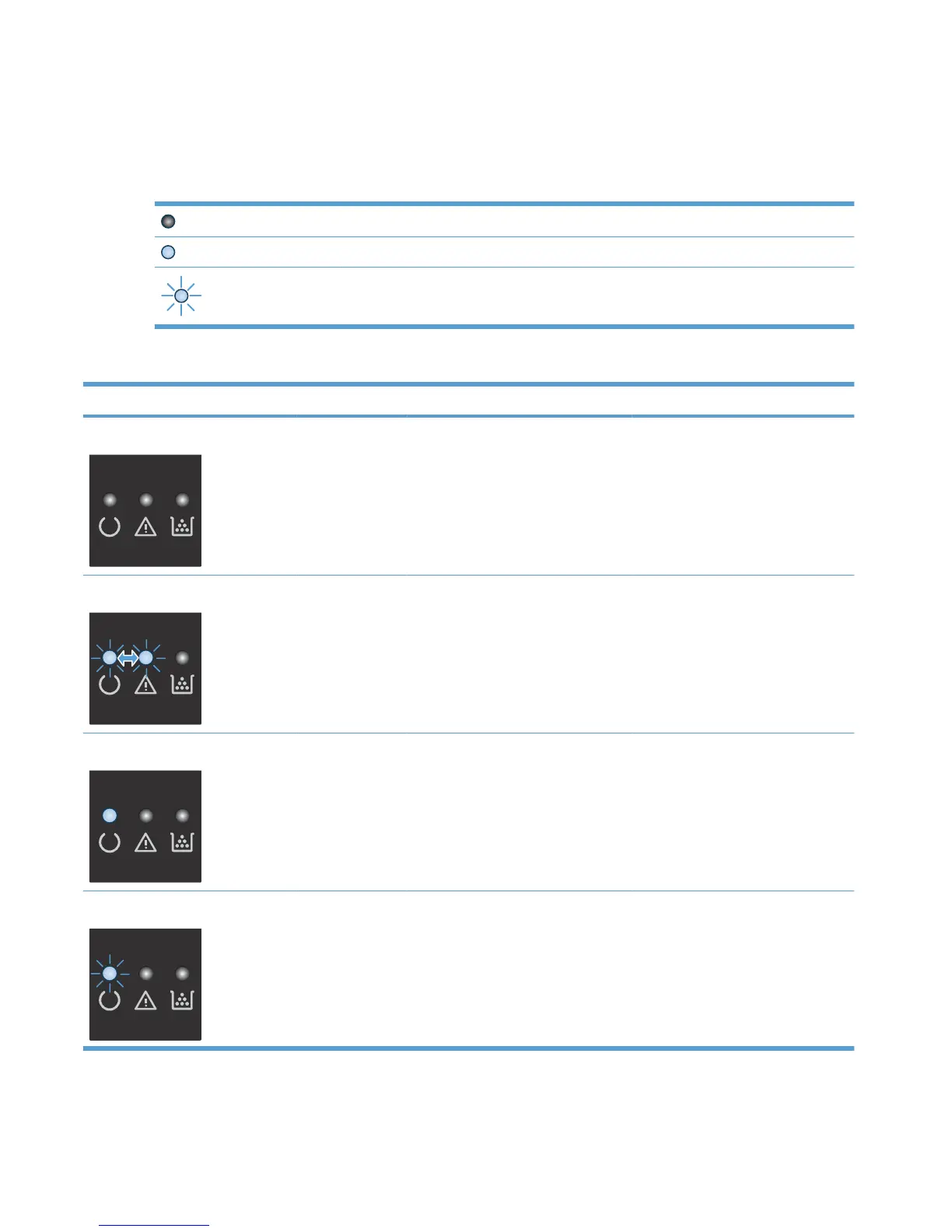
Table 2-3 Control-panel light patterns
Light status Error code State of the product Action
All lights are off. The product is turned off. Press the power button to turn on the
product.
Ready and attention lights blink. The status lights cycle during the
formatter initialization period or when
the product is processing a cleaning
page.
No action is required. Wait for the
initialization period to end. The product
should enter the ready state when the
initialization period is finished.
Ready light is on. The product is in the ready state. No action is required. The product is
ready to receive a print job.
Ready light is blinking. The product is receiving or processing
data.
No action is required. The product is
receiving or processing a print job.
120 Chapter 2 Solve problems ENWW



 To Next Page