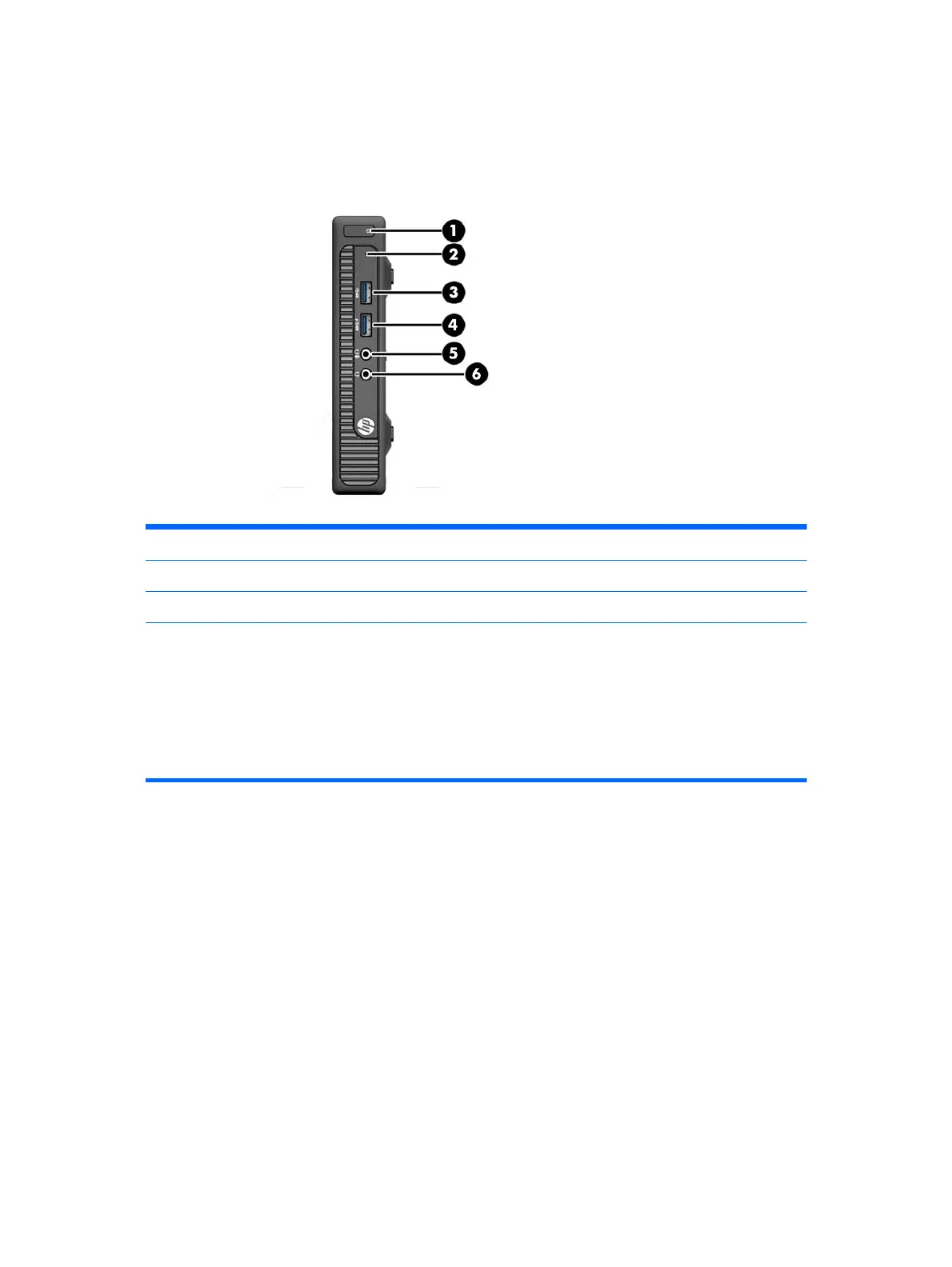
Front panel components MP9 Digital Signage Player
Drive configuration may vary by model. Some models have a bezel blank covering one or more drive
bays.
1 Dual-State Power Button 4 USB 3.0 Port - Charging
2 Hard Drive Activity Light 5 Microphone/Headphone Connector
3 USB 3.0 Port 6 Headphone Connector
NOTE: The USB 3.0 Port - Charging also provides current to charge a device such as a Smart Phone. The
charging current is available whenever the power cord is plugged into the system, even when the system is off.
NOTE: When a device is plugged into the Microphone/Headphone Connector, a dialog box will pop up asking if
you want to use the connector for a microphone Line-In device or a headphone. You can reconfigure the connector
at any time by double-clicking the Audio Manager icon in the Windows taskbar.
NOTE: The Power On Light is normally white when the power is on. If it is flashing red, there is a problem with the
computer and it is displaying a diagnostic code. Refer to the Maintenance and Service Guide to interpret the code.
2 Chapter 1 Product features











 To Next Page