EasyManua.ls Logo

HP NL571AA - User Manual

HP NL571AA
4 pages
Print Icon
To Next Page IconTo Next Page
Loading...
1.
(not shown).
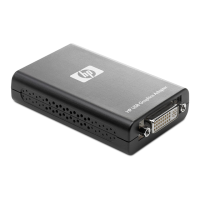
USB connector
: For connecting to a display source
via a USB cable.
2. DVI-I connector.
Allows digital or analog output to the display.
Model
NL571AA
Introduction
HP offers a variety of optional products (each sold separately) designed to complement our monitors and enhance the overall
computing experience. The super-compact HP USB Graphics Adapter enables connection of up to six simultaneous displays to help you
boost productivity and multi-task across several open applications.
QuickSpecs
HP USB Graphics Adapter
Overview
DA - 13226 North America — Version 15 — January 9, 2014
Page 1
Question and Answer IconNeed help?

Do you have a question about the HP NL571AA and is the answer not in the manual?

Summary

Overview

Compatibility & Exceptions

Lists incompatibilities and exceptions for the HP USB Graphics Adapter regarding specific hardware and software configurations.

A Variety of Uses

Describes various scenarios and benefits for using the HP USB Graphics Adapter to enhance productivity and flexibility.

Introduction

Technical Specifications

Summary

Overview

Compatibility & Exceptions

Lists incompatibilities and exceptions for the HP USB Graphics Adapter regarding specific hardware and software configurations.

A Variety of Uses

Describes various scenarios and benefits for using the HP USB Graphics Adapter to enhance productivity and flexibility.

Introduction

Technical Specifications

HP NL571AA Specifications

General IconGeneral
ModelNL571AA
TypeAC Adapter
Input Voltage100-240V
Input Frequency50-60Hz
Output Voltage18.5V
Output Current3.5A
Power Output65W
Connector Size7.4mm x 5.0mm
ConnectorBarrel
CompatibilityHP laptops

Related product manuals