2–6 Maintenance and Service Guide
External component identification
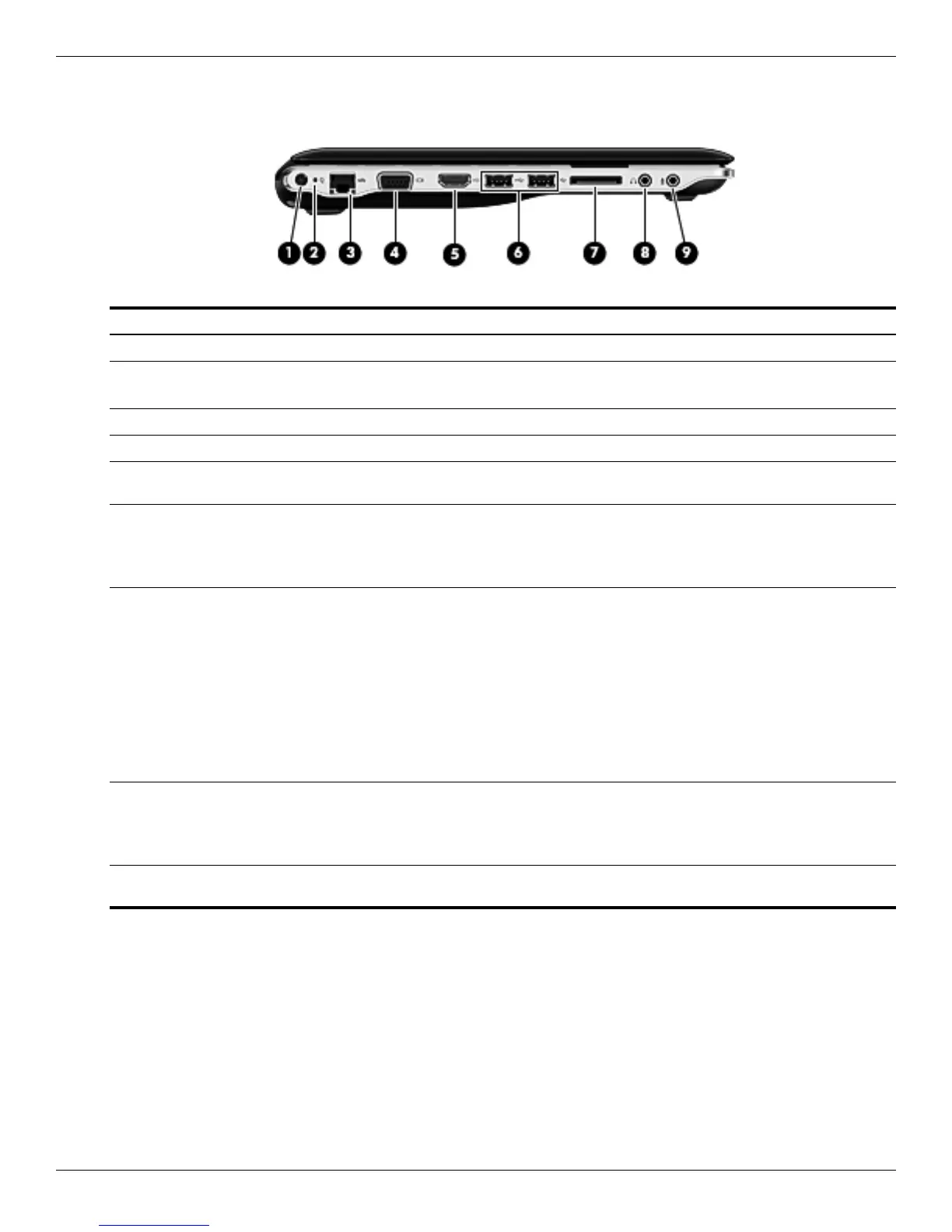
Left-side components
Item Component Description
1 Power connector Connects an AC adapter.
2 AC adapter light ■ On: The computer is connected to external power.
■ Off: The computer is not connected to external power.
3 RJ-45 (network) jack Connects a network cable.
4 External monitor port Connects an external VGA monitor or projector.
5 HDMI port Connects an optional video or audio device, such as a high-definition
television, or any compatible digital or audio component.
6 USB ports (2) Connect optional USB devices.
✎
Select models can be configured with an optional external USB optical
disc drive. For more information, refer to the printed Quick Setup
poster.
7 Digital Media Slot Supports the following digital card formats:
■ Memory Stick
■ Memory Stick Pro
■ MultiMediaCard
■ Secure Digital Memory Card
■ Secure Digital High Capacity Memory Card
■ xD-Picture Card
■ x-D-Picture Card Type H
■ x-D-Picture Card Type M
8 Audio-out (headphone) jack Produces sound when connected to optional powered stereo speakers,
headphones, ear buds, a headset, or television audio.
✎
When a device is connected to the headphone jack, the computer
speakers are disabled.
9 Audio-in (microphone) jack Connects an optional computer headset microphone, stereo array
microphone, or monaural microphone.


 To Next Page
 Loading...