Right side
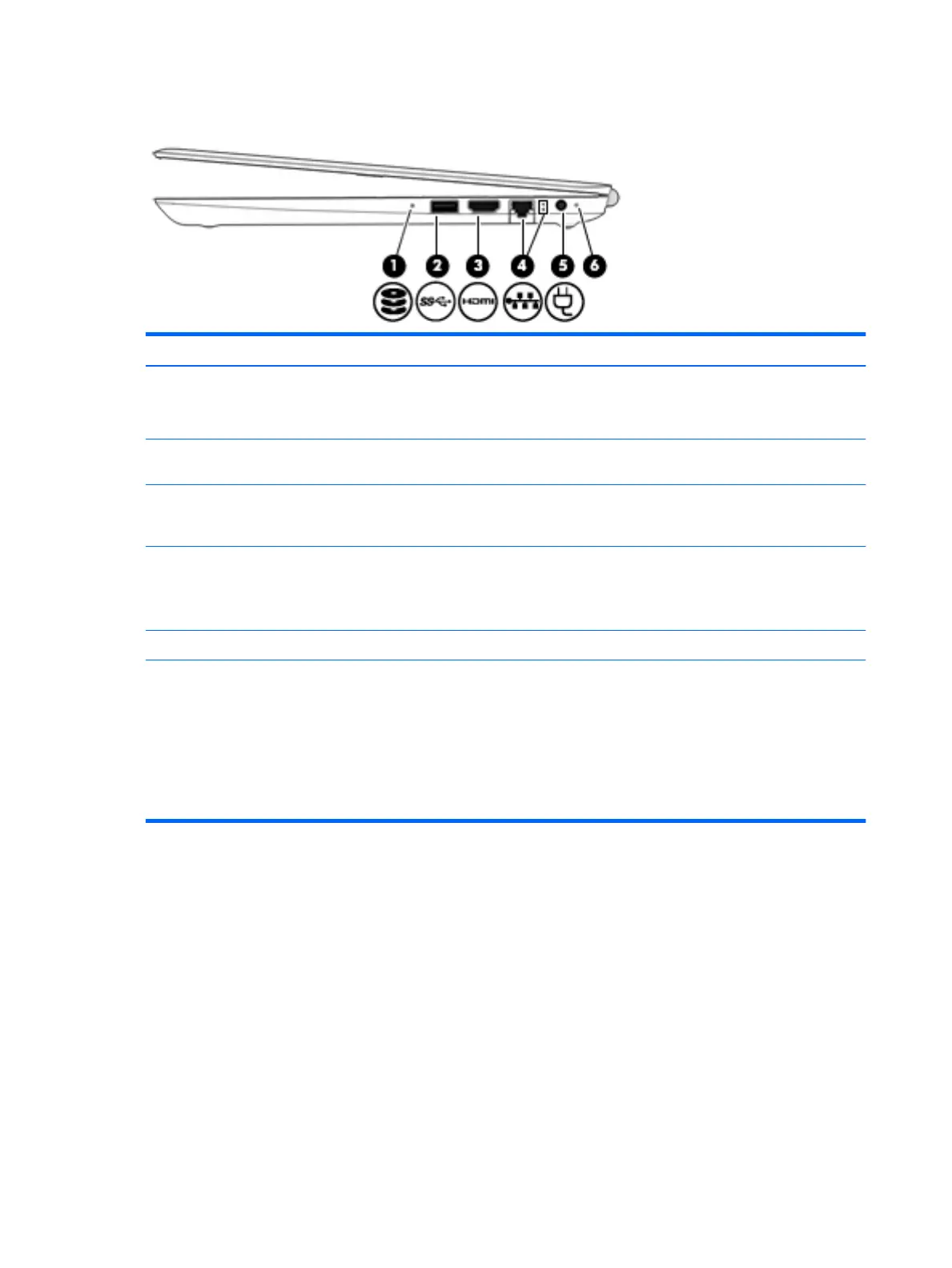
Item Component Description
(1) Drive light (select products only)
●
Blinking white: The hard drive is being accessed.
●
Amber: HP 3D DriveGuard has temporarily parked
the hard drive.
(2) USB 3.0 port Connects an optional USB device, such as a keyboard, mouse,
external drive, printer, scanner, or USB hub.
(3) HDMI port Connects an optional video or audio device, such as a high-
denition television, any compatible digital or audio
component, or a high-speed HDMI device.
(4) RJ-45 (network) jack/status lights Connects a network cable.
●
White: The network is connected.
●
Amber: Activity is occurring on the network
(5) Power connector Connects an AC adapter.
(6) AC adapter and battery light
●
White: The AC adapter is connected and the battery is
fully charged.
●
Blinking white: The AC adapter is disconnected and
the battery has reached a low battery level.
●
Amber: The AC adapter is connected and the battery
is charging.
●
O: The battery is not charging.
10 Chapter 2 External component identication


 To Next Page
 Loading...