Using the Memory Card Reader 51
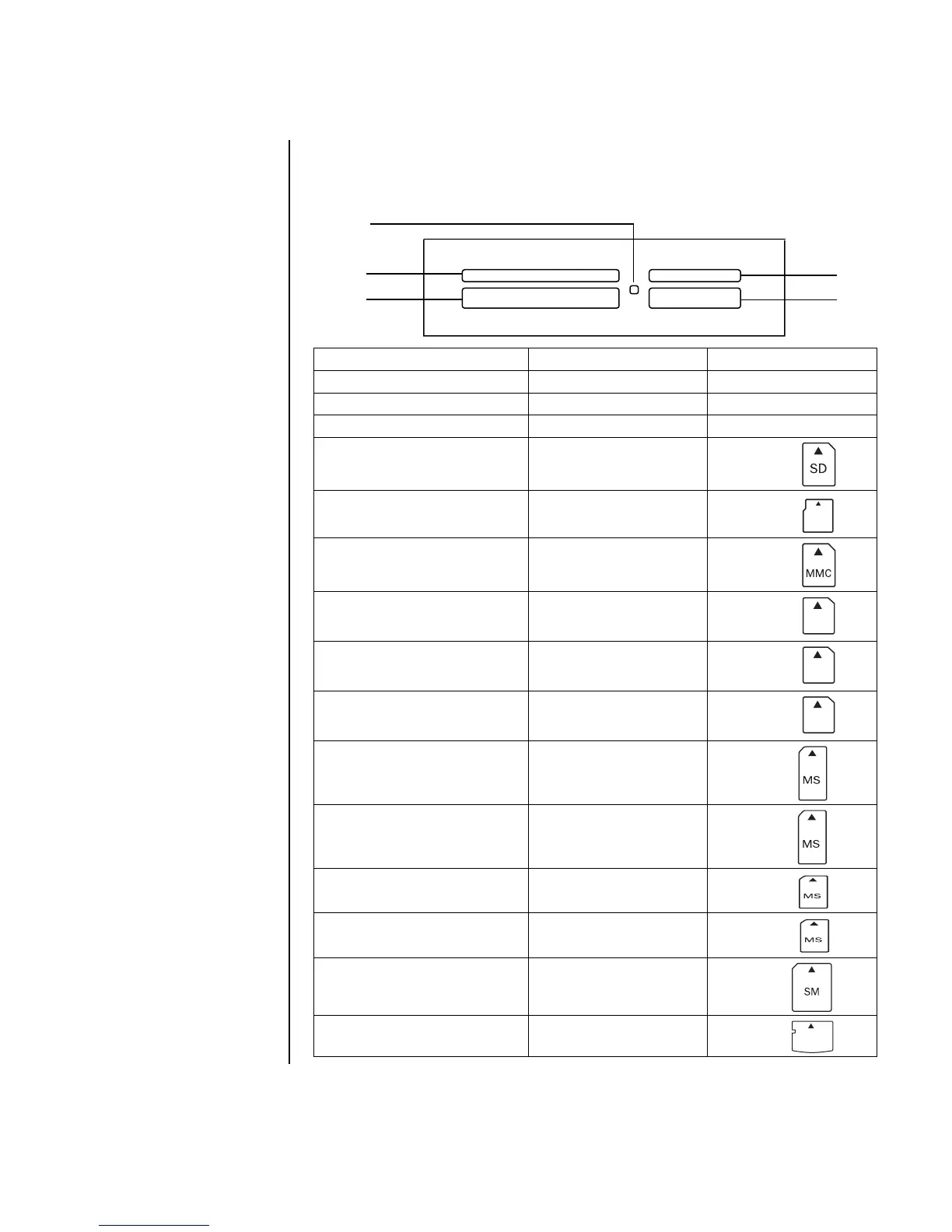
Media Insertion Guide
4-slot memory card reader (select models only)
*Select models only. Not available in all countries/regions.
Card Insert Into 4-slot reader
CompactFlash Type I media Receptacle edge (holes) C (lower-left)
CompactFlash Type II media Receptacle edge (holes) C (lower-left)
IBM Microdrive disk drive Receptacle edge (holes) C (lower-left)
Secure Digital (SD) Memory Card
*
Facing up
D (upper-right)
Mini Secure Digital (MiniSD)
Memory Card
*
Facing up
D (upper-right)
MultiMediaCard (MMC) Facing up
D (upper-right)
Reduced size MultiMediaCard
(RSMMC)
*
Facing up
D (upper-right)
MultiMediaCard Plus
(MMC +)
*
Facing up
D (upper-right)
MultiMediaCard Mobile
(MMC Mobile)
*
Facing up
D (upper-right)
Memory Stick (MS) Memory Card Facing up
E (lower-right)
Memory Stick (MS-Pro)
Memory Card
Facing up
E (lower-right)
Memory Stick (MS-Pro Duo)
Memory Card
*
Facing up
E (lower-right)
Memory Stick (MS-Duo)
Memory Card
*
Facing up
E (lower-right)
SmartMedia (SM) Memory Card Facing up
B (upper-left)
xD media Facing up
B (upper-left)
ctivity
ig
t
B Upper-left slot
C Lower-left slot
D Upper-right slot
E Lower-right slot
A
E
D
B
C
MiniSD
RSMMC
MMC
MMC
xD



 To Next Page