4 P4 3 hard drive
5 P5 4 hard drive
6 P1 24-pin power
connector
Hard disk drive
Hard drives installed in the server are labeled as HDD1, HDD 2, HDD 3, and HDD 4 from left to
right, when viewed from the front of the server.
The drive bays can accommodate large form factor (LFF) non-hot-plug SATA hard drives.
Guidelines for installing hard drives
• Install only hard drive models specified for your ProLiant MicroServer. Installing unsupported
hard drives may damage the system by consuming power and generating heat in excess of the
server’s operating tolerance. This condition may result in a loss of system and/or data integrity.
• If you removed the HDD without plans of installing a new one, you must reinstall the carrier in
the chassis for proper cooling of the system.
To install a hard drive:
1. Open the door.
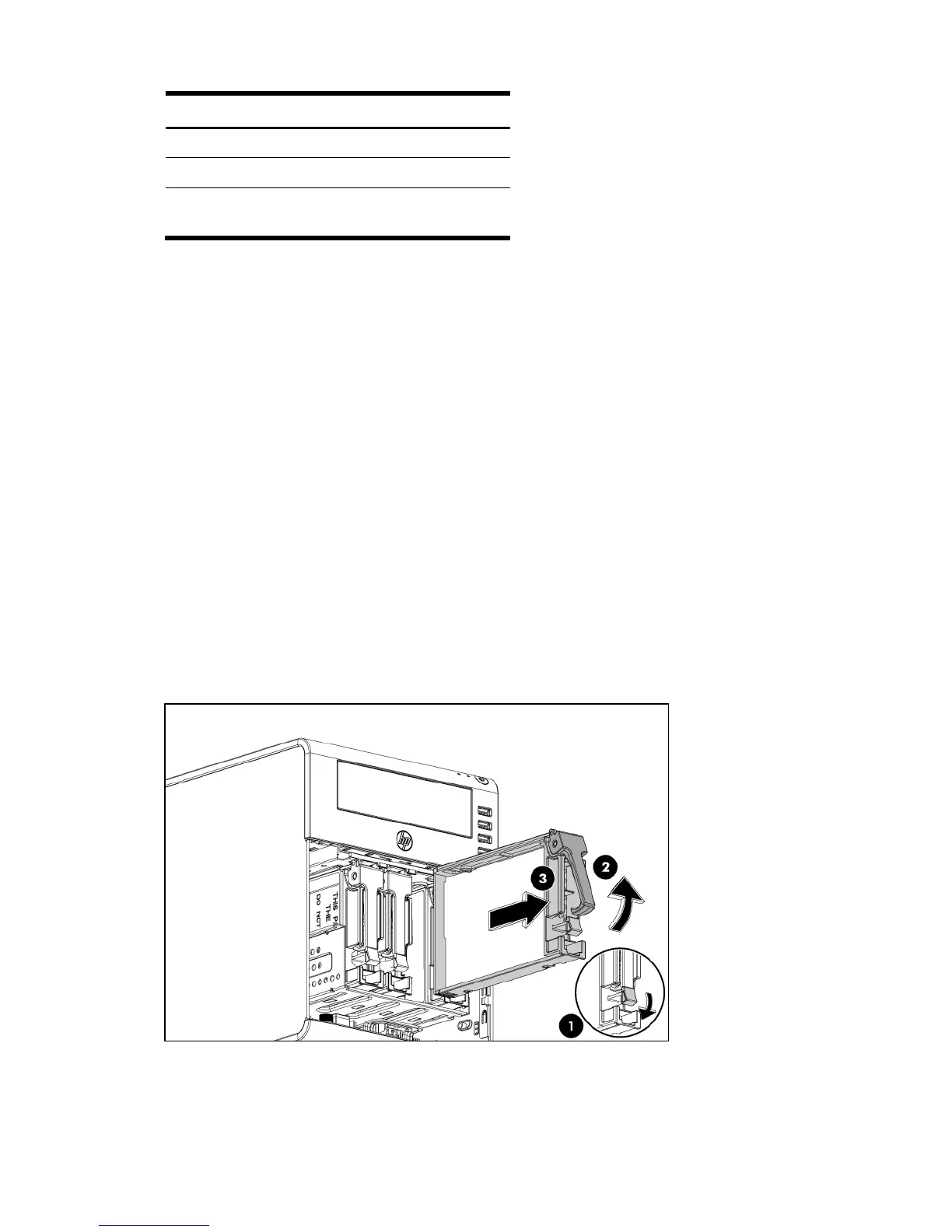
2. Remove the default HDD module.
• Press hard disk carrier latch to release the handle (1).
• Rotate the handle (2).
• Use the handle to pull the hard disk carrier out of the HDD bay (3).
• Remove the four mounting screws that secure the HDD module to its carrier (4).
• Reuse these screws when you install the new hard drive.
• Remove the old HDD module from its carrier (5).













 To Next Page