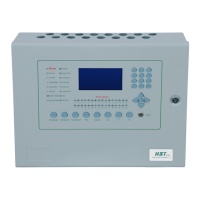
The alarm panel's sounder will activate if a trouble condition exists. In a trouble
condition, the panel displays the zone or devices causing the trouble condition. The
trouble indicator goes out automatically when the situation causing the trouble
condition is rectified or restores to normal.
5.Fault Finding
Front
panel
buttons
not
working.
To activate the front panel buttons, turn the key switch in the top left of the panel
to the ON position.
LED blinks intermittently
This is perfectly normal and indicates that the processor is running an internal
memory check.
Fault
LED
and
sense
zone
fault
LED
flashing,
buzzer
sounding.
Faults monitored are:
• Open circuit on the sense zone wiring.
• Short circuit on the sense zone wiring.
• Detector head removal.
Check all detectors and call points on the sense zone indicated. Check wiring is as
in example diagrams and ensure the end of line monitor is a 4K7 resistor or an
active end of line device.
Fault
LED
and
Sounder(NAC)
zone
fault
LED
flashing,
buzzer
sounding.
Faults monitored are:
• Open circuit on the Sounder (NAC) zone wiring.
• Short circuit on the Sounder (NAC) zone wiring.
Check Sounder (NAC) zone wiring is as in example diagrams and ensure that
the
10K end of line resistor is fitted.
Fault
LED
flashing
and
Mains
fault
LED
on,
buzzer
sounding.
Faults monitored are:
• Mains supply not present.
• Blown mains fuse.
Check relevant fuses and fuse clips.
Fault
LED
flashing
and Battery fault
LED
on,
buzzer
sounding.
Faults monitored are:
• Battery supply not present.
• Batteries damaged or not fully charged.
• Blown battery fuse.
- 16 -


 To Next Page