EasyManua.ls Logo

HSU ULS-15 - User Manual

Default Icon
12 pages
Print Icon
To Next Page IconTo Next Page
Loading...
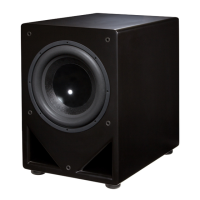
Subwoofer Manual
Features
Wireless Technology.
Contrary to popular belief, subwoofer placement is critical in order to achieve optimal sound quality. Incorporating
wireless technology in our subwoofer greatly enhances your ability to position the subwoofer for optimal performance
while still keeping the spouse happy.
Ultra Linear Woofer.
This woofer uses a patented XBL2 motor design that has an incredibly linear motor force. The motor force (BL)
stays within 2% over a wide +/- 20 mm excursion. Most woofers with Xmax of +/- 20 mm would be lucky to have
the BL within 2% over a +/- 5 mm range!
Powerful BASH
®
Amplifier.
A very high headroom BASH
®
amplifier is used to fully utilize the ultra low distortion, ultra high output capability of
the woofer. This amplifier is capable of delivering up to 1000 W rms short- term power.
Great Connectivity.
Now included are more connectivity options than any other subwoofer we know of, at any price! Inputs include
balanced XLR, unbalanced RCA, wireless, and speaker level. This flexibility allows you to use the subwoofer in
recording studios, high end two channel systems, and state-of-the-art home theater systems.
Compact Enclosure.
Traditionally it has been difficult to get loud, clean, ultra deep bass from a compact enclosure. The ULS-15 changes
that. It gives you loud, clean, ultra deep bass from a compact, beautifully-finished enclosure.
Accomodates All Room Sizes.
An Ultra Low Frequency (ULF™) trim control allows you to maintain accurate deep bass response in virtually any
room, no matter what shape or size.

Questions and Answers

  • K
    kraymondJul 27, 2025
    Why does my HSU ULS-15 go into standby mode while playing?
    • N
      nancyestesJul 27, 2025
      Your HSU subwoofer might be entering standby mode due to an insufficient signal from the source. To resolve this, increase the source signal, or raise the subwoofer level in your Dolby Digital receiver's speaker setup menu, then reduce the subwoofer's volume to compensate. Alternatively, you can set the subwoofer's ON/AUTO/OFF switch to the ON position.
  • A
    Amanda OsborneAug 2, 2025
    What to do if my HSU ULS-15 Subwoofer is making a humming or buzzing noise?
    • M
      michaelgrossAug 2, 2025
      If your HSU subwoofer is producing a humming or buzzing noise, there could be several causes. First, disconnect all interconnects from the amplifier to see if the hum persists, indicating an amplifier problem. If the hum disappears, the issue may be with your speaker wires or interconnects; try replacing them or moving them away from AC cables and power transformers. Also, check if a light dimmer or other triac-based device on the same circuit is causing interference; if so, use an AC line filter or plug the unit into a different circuit. If the hum only occurs when certain equipment is connected, that equipment is likely the source of the hum.
  • C
    Christopher OdonnellAug 8, 2025
    What to do if there is no output from my HSU ULS-15 and the LED lights up red?
    • M
      Mary NelsonAug 8, 2025
      If your HSU subwoofer has no output and the LED is red, it might not be receiving a signal. Double-check the connections between your source and the subwoofer, ensuring you're using the subwoofer pre-out on your receiver if it has Dolby Digital. If you're using a wireless connection, verify that the transmitter is powered on, the 'Wireless/Wired' switch is set correctly, and the channel selections match. For a wired connection, ensure the 'Wired/Wireless' switch is set to 'Wired'.
  • Z
    Zachary EsparzaAug 14, 2025
    Why is the bass output from my HSU ULS-15 so low?
    • J
      John ThomasAug 14, 2025
      If the bass output from your HSU subwoofer is low, the level on the subwoofer or the receiver’s subwoofer output may be too low. Try increasing the volume of the subwoofer and the subwoofer level or LFE level on the receiver or other source.
  • M
    mcgeejosephAug 20, 2025
    Why does my HSU ULS-15 Subwoofer thump when the system turns on and off?
    • R
      Richard GibbsAug 20, 2025
      If your HSU subwoofer thumps when the system is turned on or off, the noise is likely being generated by upstream equipment. To mitigate this, turn off the subwoofer first when shutting down your equipment and turn it on last when powering up.

Summary

Features

Wireless Technology

Incorporates wireless technology for flexible subwoofer placement.

Ultra Linear Woofer

Features a patented XBL2™ motor design for exceptional linear motor force.

Powerful BASH Amplifier

Utilizes a high headroom BASH® amplifier for low distortion and high output.

Great Connectivity

Offers multiple input options including XLR, RCA, wireless, and speaker level.

Compact Enclosure

Delivers loud, clean, ultra deep bass from a compact, beautifully-finished unit.

Accommodates All Room Sizes

Features ULF Trim control for accurate deep bass response in any room.

Important Safety Instructions

Electrical Shock Warning

Caution against opening the unit to avoid risk of electric shock.

Moisture and Fire Hazard Warning

Warning to prevent fire or electric shock by keeping away from rain or moisture.

Set-Up

Step 1: Unpacking

Guide to safely unpack the subwoofer, inspect for damage, and attach feet.

Step 2: Placement

Guidelines for optimal subwoofer placement to affect bass quality and quantity.

Placement Guidelines & Rules of Thumb

Advice on keeping subwoofer away from electronics and optimal room positioning.

Hookup

Method A: Connecting to SUBWOOFER;LFE Output

Connects to controllers with a dedicated subwoofer or LFE pre-out.

Method B: Connecting to HIGH LEVEL Speaker Outputs

Connects to controllers with high-level speaker outputs for bass augmentation.

ULS-15 Amplifier Panel Overview

Input and Output Connections

Details on XLR, Low Level, High Level inputs, and antenna placement.

Control Panel Functions

Explanation of Volume, Phase, Power, Crossover, ULF Trim, and Voltage Selector.

Operation and Fine Tuning

Method C: Connecting to PRE-OUTs

Connects to stereo systems with low-level pre-outs for bass augmentation.

Step 4: Volume Level Adjustment

Guide to setting subwoofer volume for optimal sound and auto-on function.

Step 5: Crossover Setting

Instructions for setting the crossover switch and frequency knob.

Step 6: Fine Tuning - ULF Trim & Phase

Adjusting ULF Trim for room gain and setting phase for smoother bass.

Advanced Tuning Methods

Using the CDR for Tone Testing

Procedure for using test tones to fine tune subwoofer response with an SPL meter.

Equalizing the Subwoofer

Using controller equalizers to reduce room modes, avoiding boosting for nulls.

Troubleshooting Common Issues

Humming or Buzzing Noise

Diagnosing and resolving humming or buzzing noise issues in the system.

Subwoofer Standby and No Output

Troubleshooting standby mode, no sound output, and fuse issues.

Troubleshooting and Repair

No Output;Low Bass and System Thumps

Resolving no output, low bass, and system thumping when powering on/off.

Repair Service Contact

Information on contacting technical support for repair authorization and assistance.

Specifications and Warranty

Product Specifications

Technical details: frequency response, woofer size, amplifier power, dimensions, weight.

Limited Warranty Information

Details on warranty coverage, exclusions, and service requirements.

Notes

HSU ULS-15 Specifications

General IconGeneral
BrandHSU
ModelULS-15
CategorySubwoofer
LanguageEnglish

Related product manuals