EasyManua.ls Logo

HSU VTF-2 MK5 - User Manual

Default Icon
12 pages
Print Icon
To Next Page IconTo Next Page
Loading...
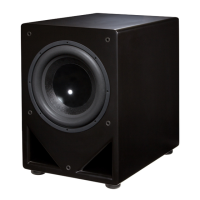
VTF-2 MK5
Subwoofer Manual
Features
Variable Tuning Hybrid Technology.
“Now you decide how deep to play.” The large flared ports can be re-tuned with the flip of a switch and the
addition or removal of a port plug(s). With support for five different operating modes, including ported and sealed
hybrid modes, this subwoofer offers state-of-the-art performance in virtually all rooms.
Custom built woofers.
“The end of featureless boom.” We design our woofers from the ground up to have exceptionally flat response
and low distortion, so you will hear clean and detailed bass not found in lesser subwoofers.
Powerful BASH amplifiers.
Our custom built amplifiers have ultra-high headroom, soft clipping, subsonic filtering, adjustable Q, and
class A/B output stage to provide extremely high fidelity, low distortion, and high output.
Flexible room placement.
The luxurious and smooth non-vinyl finishes, rounded corners and edges, and front-firing woofer and ports
allow for close placement next to listeners, in corners, and even inside built-in entertainment centers.
Connects to almost any system.
“Integration is easier than ever.” Thanks to modern receivers that use Dolby Digital, DTS, THX, or Bass
Management, you can connect the subwoofer to your system with one cable. If you have invested in a stereo-
only system, integration is also simple thanks to true 24 dB/Oct. low pass filters.

Questions and Answers

  • L
    Larry BassAug 12, 2025
    How to stop humming noise from HSU Subwoofer?
    • C
      Casey MorenoAug 12, 2025
      A humming or buzzing noise from your HSU Subwoofer can stem from several sources. It could be an amplifier problem; to check, disconnect all interconnects from the amplifier. If the hum persists, contact technical support. The noise might also come from your speaker wires or interconnects due to poor construction, oxidation, or damage. Try using different cables and keep them away from AC cables or power transformers. Another cause could be a light dimmer or similar device on the same AC circuit; try using an AC line filter or plugging the subwoofer into a different circuit. Finally, the hum might originate from other equipment; disconnect and reconnect your equipment one by one to identify the source.
  • G
    Gina GallegosAug 16, 2025
    What to do if my HSU Subwoofer goes into standby mode while playing?
    • J
      John YoderAug 16, 2025
      If your HSU Subwoofer enters standby mode during playback, it might not be receiving a strong enough signal. First, increase the source signal and, if using a Dolby Digital receiver, raise the subwoofer level in the speaker setup menu, then lower the volume knob on the subwoofer to compensate. Alternatively, set the subwoofer's ON/AUTO/OFF switch to the ON position. Also, check that the crossover on the receiver isn't set too low, and ensure the crossover on the sub is not set to ‘in’ while also being set too low, as this reduces the signal to the sub.
  • C
    Crystal Anderson MDAug 20, 2025
    Why is the bass output from my HSU Subwoofer so low?
    • J
      James LopezAug 20, 2025
      Low bass output from your HSU Subwoofer may be due to the level being too low on either the subwoofer itself or the receiver's subwoofer output. Increase the volume on the subwoofer and the subwoofer level or LFE level on the receiver or source. To properly set the subwoofer level relative to other speakers, use a test disk and an SPL meter, or the built-in tones on your pre-amp/processor.
  • L
    Lucas JonesAug 25, 2025
    What to do if there is no output from HSU Subwoofer and the LED is red?
    • N
      Noah McclainAug 25, 2025
      If your HSU Subwoofer has no output and the LED is red with the power switch set to auto, the subwoofer might not be receiving a signal. Recheck all connections between the source and the subwoofer. If the connections are correct, the subwoofer amplifier might be faulty. Set the subwoofer level to minimum and use a different RCA cable to connect the sub to a DVD player's analog output or an MP3 player. Play music and slowly increase the volume on the sub. If it plays, the problem lies in the subwoofer cable, the receiver setting, or an incorrect jack connection on the receiver. If there's still no sound, contact technical support.
  • D
    Deborah GibsonAug 27, 2025
    HSU Subwoofer has no output but LED is green, what to do?
    • D
      Derrick GonzalezAug 27, 2025
      If your HSU Subwoofer has no output but the LED is green with the power switch set to auto, the connection between the subwoofer amplifier and woofer could be faulty. Check if the wire is loose and, if so, tighten the connector and reconnect it. Alternatively, the driver or amplifier might be faulty. Remove the driver from the cabinet and connect it to your main amplifier. If it plays, the amplifier is bad. If it doesn't play, the woofer is bad. Contact technical support for authorization to return the non-working part for service.
  • P
    Peter ComptonAug 31, 2025
    Why HSU Subwoofer has no output and the LED is red?
    • E
      Erin TaylorAug 31, 2025
      If your HSU Subwoofer has no output and the LED is red with the power switch set to on, the ribbon cables between the boards may not be fully inserted, possibly shaken loose during shipping. Remove the amplifier and ensure all cables between the boards are fully and securely inserted into the sockets on the boards. Also, ensure the polarity of the speaker wires is correct by matching the +/- from the receiver/amplifier to the +/- of the subwoofer’s speaker level input.
  • E
    Erica HernandezSep 4, 2025
    Why does my HSU Subwoofer thump when turning the system on and off?
    • A
      Alex JonesSep 4, 2025
      If your HSU Subwoofer thumps when the system is turned on or off, the noise is likely being generated by upstream equipment. To mitigate this, turn off the subwoofer first when shutting down your equipment and turn it on last when powering up.
  • M
    Michelle SilvaSep 8, 2025
    Why is there little or no sound from one main speaker with HSU Subwoofer?
    • C
      coltonyoungSep 8, 2025
      If you're experiencing little or no sound from one main speaker when using speaker level connections with your HSU Subwoofer, it could be due to mixed-up polarity of the wires, potentially shorting one channel of the main amplifier. Another possibility is that one or both of your main amplifier’s ‘ - ’ are not true ground. In this case, connect only to the channel that has a true ground ‘ - ’. If neither channel has a true ground ‘ - ’, contact technical support.

Summary

Features

Variable Tuning Hybrid Technology

Allows users to tune the subwoofer's deep bass response by adjusting port configurations and switch settings.

Custom Built Woofers

Features custom-designed woofers for flat response and low distortion, delivering clean, detailed bass.

Powerful BASH Amplifiers

Utilizes custom BASH amplifiers with high headroom, soft clipping, and class A/B output for high fidelity.

Flexible Room Placement

Designed for flexible placement with front-firing driver and ports, suitable for corners and entertainment centers.

System Connectivity

Easy integration with modern systems via one cable, supporting Dolby Digital, DTS, THX, and Bass Management.

Important Safety Instructions

Setup Guide

Unpacking

Instructions on how to safely unpack the subwoofer and inspect for shipping damage.

Moving the Subwoofer

Guidance on safely moving the subwoofer, recommending two people and using gliders or rugs.

Placement

Provides optimal placement strategies, including avoiding room center, using corners, nearfield, and subwoofer crawling techniques.

Hookup Methods

Details three methods for connecting the subwoofer: SUBWOOFER/LFE output, HIGH LEVEL speaker outputs, and PRE-OUTs.

Initial Power On and Volume

Guides on turning the subwoofer on for the first time and setting the initial volume level.

Crossover Settings

Explains how to set the crossover frequency for optimal integration with main speakers.

Fine Tuning and Variable Tuning

Covers fine-tuning adjustments, including explanation of the five variable tuning modes.

Phase and Volume Fine Tuning

Details phase adjustment and advanced volume tuning using test tones and an SPL meter.

Q Control and Room Equalization

Explains how to adjust the Q control for desired response and tips for equalizing the subwoofer in the room.

Enhancing Future Performance

Suggests adding a second subwoofer for improved performance.

Troubleshooting Guide

Humming and Buzzing Noise

Addresses causes and solutions for humming or buzzing noise, including amplifier and AC circuit issues.

Standby Mode Issues

Explains why the subwoofer might go into standby mode and how to resolve it, including signal and crossover settings.

No Output or LED Issues

Covers troubleshooting no output, no LED light, and related amplifier problems.

Output and Signal Problems

Troubleshoots no output with red or green LED, faulty amplifiers, loose connections, and low bass output.

System Thumping and Repair

Addresses thumping noise when turning system on/off and provides information on initiating the repair process.

Specifications and Warranty

Product Specifications

Lists detailed technical specifications including frequency response, woofer size, amplifier power, and dimensions.

Warranty Service and Disclaimer

Outlines warranty service procedures, terms, disclaimers, exclusions, and limitations.

HSU VTF-2 MK5 Specifications

General IconGeneral
TypePowered Subwoofer
Driver Size12 inches
Amplifier Power300 watts RMS
Frequency Response18 Hz - 90 Hz (±2 dB)
Enclosure TypePorted
InputsLFE, RCA
FinishBlack Ash

Related product manuals