EasyManua.ls Logo

HSU VTF-2 - User Manual

Default Icon
12 pages
Print Icon
To Next Page IconTo Next Page
Loading...
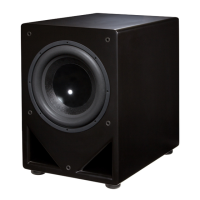
Features
Variable Tuning Technology.
“Now you decide how deep to play.” The large flared ports can be re-tuned with the flip of a switch and the
removal of a port plug. In Maximum Output mode, the subwoofer transforms into a different device capable
of playing louder material with less distortion at the expense of some deeper bass.
Custom built woofers.
“The end of featureless boom.” We design our woofers for sound quality, so you will hear clean and detailed
bass not found in lesser subwoofers.
Powerful BASH amplifiers.
Our custom built amplifiers work in concert with the woofer, protecting the subwoofer from damage and
keeping distortion to a minimum.
Flexible room placement.
The unobtrusive finish, rounded corners, and overall design allows for close placement next to listeners or
discreet placement in corners.
Connects to almost any system.
“Integration is easier than ever.” Thanks to modern receivers that use Dolby Digital, DTS, THX, or Bass
Management, you can connect the subwoofer to your system with one cable. If you have invested in a
stereo-only system, integration is also simple thanks to true 24 dB/Oct. crossovers.
Subwoofer Manual
MK 2

Questions and Answers

  • Y
    ymartinJul 26, 2025
    Why is my HSU VTF-2 Subwoofer humming or buzzing?
    • J
      Judith RojasJul 26, 2025
      A humming or buzzing noise from your HSU Subwoofer can stem from several sources. It could be an amplifier problem; to check, disconnect all interconnects from the amplifier. If the hum persists, contact support. The noise may also be caused by faulty speaker wires or interconnects with poor grounding or shielding. Try alternative cables and ensure they are away from AC cables or EMI sources. Another cause might be a light dimmer or similar device on the same AC circuit. Try using an AC line filter or plugging the unit into a different circuit. Finally, the hum could originate from another piece of equipment. If the hum disappears when interconnects are disconnected, add them back one at a time to identify the source.
  • T
    terri57Jul 30, 2025
    What to do if HSU VTF-2 Subwoofer goes into standby mode while playing?
    • J
      James SanchezJul 30, 2025
      If your HSU Subwoofer enters standby mode during playback, the source signal might be too weak. Try increasing the source signal. If you're using a Dolby Digital receiver, raise the SUBWOOFER level in the SPEAKER SET-UP menu, and then lower the volume knob on the subwoofer to compensate. Alternatively, you can set the subwoofer's ON/AUTO/OFF switch to the ON position. Also, check that the power cord is securely plugged in at both ends and that the power outlet is functioning correctly.
  • T
    Tiffany WilliamsAug 3, 2025
    What to do if there is no output from HSU Subwoofer (LED lights up red)?
    • P
      Philip BlairAug 3, 2025
      If your HSU Subwoofer has no output and the LED is red, first, recheck all connections between the source and the subwoofer to ensure they are secure. If the connections are good, and with the volume on the subwoofer turned to a low setting, try plugging the subwoofer directly into a CD player or lightly touching the unplugged end of the input cable. If you hear noise, the issue is with your connection to the system. If there is no noise, turn the volume up more. If you still hear nothing, contact technical support.
  • O
    oalexanderAug 7, 2025
    Why is the bass output from my HSU VTF-2 so low?
    • G
      gabriel93Aug 7, 2025
      If the bass output from your HSU Subwoofer is low, the subwoofer or receiver's subwoofer output level may be set too low. Increase the volume on the subwoofer and the subwoofer level or LFE level on the receiver or other source. For optimal level setting, use a test disk and a Radio Shack SPL meter or built-in tones on your pre-amp/pro- cessor to balance the subwoofer relative to the other speakers.
  • M
    Michelle HarrisAug 11, 2025
    What to do if there is no output from HSU Subwoofer (LED turns green)?
    • D
      Dawn RowlandAug 11, 2025
      If your HSU Subwoofer has no output but the LED is green, the connection between the subwoofer amplifier and woofer may be faulty, or the driver or amplifier itself could be faulty. Return the subwoofer to the dealer or contact HSU Research.
  • C
    Cristina MercadoAug 16, 2025
    How to stop HSU VTF-2 Subwoofer from thumping when turning system on/off?
    • D
      Douglas JacksonAug 16, 2025
      If your HSU Subwoofer thumps when the system is turned on or off, the noise is likely being generated by upstream equipment. To mitigate this, when shutting down your equipment, turn off the subwoofer first. When powering up, turn on the subwoofer last.
  • D
    Danny FernandezAug 20, 2025
    Why is there little or no sound from one main speaker connected to my HSU Subwoofer?
    • S
      Sandra KellyAug 20, 2025
      If you're experiencing little or no sound from one main speaker connected to your HSU Subwoofer, and you're using speaker level connections, check the polarity of the wires. Incorrect polarity can short one channel of the main amplifier. Correct the polarity by matching the +/- from the receiver/amplifier to the +/- of the subwoofer’s speaker level input. Also, if you used speaker level connections, one or both of your main amplifier’s ‘ - ’ might not be a true ground. Connect only to the channel that has a true ground ‘ - ’.

Summary

Features

Key Technologies

Variable Tuning, Custom Woofers, and Powerful BASH Amplifiers for enhanced performance.

Design and Connectivity

Flexible room placement and easy system integration features.

Safety Instructions

General Safety and Operation

Read, keep, and follow all safety and operation instructions provided.

Appliance Safety Warnings

Do not expose to moisture/heat; ensure proper ventilation and avoid water proximity.

Electrical Safety and Handling

Verify plug, cords, grounding; unplug during storms; refer servicing to qualified personnel.

Setup Procedures

Unpacking the Subwoofer

Carefully unpack, inspect for damage, and notify dealer of any issues found.

Optimal Subwoofer Placement

Follow guidelines for port clearance, monitor distance, floor type, and placement rules.

Hookup Methods

Connecting via SUBWOOFER;LFE Output

Use a standard mono interconnect cable from controller's SUBWOOFER/LFE output.

Connecting via HIGH LEVEL Speaker Outputs

Use two conductor speaker cable from controller's HIGH LEVEL speaker outputs.

Connecting via PRE-OUTs

Use a stereo RCA interconnect from controller's PRE-OUTs to subwoofer inputs.

Operation and Calibration

Initial Power-On and Volume Level

Turn on the subwoofer, set volume to match main speakers or higher for home theater.

Crossover Configuration

Configure controller or subwoofer crossover for smooth sound integration.

Fine Tuning Operations

Adjust tuning, phase, and volume using test tones for optimal performance.

Advanced Fine Tuning

Volume Calibration with SPL Meter

Use test tones and SPL meter for precise volume integration with main speakers.

Room Resonance and Equalization

Manage room resonance and equalize subwoofer response for optimal sound.

Troubleshooting - Part 1

Humming, Buzzing, and Standby Issues

Diagnose and resolve humming, buzzing, or standby mode problems.

No Subwoofer Output

Verify power, check fuses, and confirm signal path for no output issues.

Troubleshooting - Part 2

Sound and Output Troubleshooting

Address issues like no output, low bass, main speaker sound, or system thumping.

Repair Service Contact

Contact dealer or tech support for service after reviewing troubleshooting steps.

Specifications and Warranty

Product Specifications

Details technical specs: frequency response, woofer size, power, dimensions, weight, power requirement.

Warranty Terms and Service

Covers defects, excludes damages, and outlines service procedures with authorization.

HSU VTF-2 Specifications

General IconGeneral
BrandHSU
ModelVTF-2
CategorySubwoofer
LanguageEnglish

Related product manuals