Taking photos and videos
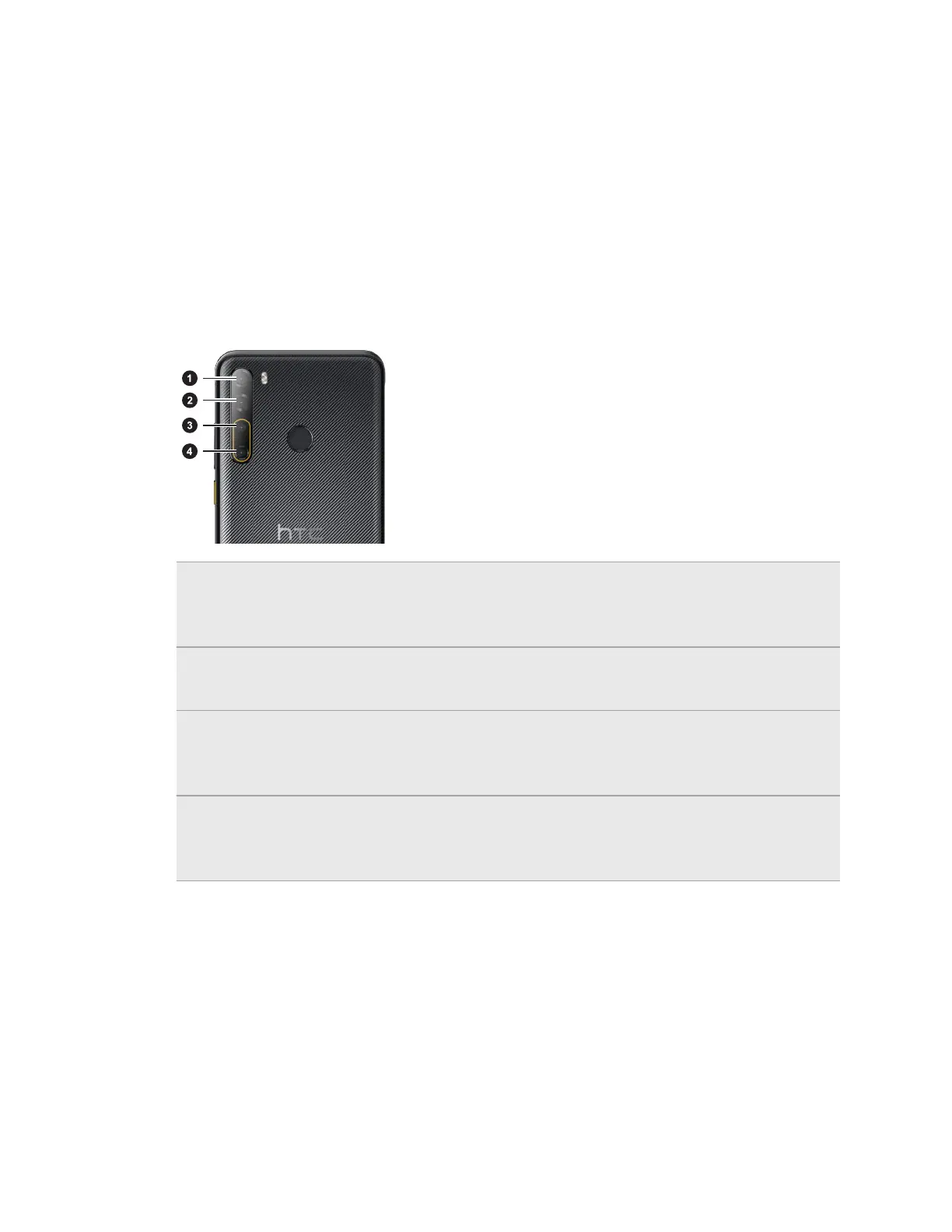
Quad cameras
HTC Desire 20 pro gives you imaging at its finest. With four rear-mounted cameras, take stunning
shots from a variety of perspectives.
1. 8MP ultra-wide camera
Take ultra-wide photos with the 118-degree camera. See Taking an ultra-wide photo on page
46.
2. 48MP f/1.8 camera
Capture high-resolution photos at 48MP. See Taking a photo on page 43.
3. 2MP depth-sensing camera
Capture professional-looking portraits with blurred background. See Taking portraits or selfies
on page 44.
4. 2MP macro camera
Take macro shots at the closest focal distance of 2.5 cm (1 in). See Taking a close-up photo on
page 46.
Getting started with the Camera app
Take great photos and videos with HTC Desire 20 pro.
For your convenience, there's more than one way to launch the Camera app.
39 Taking photos and videos



 To Next Page