Getting Started
l Do not insert or remove the SIM card when your device
is powered on.
l Ensure that the card is correctly aligned and that the
card tray is level when you insert it into your device.
l Be careful not to scratch your device or hurt yourself
when using the eject pin.
l Store the eject pin out of the reach of children to
prevent accidental swallowing or injury.
l Do not use cut or modied SIM or microSD cards with
your device as these may not be recognized and could
damage the card tray (slot).
l If your SIM card does not match your device, please
contact your carrier.
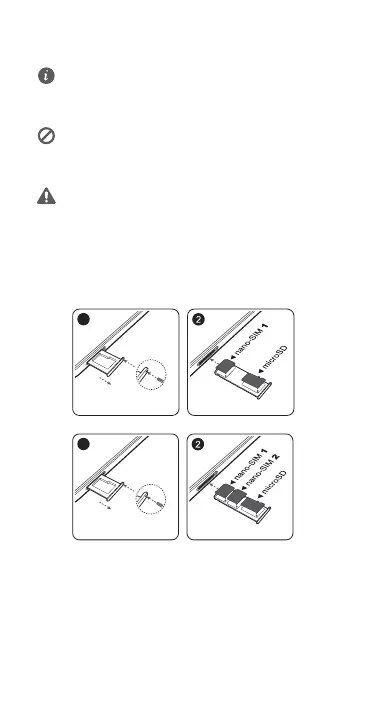
Follow the instructions in the following gures to set up your
device. Please use the eject pin included.
Single-SIM:
Dual-SIM:
2



 To Next Page