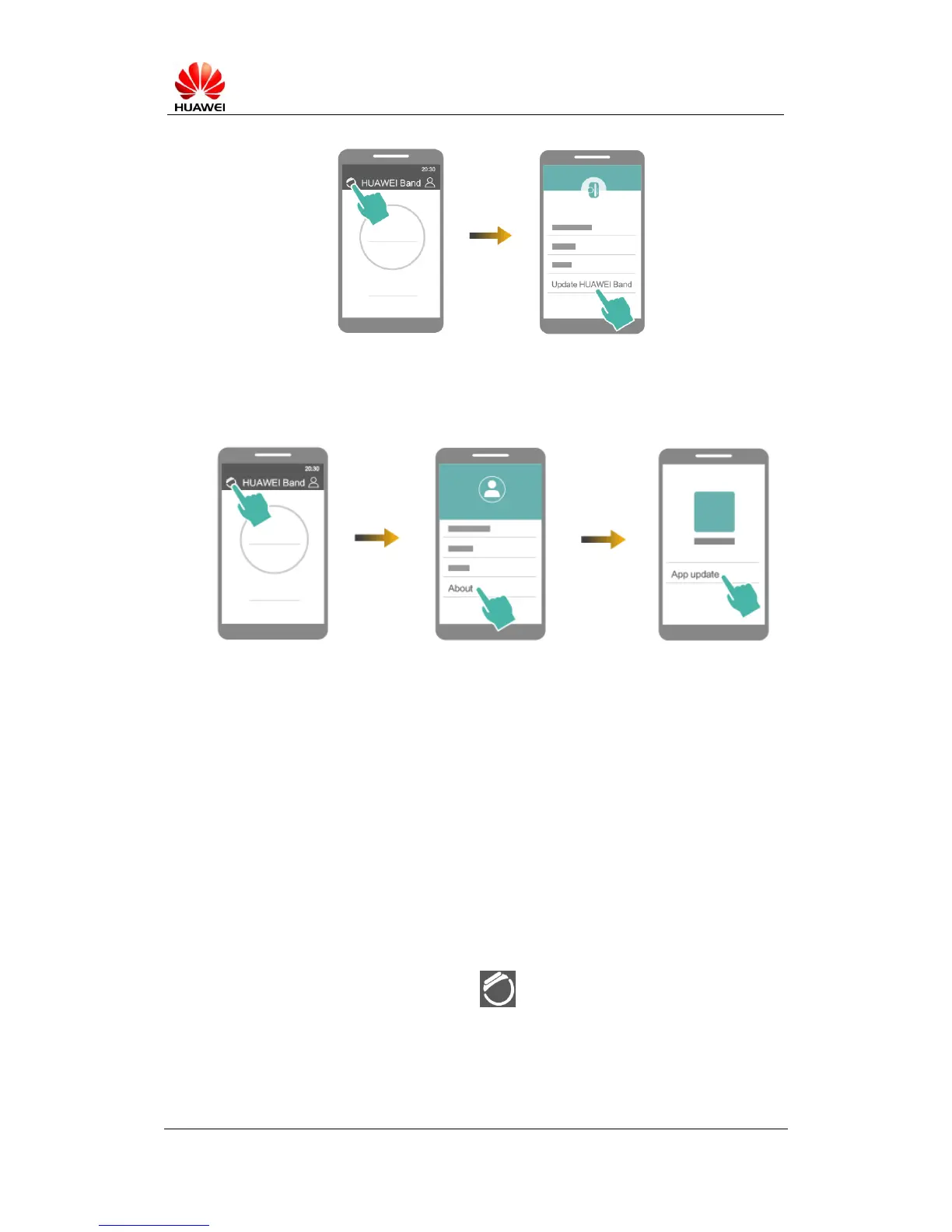
Update Huawei Wear: In the Huawei Wear app, touch the little person icon in the
top-right corner and then select About > App update. When the screen displays
Updating..., your phone will check for and apply any updates.
Note: The Band will disconnect from Bluetooth during the update. Please wait
patiently until the update is complete.
3.18 Avoid losing your personal data
Your Band can store seven days' worth of data. It is recommended that users sync
their Band to the cloud on a daily basis.
When you perform a sync, data is backed up to the cloud. Before syncing data, please
ensure that: (i) you have the latest version of the Huawei Wear app; (ii) there is a
working Bluetooth connection between your Band and phone; (iii) both your Band
and phone have sufficient charge.
Follow the steps below to sync your data:
Open the Huawei Wear app and touch to enter the Band settings menu.
Touch Log in then choose any login method.
Once you have logged in, go to the Huawei Wear screen and swipe down to sync
data.


 To Next Page