English
3
Start Shooting
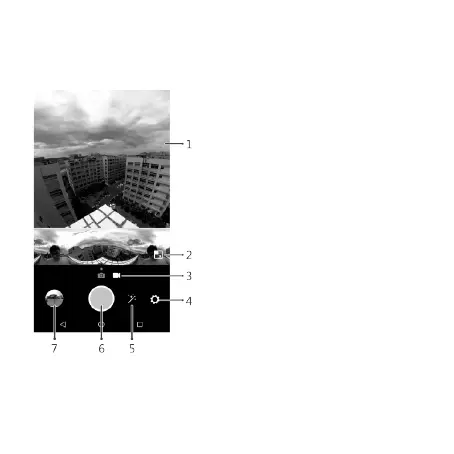
Once the camera is connected, go to the shooting screen to start taking photos and
recording videos.
1.
Preview screen:
Displays real-time 360°
images with a larger screen ratio. Use
hand gestures to zoom in or out.
2.
Panorama preview:
Displays real-time
360° images in panorama mode. Zoom
feature is not supported.
3.
Switching shooting modes:
Drag or
slide the screen left or right to switch
between Camera mode and Video mode.
4.
Settings:
Enables the
Settings
menu.
5.
Special effects options:
Enables the
Filter
menu.
6.
Shutter button:
Touch the shutter
button to begin taking photos or
recording videos.
7.
Photo album thumbnail:
Displays the
most recent photos or videos in a
particular gallery.


 To Next Page