EasyManua.ls Logo

Huawei DTSU666-FE - User Manual

Huawei DTSU666-FE
15 pages
Print Icon
To Next Page IconTo Next Page
Loading...
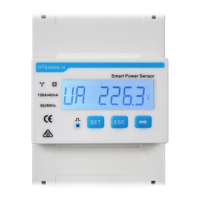
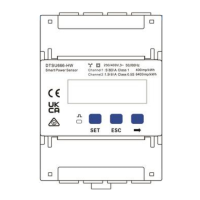
DTSU666-HW Smart Power Sensor
Quick Guide
ZTY0.464.1516
Issue: 08
Date: 2022-08-20

Questions and Answers

  • J
    Jaclyn MarquezAug 10, 2025
    Why is my Huawei Security Sensor metering inaccurately?
    • J
      Jacob DavisAug 10, 2025
      Inaccurate metering in your Huawei Security Sensor can stem from a couple of issues. First, the cable connections may be incorrect, so verify that the phase sequence of voltage and current is correct, referring to the wiring diagrams. Second, the high and low ends of the current transformer inlet might be reversely connected. If the values Pa, Pb, and Pc are negative, you should change the cable connection for the current transformer to ensure correct connection.
  • E
    Eric HardyAug 20, 2025
    What to do if my Huawei Security Sensors have no display after power-on?
    • K
      kmarshallAug 20, 2025
      If your Huawei Security Sensor shows no display after powering on, the issue might be related to the cable connection or the voltage supply. Ensure the cables are correctly connected according to the wiring diagrams. Also, check that the voltage supplied matches the specifications required for the sensor.
  • D
    davisginaAug 30, 2025
    How to fix abnormal RS485 communication in Huawei Security Sensors?
    • M
      Matthew JohnsAug 30, 2025
      Abnormal RS485 communication in Huawei Security Sensors can be due to several reasons: * The RS485 communication cable might be disconnected, short-circuited, or reversely connected. If the cable is faulty, replace it. * The communication address, baud rate, data bit, and parity bit of the meter may not match those of the inverter. Correct this by setting these parameters to match those of the inverter using the buttons on the device.

Summary

Installation and Cable Preparation

Installing the DTSU666-HW

Instructions for mounting the power sensor onto a DIN35mm guide rail.

Preparing Cables

Details on cable types, ports, conductor sizes, and sources.

Wiring Scenarios and Direct Connection

Wiring Scenarios

Configuration options based on current, line voltage, and connection modes.

Current Transformer and Potential Transformer Connections

Connection Through Current Transformer and Potential Transformer

Wiring diagrams for connections involving current and potential transformers.

Display and Parameter Settings

Parameter Settings

Details on configurable parameters like CT ratio, baud rate, and wiring mode.

Huawei DTSU666-FE Specifications

General IconGeneral
BrandHuawei
ModelDTSU666-FE
CategorySecurity Sensors
LanguageEnglish

Related product manuals