3
Set up your Huawei E272
modem
Before you can start using your new
modem, you’ll need to set it up.
You will need to have an activated
Vodafone SIM card – this should have
been provided when the modem was
purchased.
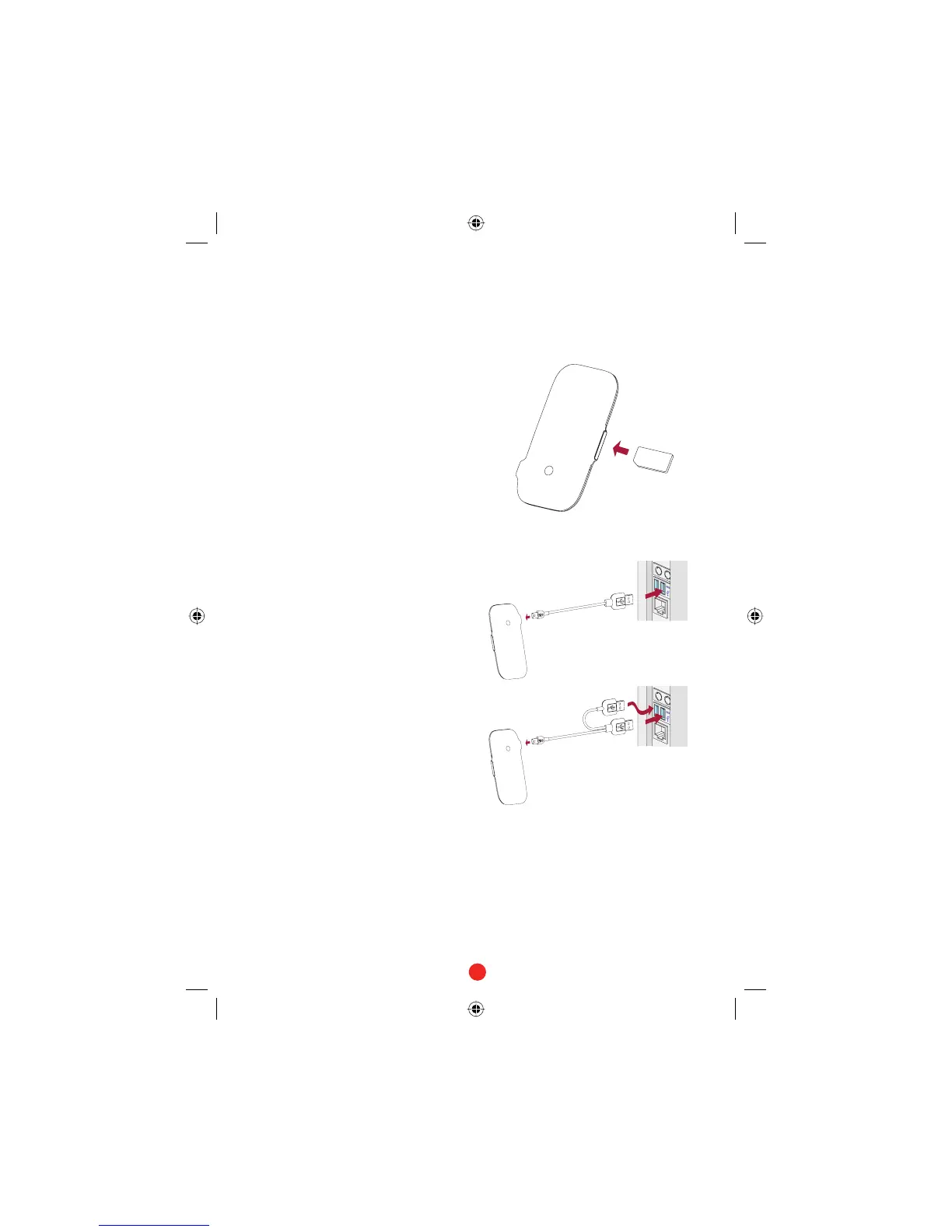
Put the SIM card into the side of the
modem.
You should have been supplied with
two data cables – one short and
single-ended one, and one long and
double-ended. You only need to use the
double-ended cable if a single USB port
does not supply enough power (if it is a
USB-powered hub for example).
Plug the single end of the data cable
into the modem as shown.
Plug the other end into your
computer’s USB port – if this does
not power the modem, then use the
double-ended cable.
This should automatically start
the software – see next page.
•
•
•
QSG_VMCLite_v30_08-2007_e272_en-Sec2:3 Sec2:3QSG_VMCLite_v30_08-2007_e272_en-Sec2:3 Sec2:3 15/8/07 10:12:3315/8/07 10:12:33



 To Next Page