Installation
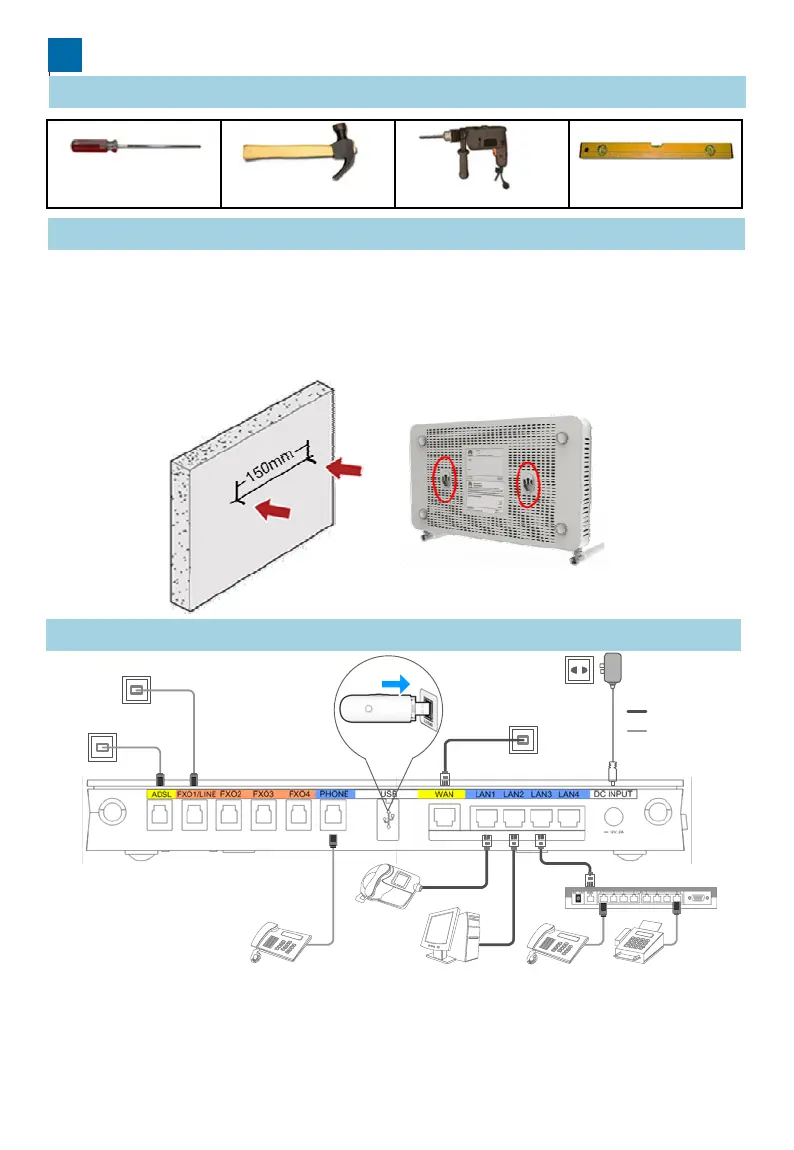
1 Preparing Installation Tools
Install the EGW1520 on a horizontal surfac
I t lli th EGW1520 h i t l
2 Installing the EGW1520
Phillips screwdriver
Claw hammer
ns
a
ng
e
on a
or
zon
a
on the surface and leave 10 cm space a
z To install the EGW1520 on a wall, fix th
of the swell fixtures is exposed for moun
3 Connecting Cables
Phone line port
Phone line port
3G dat
After cables are connected, press the powe
the POWER indicators (on the front panel)
the POWER indicator is steady, the EGW1
Analog phone
IP ph
Note: Either the ADSL or WAN port can
be used. The FXO1/LINE port supports
power-off survival, and you are advised
to use it with preference.
or on a wall.
Hammer drill
Level ruler
ur
ace
s easy.
ou on
y nee
o p
ace
ound for heat dissipation.
swell fixtures (M4) and ensure that 5 mm
ing the EGW1520.
Network cable
Phone line
Power supply socket
Network cable port
card
r button to power on the EGW1520. View
nd check the EGW1520 working status. If
20 is working properly.
n
FAX
Analog phone
IAD
PC



 To Next Page