Adding online wallpapers to the viewing list
Magazine Unlock must be enabled in order to add online wallpapers to the viewing list. For more
information on Magazine Unlock, see Changing the screen lock method.
Swipe up from the bottom of the lock screen to display the Magazine Unlock options, and then
touch . Touch and select the wallpapers that you want to add to the viewing list.
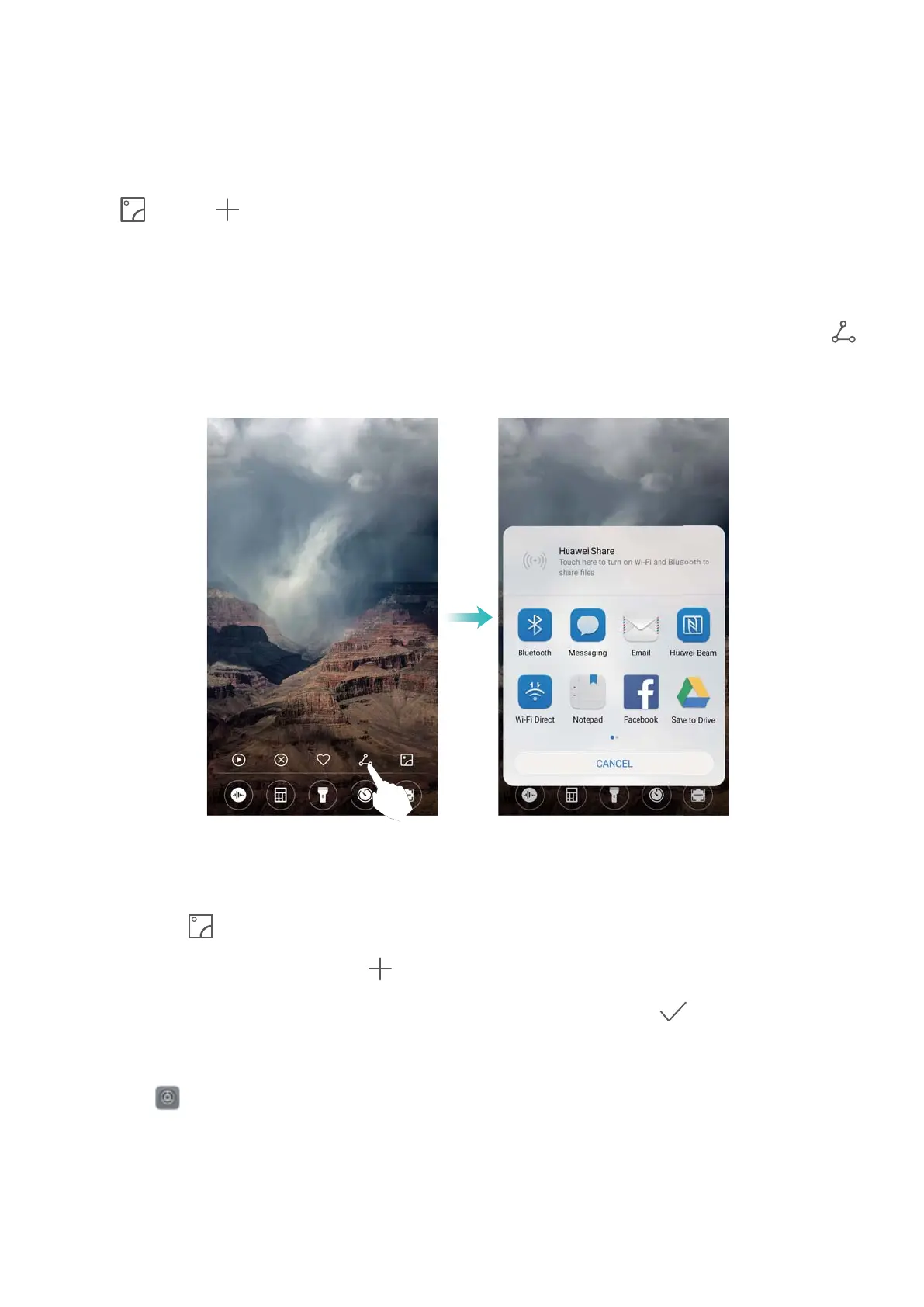
Sharing Magazine Unlock wallpapers
Share your favorite Magazine Unlock wallpapers with friends.
Swipe up from the bottom of the lock screen to display the Magazine Unlock options. Touch
and select a sharing method to share the current wallpaper.
Adding offline wallpapers to the viewing list
1 Swipe up from the bottom of the lock screen to display the Magazine Unlock options, and
then touch
.
2 Touch Added by me and select .
3 Select the images that you want to add to the viewing list and touch .
Updating Magazine Unlock covers
1 Touch Settings.
2 Touch Screen lock & passwords > Magazine unlock.
l Touch Subscriptions > Downloaded > Update to manually update your Magazine Unlock
wallpapers.
Screen and Display
30



 To Next Page