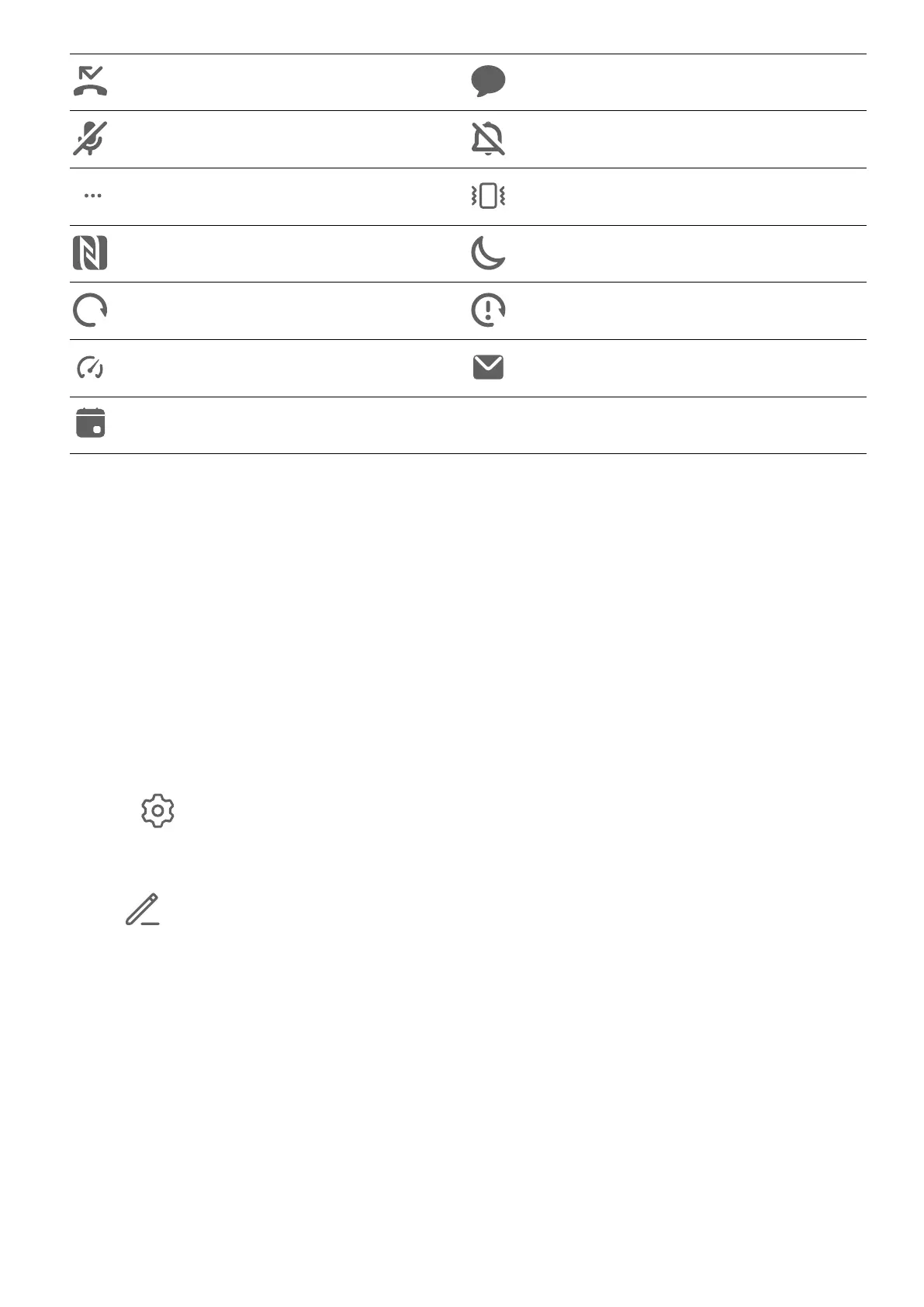
Missed call Unread SMS
Microphone disabled Muted
More notications Vibrate only
NFC enabled Do Not Disturb mode enabled
Data syncing Data sync failed
Performance mode enabled New email
Event reminders
Shortcut Switches
Shortcut Switches
Turn on a Shortcut Switch
Swipe down from the status bar to open the notication panel, then swipe down further to
show all shortcut switches.
• Touch a shortcut switch to enable or disable the corresponding feature.
• Touch and hold a shortcut switch to enter the settings screen for that feature. (Only
available for some features)
• Touch to open Settings.
Customize Shortcut Switches
Touch
, touch and hold an icon, then drag it to the desired position.
Home Screen Widgets
Home Screen Widgets
You can add, move, or delete home screen widgets, such as Screen lock, Weather, Notepad,
Clock, Contacts, and Calendar, according to your personal requirements.
Add a Widget to the Home Screen
1 Pinch two
ngers together on the home screen to access the Home screen editor.
2 Touch Widgets, then swipe left to view all widgets.
Essentials
7



 To Next Page