Camera and Gallery
91
2
Open
Camera
and swipe right on the screen. Touch
PANORAMA
.
3
Touch to start shooting.
4
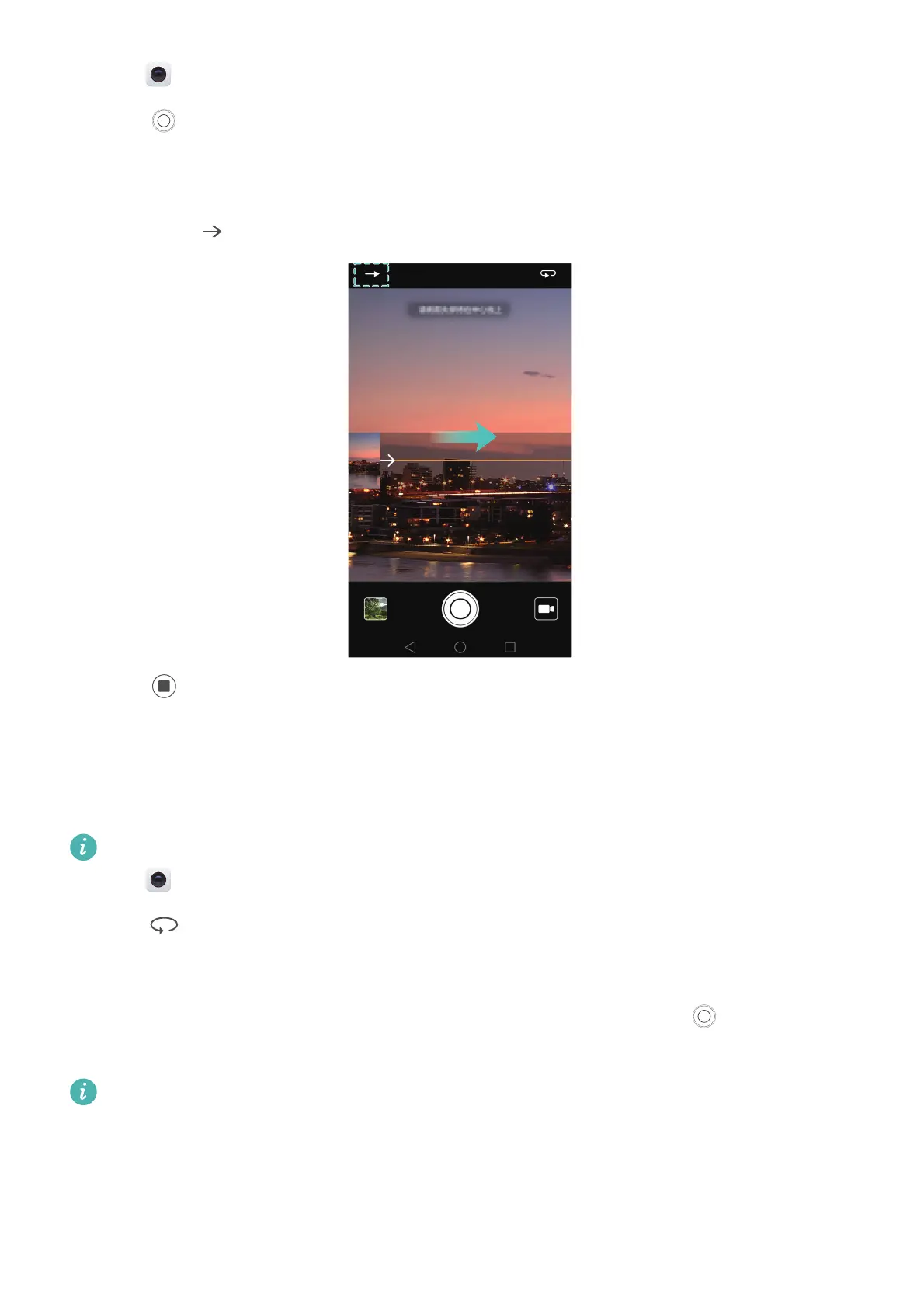
Follow the onscreen instructions to take the photo. Slowly move your camera from left to right,
ensuring that the arrow stays level with the centre line. To take a panoramic shot in portrait
mode, select and then slowly move your camera upwards.
5
Touch to stop shooting. The camera automatically stitches the photos together to create
one panoramic photograph.
Taking a panoramic self-portrait
You can also take wide-angle shots in self-portrait mode to capture the beautiful surroundings.
You cannot take panoramic self-portraits in landscape mode.
1
Open
Camera
.
2
Touch to select the front-facing camera.
3
Swipe right on the screen and touch
PANORAMA
.
4
Hold your phone steady, point the camera at the subject and then touch to take the first
photo.
Make sure that subjects don't move between each photo.
5
Follow the onscreen instructions and slowly turn your camera to the left. Your camera will take
the second photo automatically when the blue box lines up with box on the left-hand side.



 To Next Page