Huawei Proprietary and Confidential
Copyright © Huawei Technologies Co., Ltd
Communicating with theHuawei NetEco
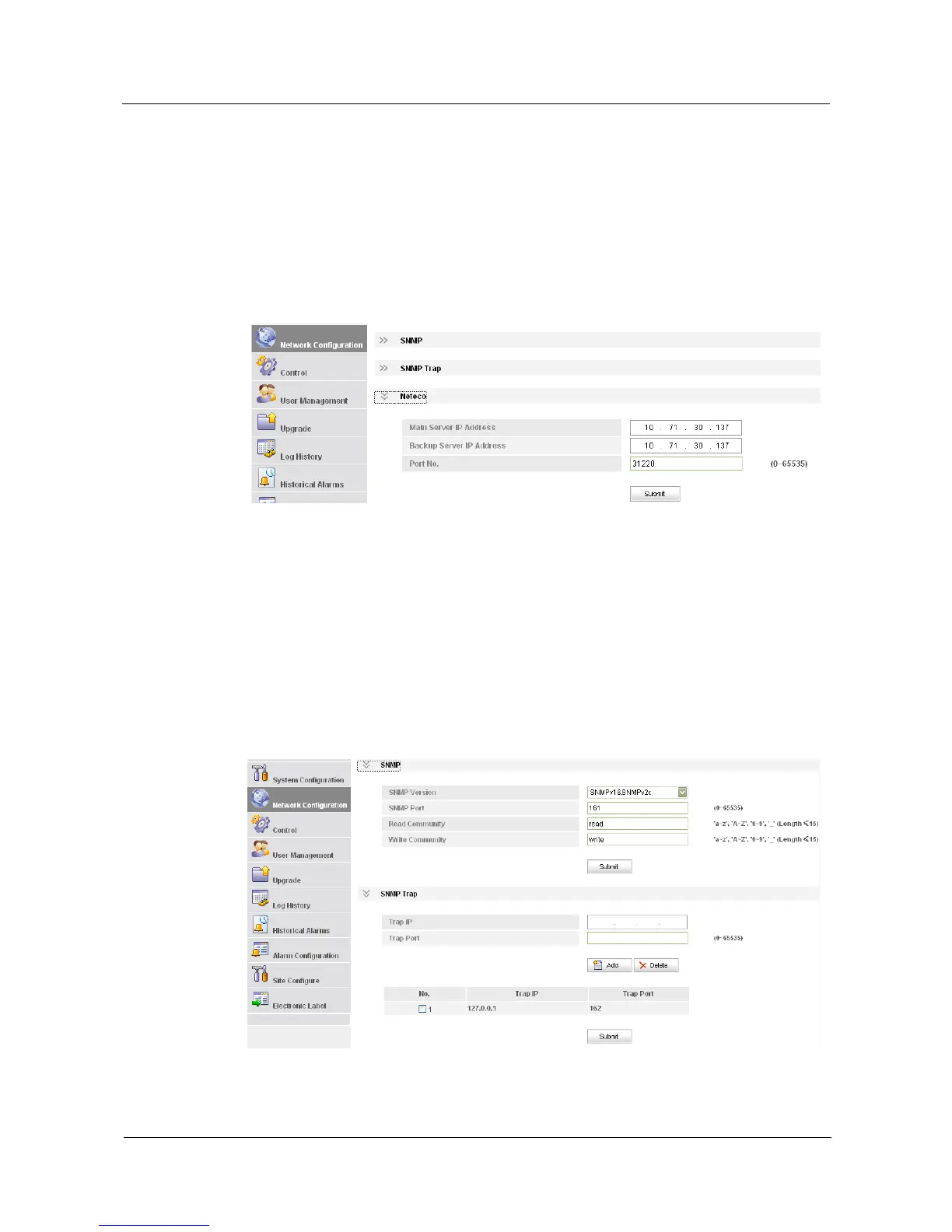
To communicate with the NetEco, set the port number and IP address of the NetEco server on
the LCD or over the web UI.
On the LCD, you can choose Settings > Communication Parameter to set the IP address
and port number of the NetEco server.
Figure 5-1 shows how to set the IP address and port number of the NetEco server.
Figure 5-1 Setting the IP address of the NetEco server
Communicating with a Third-Party EMS over SNMP
Configure the network over the web UI when the SMU01A communicates with a third-party
EMS.
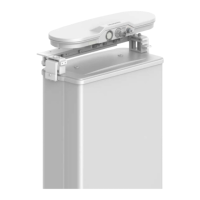
After you select the appropriate SNMP version, set the trap address (a maximum of six
addresses) and trap port on the Network Configuration tab page. The trap IP address is the
server IP address. The IP port is the alarm interception port and its default value is 162. For
details, see Figure 5-2.
Figure 5-2 Network Configuration tab page


 To Next Page