Huawei Proprietary and Confidential
Copyright © Huawei Technologies Co., Ltd
Setting Internet Explorer
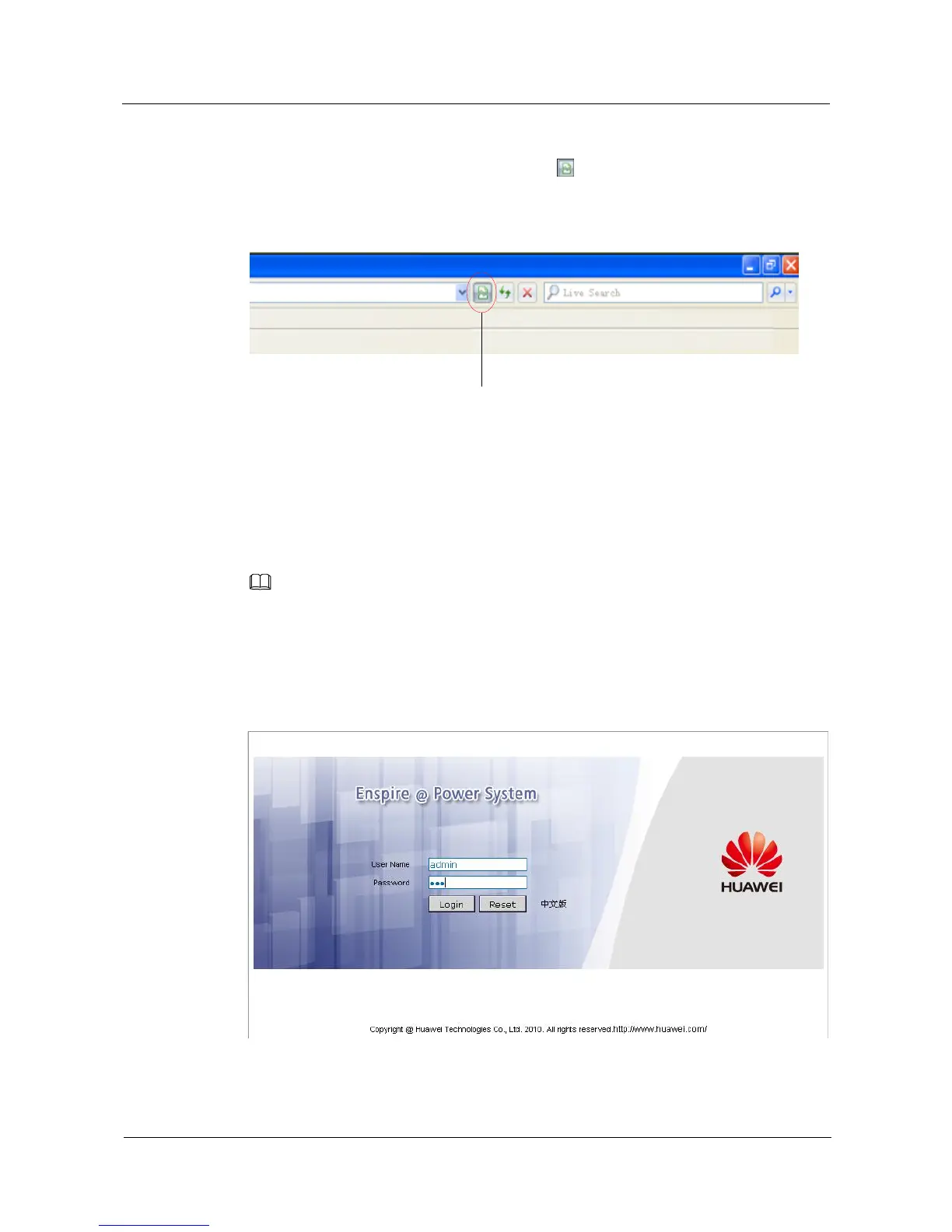
If Internet Explorer 8.0 is used, you need to click to open the compatibility view and set
Internet Explorer 8.0, as shown in Figure 4-2. This ensures normal use of the web UI.
Figure 4-2 Clicking the icon to open the compatibility view
4.3 Web UI Overview
The parameter values in the figures in this section are for reference only.
Login Page
To ensure the security of data transmission, the NetEco transmits data after encrypting it over SSL.
Enter the IP address of the SMU01A in the Internet Explorer address box and press Enter. A
login page is displayed, as shown in Figure 4-3. Set User Name to admin and Password to
001, and then press Login.
Figure 4-3 Login page


 To Next Page